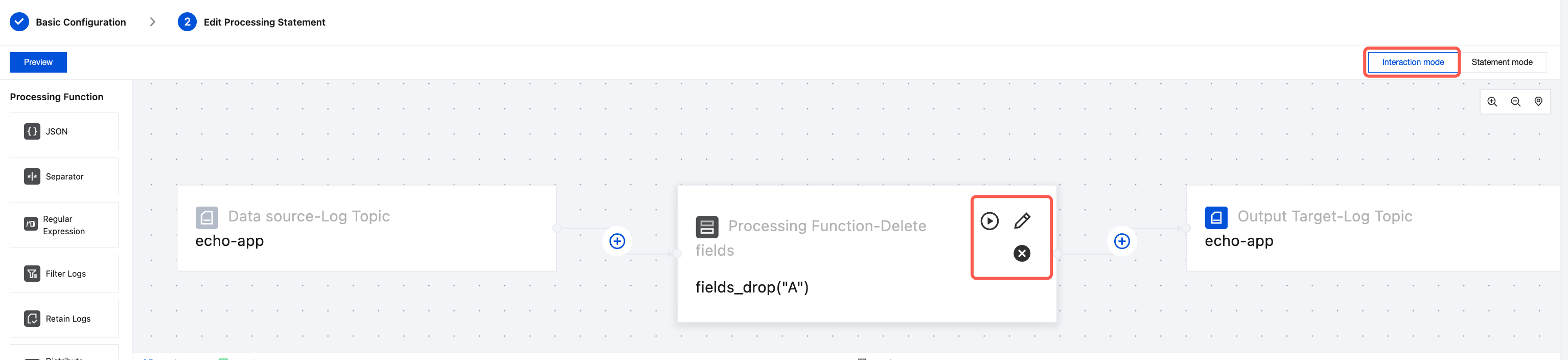
Interactive mode supports only a subset of functions. When the target log topic is a dynamic log topic, interactive mode is not supported.
Managing Visualization Functions
You can switch to Interactive Mode on the Edit Processing Statement page.
Add a visualization function: Click
and select the visualization function category and name you want to add.
Debug a visualization function: Click the ▶️ in the upper-right corner of the visualization function.
Delete a visualization function: Click the X in the upper-right corner of the visualization function.
Edit a visualization function: Click the
in the upper-right corner of the visualization function.
The currently supported visualization functions are as follows:
Function Category
Visual Function Name
Application Scenario
Extract Key Value
JSON: Extract fields and field values from a JSON node.
Separator: Extract field values based on the delimiter. The user needs to specify the field name.
Regular Expression: Extract field values based on the regular expression. The user needs to specify the field name.
Log structuring
Log Processing
Filter Logs: Configure conditions for filtering logs (multiple conditions are in an OR relationship). For example, if field A exists or field B does not exist, the log entry is filtered out.
Distribute Logs: Configure conditions for distributing logs.
For example, items where status="error" and the message contains "404" are distributed to Topic A.
For example, items where status="running" and the message contains "200" are distributed to Topic B.
Retain Logs: Configure conditions for retaining logs.
Delete/Preserve logs
Process Field
Delete Fields.
Rename Field.
Delete/Rename Field
Processing Cases
Log Structuring
Raw Log
Logs contain two fields, `log` and `message`, which can be further structured.
Fill in your description of the processing function
Field
content
Yes
Select the original field to process
Separator
:
Yes
Split logs into multiple field values
new field name
module,delay_time,msg
Yes
New field extracted using a delimiter
Original field auto-delete
☑️
No
Process and delete the original field
Processing Result
Extract new field and field value as follows:
{
"dates":"2024-10-11 15:32:10.003",
"delay_time":"1.06s",
"level":"DEBUG",
"module":"cls_ETL",
"msg":"fields_renamed",
"offset":"281",
"path":"/logs/gate.log",
"traceid":"gateway3036810e0c33b"
}
Log Distribution
Raw Log
Distribute logs based on loglevel.
{
"__FILENAME__":"python.log",
"__SOURCE__":"127.0.0.1",
"log_level":"ERROR",
"status":"404",
"time":"2024-07-21 05:17:30.421"
}
Configuring a Processing Function for Data Visualization
Visualization Function
Configure Project
Value in Example
Required
Description
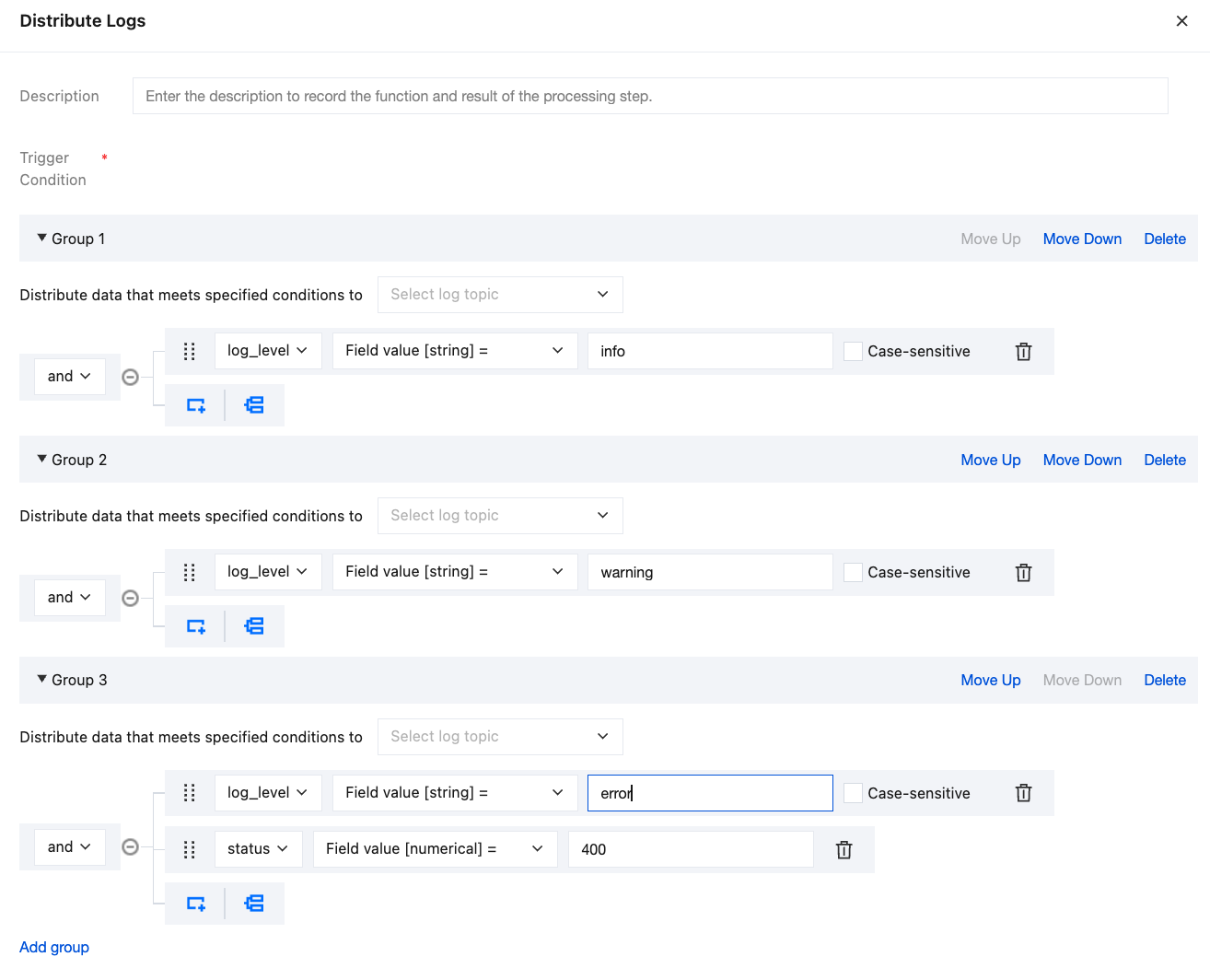
Processing function - Distribute Logs
Description
-
No
Fill in your description of the processing function
Groups
log_level="info"
Yes
Configure your distribution conditions. When conditions are met, logs will be sent to the corresponding log topic. The example shows a log topic named info.
Group 2
log_level="warning"
No
Configure your distribution conditions. When conditions are met, logs will be sent to the corresponding log topic. The example shows a log topic named warning.
Group 3
log_level="error" and status="400"
No
Configure your distribution conditions. When conditions are met, logs will be sent to the corresponding log topic. The example shows a log topic named error.