Function Overview
다운로드
포커스 모드
폰트 크기
Cloud Log Service (CLS) processing functions can be freely combined to clean, structure, filter, distribute, and mask logs in various scenarios.
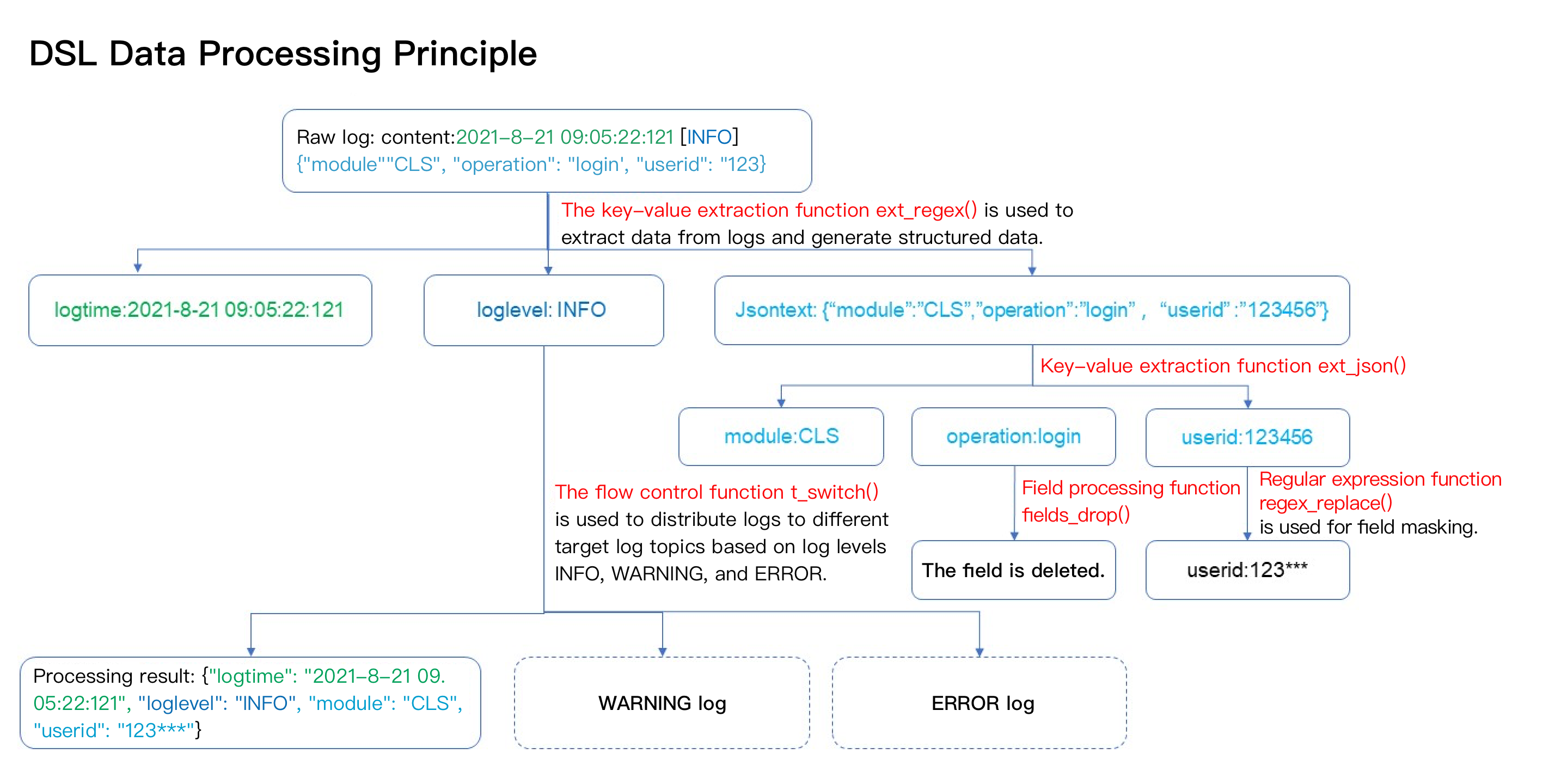
Function Overview
Key-Value Extraction Function Class
Extract fields/field values from log text.
Function Name | Function Feature | Function Syntax Description | Type of Return Value |
Extracts field value content based on a delimiter. | ext_sep("source field name", "target field 1,target field 2,target field...", sep="delimiter", quote="part not involved in segmentation", restrict=False, mode="overwrite") | Return the extracted log (LOG). | |
Extracts field value content based on the specified character(string). | ext_sepstr("source field name","target field 1,target field 2,target field...", sep="abc", restrict=False, mode="overwrite") | Return the extracted log (LOG). | |
Extracts field values from JSON string format. | Return the extracted log (LOG) ext_json("source field name",prefix="",suffix="",format="full",exclude_node="unflattened JSON node") | Return the extracted log (LOG). | |
Extract a field value based on a Jmes expression. | ext_json_jmes ("source field name", jmes= "formula for extracting JSON", output= "target field", ignore_null=True, mode= "overwrite") | Return the extracted log (LOG). | |
This function is used to extract key-value pairs by using two levels of separators. | ext_kv("source field name", pair_sep=r"\\s", kv_sep="=", prefix="", suffix="", mode="fill-auto") | Return the extracted log (LOG). | |
This function is used to extract the value of a field by using a regular expression. | ext_regex ("source field name", regex="regular expression", output="target field 1, target field 2, target field.......", mode="overwrite") | Return the extracted log (LOG). | |
Return the first non-null and non-empty result value in the parameter. | ext_first_notnull (value 1, value 2, ...) | Return the first non-null and non-empty result value in the parameter. | |
Extract the matched result value based on grok syntax. | ext_grok (field value, grok="", extend="") | Return the extracted log (LOG). |
Enrichment Function Class
Add a new field based on existing fields according to the rule.
Function Name | Function Feature | Function Syntax Description | Type of Return Value |
Fields in the log are matched using the csv structured data. Other fields and values from csv can be added to the source log when the value is the same. | enrich_table ("csv source data", "csv enrichment field", output="target field 1, target field 2, target field....", mode="overwrite") | Return the mapped log (LOG). | |
Uses Dict structure data to match a field value in a log. If the specified field and Value match a Key in the Dict structure data, the function assigns the Value of the Key to another field in the log. | enrich_dict ("JSON dictionary", "source field name", output=target field name, mode="overwrite") | Return the mapped log (LOG). | |
Map to the target table based on the input field name and return the field value, simply put, join logs with dimensional tables. | t_table_map(data, field, output_fields, missing=None, mode="fill-auto") | Return the mapped log (LOG). |
Stream Control Function Class
Since condition judgment.
Function Name | Function Feature | Function Syntax Description | Type of Return Value |
Combination operation function, which is similar to the combination capability of branch code blocks. It can combine multiple operation functions and execute them in sequence and it can be used with branch and output functions. | compose ("function 1", "function 2", ...) | Return log (LOG). | |
Executes a corresponding function if a condition is met and does not perform any processing if the condition is not met. | t_if ("condition", function) | Return log (LOG). | |
Executes a corresponding function if a condition is not met and does not perform any processing if the condition is met. | t_if_not ("condition",function) | Return log (LOG). | |
Executes a function based on the evaluation result of conditions. | t_if_else ("condition", function 1, function 2) | Return log (LOG). | |
Executes different functions depending on whether branch conditions are met. If all conditions are not met, the data is discarded. | t_switch ("condition 1", function 1, "condition 2", function 2, ...) | Return log (LOG). |
Row Processing Function Class
Log distribution, discarding, and splitting.
Function Name | Function Feature | Function Syntax Description | Type of Return Value |
Output to a specified target topic. This function can be used together with branch conditions or independently. | log_output (log topic alias), configured in the target log topic alias when creating a new data processing task. | No return, output the current data flow. | |
Output logs to dynamic destination topics. For example, if you need to dynamically create multiple target log topics based on the value of the log field "pd" and distribute corresponding logs to target log topics. | log_auto_output(topic_name="", logset_name="", index_options="", period=3,storage_type=" ",hot_period=0) | No return, output the current data flow. | |
Split a specific field by delimiters and Jmes expressions, and the splitting result is split into multi-line logs. | log_split(field_name, sep=",", quote="\\"", jmes="", output="") | Return log (LOG). | |
Discard logs that meet a specified condition. | log_drop (condition 1) | Return log (LOG). | |
Retain logs that meet a specified condition. | log_keep (condition 1) | Return log (LOG). | |
Splits and expands the JSON array in the log according to Jmes syntax. | log_split_jsonarray_jmes("field", jmes="items", prefix="") | Return log (LOG). |
Field Processing Function
Used for CRUD operations and renaming fields.
Function Name | Function Feature | Function Syntax Description | Type of Return Value |
Tag dynamically generated topics. Extract tag values from log fields and use these values as tags for dynamic topic generation. | extract_tag(tag name1, tag value1, tag name2, tag value2...) | Return log (LOG). | |
Delete the fields that meet a specified condition. | fields_drop (field name 1, field name 2, ..., regex=False, nest=False) | Return log (LOG). | |
Retain the fields that meet a specified condition. | fields_keep (field name 1, field name 2, ..., regex=False) | Return log (LOG). | |
Match field names based on a regular expression and encapsulate the matched fields into a new field whose value is in JSON format. | fields_pack (target field name, include=".*", exclude="", drop_packed=False) | Return log (LOG). | |
Set field values or adds fields. | fields_set (field name 1, field value 1, field name 2, field value 2, mode="overwrite") | Return log (LOG). | |
Renames fields. | fields_rename (field name 1, new field name 1, field name 2, new field name 2, regex=False) | Return log (LOG). | |
If the specified field exists, return True. Otherwise, return False. | has_field (field name) | Return condition value (BOOL). | |
If the specified field does not exist, return True. Otherwise, return False. | not_has_field (field name) | Return condition value (BOOL). | |
Obtain the value of a specified field and return the corresponding string. | v (field name) | Return value string type (STRING) |
Dictionary and List Functions
Function Name | Function Feature | Function Syntax Description | Type of Return Value |
Get list (array) value | array_get(array, index) | Return value string type (STRING) | |
Add a node to JSON | json_add(key,data) | Return value string type (STRING) | |
Add/delete/modify key-value pairs in a dictionary | json_edit("result", path="", key="",value="333",index=1,mode="edit") | return dict | |
Extract a JSON field value with a Jmes expression and return the JSON string of the extraction result. | json_select (v(field name), jmes="") | Return value string type (STRING) | |
Add a KV pair to JSON | json_update(json_value, key1, value1, key2, value2) | Return value string type (STRING) | |
Parse and convert an XML-formatted value to a JSON string. The input value must be an XML string. Otherwise, a conversion exception will occur. | xml_to_json (field value) | Return Value dict | |
Parse and convert a JSON string value to an XML string. | json_to_xml (field value) | Return value string type (STRING) | |
Checks whether it is a JSON string. | if_json (field value) | Return condition value (BOOL). |
Regular Expression Processing Function Class
Match and replace characters in text using regular expressions.
Function Name | Function Feature | Function Syntax Description | Type of Return Value |
Detect sensitive information, such as ID card and bank card. | sensitive_detection(scope="", ratio=1, discover_items="", replace_items="") | Return value string type (STRING) | |
Match data in full or partial match mode based on a regular expression and returns whether the match is successful. | regex_match (field value, regex="", full=True) | Return condition value (BOOL). | |
Match data based on a regular expression and return the corresponding partial match result. You can specify the sequence number of the matched expression and the sequence number of the group to return (partial match + sequence number of the specified matched group). If no data is matched, an empty string is returned. | regex_select (field value, regex="", index=1, group=1) | Return value string type (STRING) | |
Split data based on a regular expression and return a JSON Array string (partial match). | regex_split (field value, regex=\\\\" | Return value string type (STRING) | |
Match and replace based on a regular expression (partial match). | regex_replace (field value, regex="", replace="", count=0) | Return value string type (STRING) | |
Match data based on a regular expression, add the match result in the JSON array and return an Array string (partial match). | regex_findall (field value, regex="") | Return value string type (STRING) |
Date Processing Class
Function Name | Function Feature | Function Syntax Description | Type of Return Value |
Convert a time field value (a date string or timestamp in a specific format) to a target date string of a specified time zone and format. | dt_str (value, format="format string", zone="") | Return value string type (STRING) | |
Convert a time field value (a date string in a specified format) and specify the time zone that corresponds with the specific field to a UTC timestamp. | dt_to_timestamp (value, zone = "") | Return value string type (STRING) | |
Convert a timestamp field value to a time string in the specified time zone. | dt_from_timestamp (value, zone = "") | Return value string type (STRING) | |
Obtain the local time of the processing calculation. | dt_now (format="formatting string", zone="") | Return value string type (STRING) | |
Customize log time generates a new log time as per your processing rules, supporting second, millisecond, microsecond, and nanosecond. | custom_cls_log_time(time) | UTC Timestamp Type |
String Processing Class
Function Name | Function Feature | Function Syntax Description | Type of Return Value |
determine whether a substring exists | str_exist (value 1, value 2, ignore_upper=False) | Return the calculated result (BOOL). | |
Search for a substring in a specified range of a value and return the number of occurrences of the substring. | str_count(value, sub="", start=0, end=-1) | Return substring count (INT). | |
Return string length. | str_len (value) | Return string length (INT). | |
Return uppercase string. | str_uppercase (value) | Return value string type (STRING) | |
Return lowercase string. | str_lowercase (value) | Return value string type (STRING) | |
Concatenate values by using a concatenation string. | str_join (concatenation string 1, value 1, value 2, ...) | Return value string type (STRING) | |
Replace string and return the replaced string. | str_replace (value, old="", new="", count=0) | Return value string type (STRING) | |
Format string and return the formatting result. | str_format (formatting string, value 1, value 2, ...) | Return value string type (STRING) | |
Remove specified characters from the beginning and end of a string | str_strip (value, chars="\\t\\r\\n") | Return value string type (STRING) | |
Remove specified characters from the beginning of a string. | str_strip (value, chars="\\t\\r\\n") | Return value string type (STRING) | |
Remove. Remove specified characters from the end of a string. | str_strip (value, chars="\\t\\r\\n") | Return value string type (STRING) | |
Check the substring in the value and return the position of the substring. | str_find (value, sub="", start=0, end=-1) | Return the position of the first occurrence of the substring in the value (INT). | |
Check whether a string starts with a specified string. | str_start_with (value, sub="", start=0, end=-1) | Return the result of matching or not (BOOL). | |
Check whether a string ends with a specified string. | str_end_with (value, sub="", start=0, end=-1) | Return the result of matching or not (BOOL). |
Type Conversion Function Class
Function Name | Function Feature | Function Syntax Description | Type of Return Value |
Perform integer conversion on the value. The base of the original value can be specified and converted to a decimal value. | ct_int (value1, base=10) | Return evaluation result. | |
Convert a value to a floating-point number. | ct_float (value) | Return evaluation result. | |
Convert a value to a string. | ct_str (value) | Return evaluation result. | |
Convert a value to a Boolean value. | ct_bool (value) | Return evaluation result. |
Logical Expression Function Class
Function Name | Function Feature | Function Syntax Description | Type of Return Value |
Return a value based on a specified condition. | op_if (condition 1, value 1, value 2) | If the condition is True, value 1 is returned; otherwise, value 2 is returned. | |
Perform the AND operation on values. If all the specified parameter values are evaluated to True, True is returned; otherwise, False is returned. | op_and (value 1, value 2, ...) | Return the calculated result (BOOL). | |
Perform the OR operation on values. If one or more of the specified parameter values are False, False is returned; otherwise, True is returned. | op_or (value 1, value 2, ...) | Return the calculated result (BOOL). | |
Perform the not operation on values. | op_not (value) | Return the calculated result (BOOL). | |
Compare two values. If the values are equal, True is returned. | op_eq (value 1, value 2) | Return the result of comparison (BOOL). | |
Compare two values. If value 1 is greater than or equal to value 2, True is returned. | op_ge (value 1, value 2) | Return the result of comparison (BOOL). | |
Compare two values. If value 1 is greater than value 2, True is returned. | op_gt (value 1, value 2) | Return the result of comparison (BOOL). | |
Compare two values. If value 1 is less than or equal to value 2, True is returned. | op_le (value 1, value 2) | Return the result of comparison (BOOL). | |
Compare two values. If value 1 is less than value 2, True is returned. | op_lt (value 1, value 2) | Return the result of comparison (BOOL). | |
Perform a sum operation on the values. | op_add (value 1, value 2) | Return evaluation result. | |
Perform a subtraction operation on the values. | op_sub (value 1, value 2) | Return evaluation result. | |
Perform a multiplication operation on the values. | op_mul (value 1, value 2) | Return evaluation result. | |
Perform a division operation on the values. | op_div (value 1, value 2) | Return evaluation result. | |
Accumulate and sum multiple values. | op_sum (value 1, value 2, ...) | Return evaluation result. | |
Perform a modulo operation on the values. | op_mod (value 1, value 2) | Return evaluation result. | |
Check whether a value is null. If so, True is returned; otherwise, False is returned. | op_null (value) | Return the calculated result (BOOL). | |
Check whether a value is not null. If so, True is returned; otherwise, False is returned. | op_notnull (value) | Return the calculated result (BOOL). | |
Compare string values. If they are equal to each other, True is returned. | op_str_eq (value 1, value 2, ignore_upper=False) | Return the calculated result (BOOL). | |
Generate the random number (a random number between two parameters), left closed and right closed. | random (value 1, value 2) | Return evaluation result. |
Encoding and Decoding Function Class
Function Name | Function Feature | Function Syntax Description | Type of Return Value |
Decodes an encoded URL. | decode_url (value) | Return value string type (STRING) | |
Calculate and return the MD5 value. | md5_encoding (value) | Calculate and return the MD5 value. | |
Generate universally unique identifier (UUID), i.e., unique identification code. | uuid() | Calculate and return the UUID value. | |
Encode a string in the specified format. | str_encode (value) | Return value string type (STRING) | |
Decode a string in the specified format. | str_decode (value) | Return value string type (STRING) | |
Encode the string to base64 | base64_encode(value, format="RFC3548") | Return base64 string type (STRING) | |
Decode the string from base64 | base64_decode(value, format="RFC3548") | Return value string type (STRING) |
IP Parsing Function Class
Function Name | Function Feature | Function Syntax Description | Type of Return Value |
Parse the geographical location of functions. | geo_parse (field value, keep=("country", "province", "city"), ip_sep=",") | Return JSON string | |
Check whether the IP is within a subnet and supports multiple subnets. | is_subnet_of (subnet list, ip) | Return the calculated result (BOOL). |
Field Extraction Mode Description
Related Functions
Category | Function | Extraction Mode Default Value |
Field Processing | overwrite | |
Key-value Extraction | overwrite | |
| overwrite | |
| overwrite | |
| overwrite | |
| overwrite | |
Enrichment Function | overwrite | |
| overwrite | |
| fill-auto | |
Extraction Mode Description
Raw log:
{"a": "","b": 100}
Parameter Name | Description | Example | |
| | Processing Statement | Processing Result |
add | Set the target field when it does not exist | fields_set("c", 200,mode="add") | { "a":"", "b":"100", "c":"200" } |
add-auto | Set the target field when the new value is not empty and the target field does not exist. | fields_set("c", "",mode="add-auto") | { "a":"", "b":"100" } |
fill | Set the target field when it does not exist or is an empty string. | fields_set("a", "123",mode="fill") | { "a":"123", "b":"100" } |
fill-auto | Set the target field when the new value is not empty and the target field does not exist or is an empty string. | fields_set("a", "123",mode="fill-auto") | { "a":"123", "b":"100" } |
overwrite | Always set the target field. | fields_set("a", "123",mode="overwrite") | { "a":"123", "b":"100" } |
overwrite-auto | Set the target field when the new value is a non-empty string. | fields_set("b", "123",mode="overwrite-auto") | { "a":"null", "b":"123" } |
피드백