Terminating Instances
다운로드
포커스 모드
폰트 크기
This document describes how to terminate a TencentDB for PostgreSQL instance in the console.
Overview
You can manually terminate instances at any time as needed. Terminated instances will be moved to the recycle bin.
Notes
If a pay-as-you-go instance is terminated, it will be moved to the recycle bin and retained there for up to three days. The instance in the recycle bin is in the "Isolated" status and cannot be accessed.
To use the instance again, you can restore it from the recycle bin.
If the instance in the recycle bin is no longer needed, you can eliminate it.
After the instance is eliminated, its data and backup files will also be deleted and cannot be restored in the cloud. Please store your backup files safely elsewhere in advance.
If a primary instance has one or more read-only instances, terminating the primary instance won't affect the read-only instances, but eliminating the primary instance will eliminate the read-only instances at the same time. To prevent instances from being eliminated due to overdue payment, please pay attention to the instance expiration information.
If a pay-as-you-go instance is terminated, its billing stops.
Directions
1. Log in to the TencentDB for PostgreSQL console, locate the instance to be terminated in the instance list, and click More > Terminate Instance in the Operation column.
2. In the pop-up dialog box, indicate your consent and click Terminate Now.
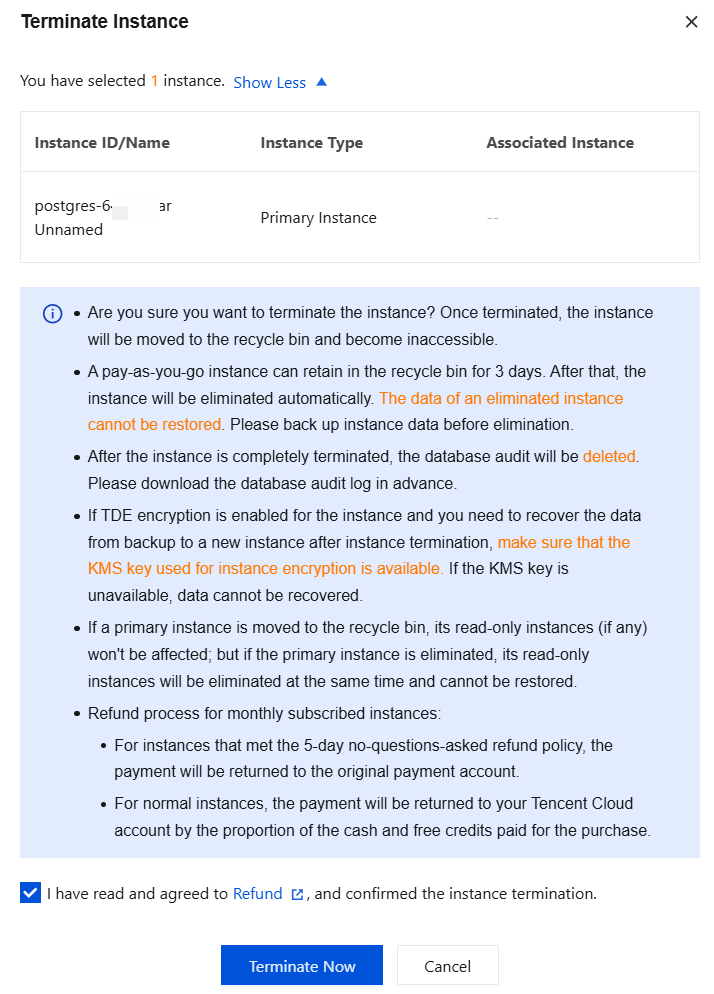
3. After you click Terminate Now, the instance will be moved to the recycle bin. You can see the "Isolated" instance in the recycle bin.
피드백