Setting Change Tracking (CT)
Download
포커스 모드
폰트 크기
Change tracking (CT) can be applied to track a specific table or even column in a database. When you perform an addition, modification, or deletion operation in a table with CT enabled, the system will automatically generate a version number for the operation and record the operation information, including the operation timestamp, operation type, and primary key of the affected data.
CT only records whether the rows in the table have been changed but not the changed data, so it has little impact on the performance of data operations. Such information will be recorded in the SQL Server system table and automatically cleared and maintained by the system.
Enabling/Disabling CT for one database
1. Log in to the TencentDB for SQL Server console. In the instance list, click an Instance ID or Manage in the Operation column to access the instance management page.
2. On the Database Management tab, locate the row of the target database and click Other > Enable/Disable CT in the Operation column.

3. The pop-up window displays the names and current CT status of the databases. After enabling or disabling CT, click OK. If you enable CT, you can set the data retention period.
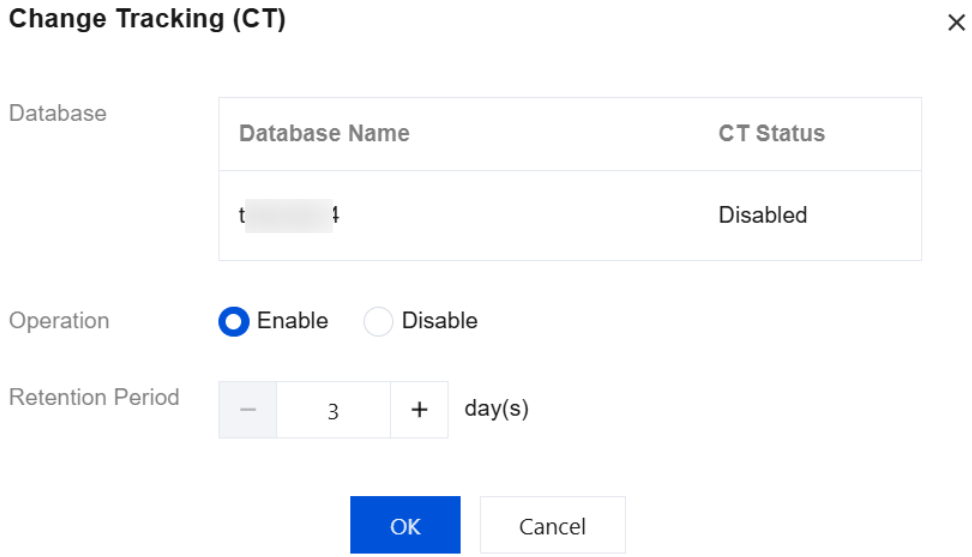
4. You can view the task progress of enabling or disabling CT through Running Tasks in the top-right corner of the Database Management tab.
Batch enabling/disabling CT for multiple databases
1. Log in to the TencentDB for SQL Server console. In the instance list, click an Instance ID to enter the instance management page.
2. On the instance management page, select the Database Management tab, select the rows of the target databases, and click Batch Management > Batch Enable/Disable CT at the top of the list.
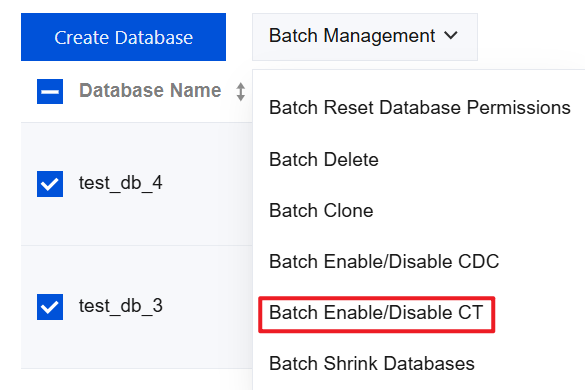
3. The pop-up window displays the names and current CT status of the databases. After enabling or disabling CT, click OK. If you enable CT, you can set the data retention period.
4. You can view the task progress of enabling or disabling CT through Running Tasks in the top-right corner of the Database Management tab.
Related APIs
API | Description |
This API is used to enable or disable CT for databases. |
피드백