Shrinking Database
Download
포커스 모드
폰트 크기
TencentDB for SQL Server supports reducing database size by shrinking all database files to release unused space. This document describes how to shrink a database in the TencentDB for SQL Server console.
Shrinking one database
1. Log in to the TencentDB for SQL Server console. In the instance list, click an Instance ID or Manage in the Operation column to access the instance management page.
2. On the Database Management tab, locate the row of the database to be shrunk and click Other > Shrink Database in the Operation column.

3. In the pop-up dialog box, the database name and the percentage of space that can be reduced to the remaining space capacity are displayed. Currently, it only supports reducing to 10% of the remaining space. Click OK.
Note:
Only 10% of the database's free space will remain once it has been shrunk. However, if 10% of free space is less than 2 GB, the free space will be shrunk to 2 GB.
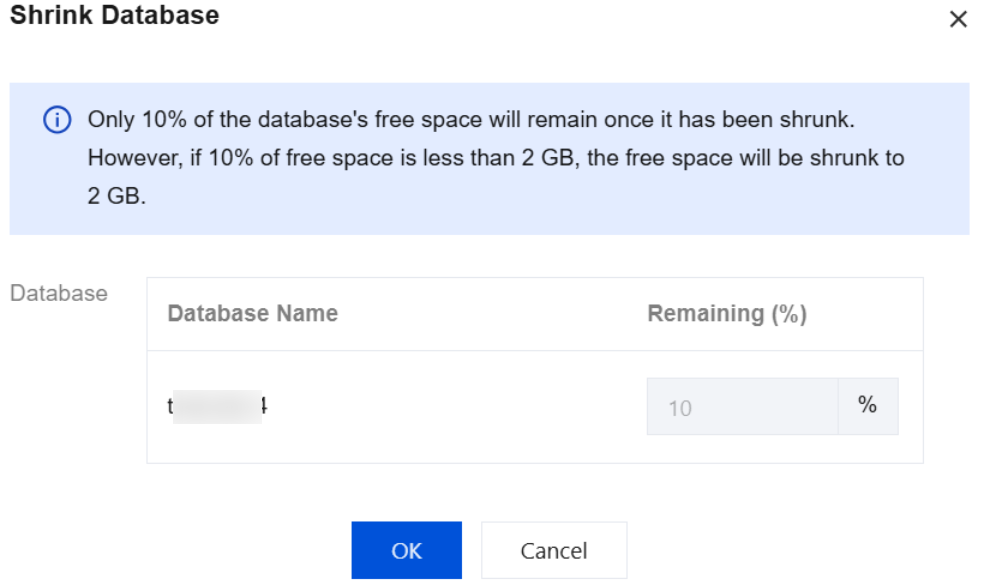
You can view the task progress of database shrinking through Running Tasks in the top-right corner of the Database Management tab.
Batch shrinking databases
1. Log in to the TencentDB for SQL Server console and click the Instance ID in the instance list to go to the instance management page.
2. On the instance management page, select the Database Management tab, check the target database row, and choose Batch Management > Batch Shrink Databases above the list.
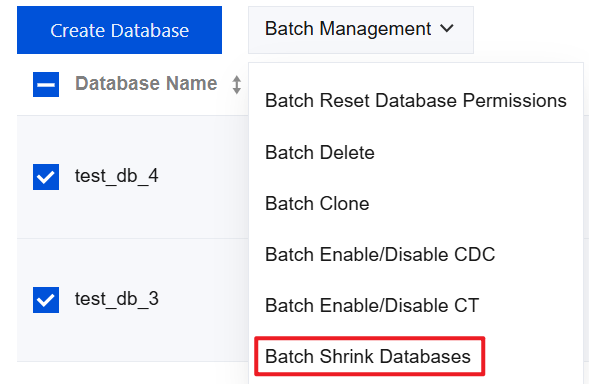
3. In the pop-up dialog box, the database name and the shrink ratio of the remaining space are displayed. Currently, only shrinking to 10% of the remaining space is supported. Click OK to proceed.
Note:
Only 10% of the database's free space will remain once it has been shrunk. However, if 10% of free space is less than 2 GB, the free space will be shrunk to 2 GB.
You can view the task progress of database shrinking through Running Tasks in the top-right corner of the Database Management tab.
Related APIs
API | Description |
This API is used to shrink the database mdf (Shrink mdf). |
피드백