Performance
다운로드
포커스 모드
폰트 크기
How to Perform Self-Service Diagnosis and Optimization for TDSQL Boundless Instance Failures or Exceptions?
1. Log in to the DBbrain Console and select Performance Optimization on the left sidebar.
2. At the top of the page, select TDSQL Boundless as the database type, and then select the target Instance ID.
3. Click the Exception Diagnosis tab.
4. View the diagnostic hints.
The Diagnosis Prompt section lists diagnosis events triggered within the last 3 hours, including fields such as level, start time, diagnosis item, and last occurrence time.
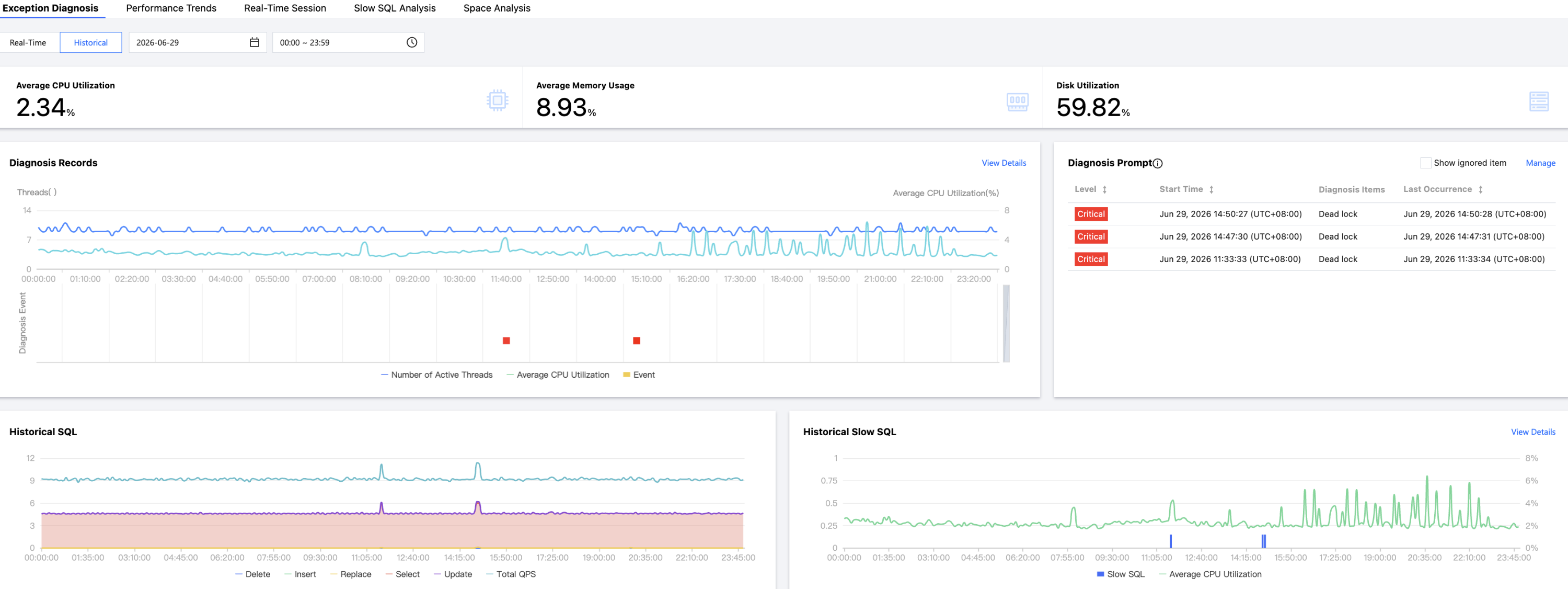
5. View the diagnosis event details.
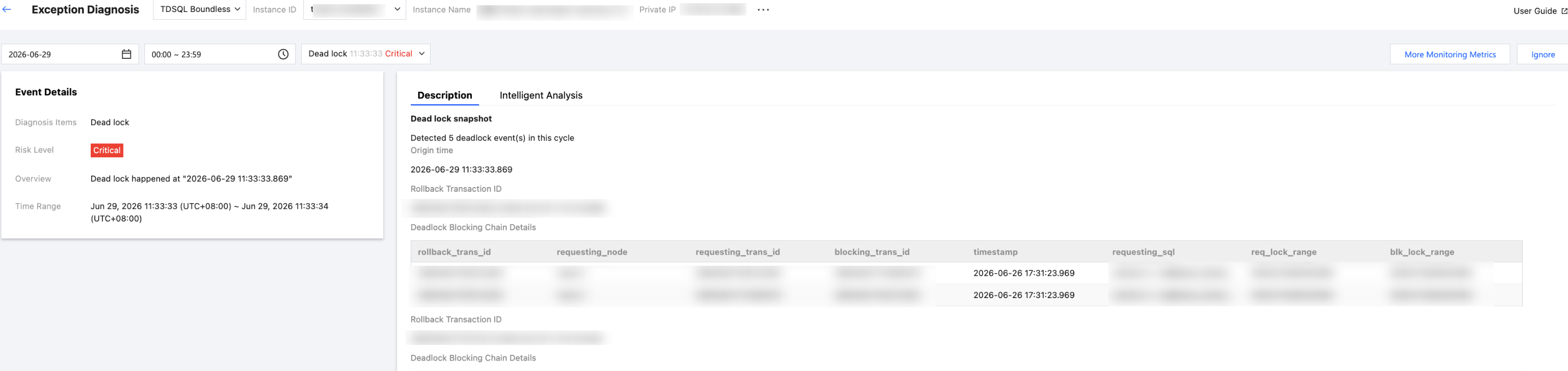
In the Diagnostic Hints section, click the row of a specific event alarm or hover over the event alarm and click View to go to the event details page and view the details.
Event details mainly include the detailed information, on-site description, intelligent analysis, and optimization suggestions of the event. The event details displayed vary depending on the diagnosis type. Please refer to the actual display.
Event details: Include the diagnosis item, start/end time, risk level, and overview.
Description: includes information such as problem snapshots and performance trends of the exception or health inspection event.
Intelligent analysis: Displays descriptions such as the problem description and possible causes to help you understand the event.
Optimization suggestions: Provides corresponding handling suggestions for different diagnosis items such as resource, session, and deadlock types.
How to View and Optimize TDSQL Boundless Slow Logs?
1. Log in to the DBbrain Console and select Performance Optimization in the left sidebar.
2. Select the Slow SQL Analysis tab.
3. At the top of the page, select TDSQL Boundless as the database type, and then select the target Instance ID.
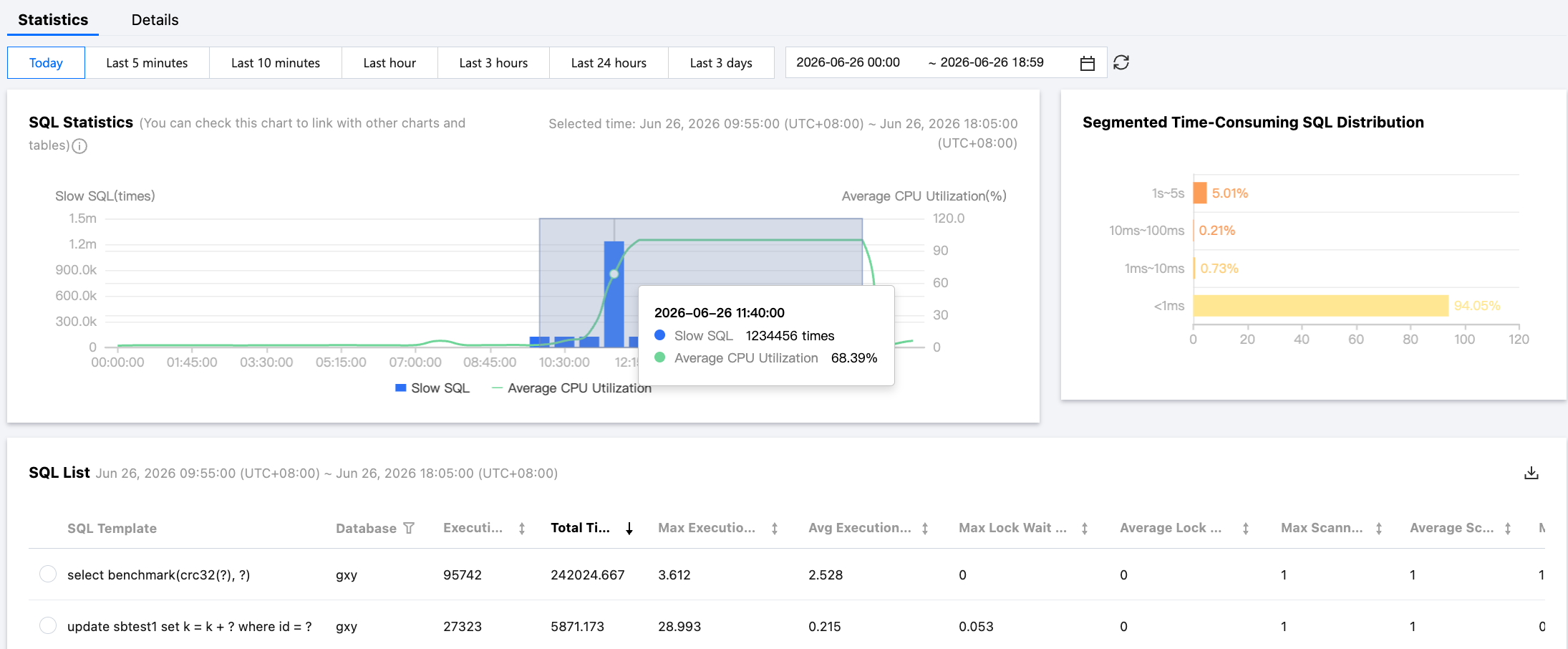
4. On the Statistics tab, you can identify the inefficient queries that most severely impact your business, view their key information such as execution time distribution, scanned rows, and source database, and use this information to assist with SQL tuning. For detailed operations, see Slow SQL Analysis.
Common Causes and Solutions for High CPU Usage in TDSQL Boundless Instances
Check the memory usage on the instance monitoring page. If the usage significantly exceeds the instance specification and the disk I/O volume increases noticeably, it indicates that memory has become a bottleneck. We recommend upgrading the memory.
What Are the Differences in Read/Write Performance Between TDSQL Boundless and Native MySQL?
TDSQL Boundless is a native distributed database. It maintains consistency among replicas of data units through the Raft protocol. By default, each data unit has three replicas, and the data is evenly distributed across all data nodes. This data distribution policy significantly improves the efficiency of handling large volumes of write operations, particularly excelling in write-intensive, read-light business scenarios.
Compared with MySQL's InnoDB storage engine, TDSQL Boundless can achieve a data compression ratio of 3 to 9 times. This not only effectively reduces storage space requirements but may also improve write I/O performance. Consequently, TDSQL Boundless is particularly well-suited for scenarios that have high demands on write performance.
Is Query Performance of LSM-Tree-Based TDSQL Boundless Lower Than That of Native MySQL?
Compared with MySQL's B+ tree index, LSM-tree (Log-Structured Merge-tree) has a significant advantage in write performance, possibly at the cost of compromising some read performance.
However, as a distributed database, TDSQL Boundless provides multiple mechanisms to enhance query performance:
1. Vertical/Horizontal scaling: TDSQL Boundless can scale out database processing capacity by adding more nodes, thereby increasing queries per second (QPS). This cannot be achieved with a standalone MySQL instance because its performance is constrained by the hardware resources of a single server.
2. Optimization policies: Even on a single node, TDSQL Boundless employs a series of optimization policies to improve read performance:
Leveling Compaction: TDSQL Boundless stores all data, including primary keys and indexes, in a large, ordered key-value space. This data corresponds to multiple SST files on the physical disk, organized into seven levels from L0 to L6. The Leveling Compaction policy ensures key uniqueness within each level except L0, which helps accelerate queries. The L0 level is special, allowing range overlaps between files. However, TDSQL Boundless limits the number of files in the L0 level, typically to no more than four. When data needs to be accessed, TDSQL Boundless first checks the in-memory memtable. If the data is not in the memtable, it checks the SST files on disk in level order. Because keys are unique from L1 to L6, only one SST file per level needs to be checked to determine whether the target data exists.
Bloom Filter: When searching for data, TDSQL Boundless uses a Bloom filter to quickly exclude SST files that cannot contain the target key. This avoids unnecessary disk lookups and saves resources.
Block Cache: TDSQL Boundless uses block cache to store hot data, reducing disk I/O operations and further improving read performance.
In summary, although LSM-tree is generally perceived as write-strong and read-weak, its read speed can fully support various high-concurrency, low-latency online scenarios through a series of engineering optimizations. At the same time, due to its distributed nature, a single TDSQL Boundless instance can achieve throughput exceeding one million, a performance target unattainable by traditional architectures.
Impact of Compaction on TDSQL Boundless Performance
The Compaction process in TDSQL Boundless primarily consists of two actions: reading files from the previous level, performing a sort-merge operation, and then writing the results to files in the next level or levels. This process mainly consumes CPU and I/O resources. Therefore, as long as the system has sufficient resources, Compaction itself typically does not significantly impact business performance, and may even have no impact at all.
Additionally, because TDSQL Boundless employs a native distributed architecture, it can utilize resources from all nodes for Compaction. This differs from traditional primary-secondary architectures, where typically only the primary node's resources are used to handle read and write operations (disregarding read/write separation scenarios). Consequently, the distributed nature of TDSQL Boundless effectively mitigates the potential issue of needing to allocate additional resources for Compaction.
Concerns about the impact of compaction on performance largely stem from the relatively simple compaction policy in early RocksDB implementations, which triggered lasting concerns about the impact of compaction. However, with continuous version iterations, compaction policies have been greatly optimized, making the impact on performance more controllable.
Are There Performance Issues in TDSQL Boundless Read Scenarios? How to Determine Data Shard Locations?
In the TDSQL Boundless distributed database, read performance can be affected by data shards and query methods. The following are two common scenarios:
Queries with a partition key: If a query includes the partition key, TDSQL Boundless can directly route the query to the specific data shard containing that key. This approach is highly efficient because it avoids unnecessary data traversal and directly locates the correct data node.
Queries without a partition key: When a query does not specify a partition key, TDSQL Boundless needs to use a secondary index to locate the data. In this scenario, the system performs a scan query on the nodes containing the table data. This may cause a slight performance degradation because more data needs to be checked.
Does InnoDB Have the Same Performance as TDSQL Boundless Regarding Primary/Secondary Replication Lag in Large Transactions?
InnoDB and TDSQL Boundless exhibit different characteristics when handling primary/secondary latency issues caused by large transactions:
InnoDB: InnoDB uses binary logs (binlogs) to synchronize primary/standby data. In high-concurrency and large-data-volume scenarios, large transactions may cause primary/standby latency due to the time-consuming replication and replay process of binlogs.
TDSQL Boundless: TDSQL Boundless is a distributed database based on the Raft protocol, which synchronizes data between nodes in real time through Raft logs. In the Raft protocol, after receiving a client request, the Leader node first adds the request as a new log entry to its local log and then replicates it to Follower nodes. The Leader node responds to the client only after the log entry is replicated to a majority of nodes and marked as committable. This design effectively reduces the latency that large transactions might cause.
In TDSQL Boundless, the apply operation between primary and secondary nodes is almost never delayed. The only potential delay occurs when a Follower node needs to wait for the Leader node to send the next log entry (or heartbeat) to obtain the committable index. However, this time interval is typically very short and negligible.
Additionally, TDSQL Boundless imposes a size limit on transactions, especially for delete operations. It is recommended to split large transactions into multiple smaller ones for execution. This helps prevent a single transaction from consuming excessive resources and reduces the impact on system performance.
In summary, compared to InnoDB, the Raft protocol synchronization mechanism of TDSQL Boundless delivers lower primary/secondary latency when large transactions are handled, especially in high-concurrency and large-data-volume scenarios.
Which Monitoring Metrics Should Users Regularly Focus on for Instances?
CPU utilization, memory utilization, and disk space utilization. You can configure alarm policies based on your actual situation. When you receive an alarm, you can take corresponding measures to clear it.
피드백