Issues Related to Storage Space
다운로드
포커스 모드
폰트 크기
How to View TDSQL Boundless Instance Storage Space Usage?
1. Log in to the DBbrain Console and select Performance Optimization on the left sidebar.
2. At the top of the page, select the corresponding Instance ID and then select the Space Analysis tab.
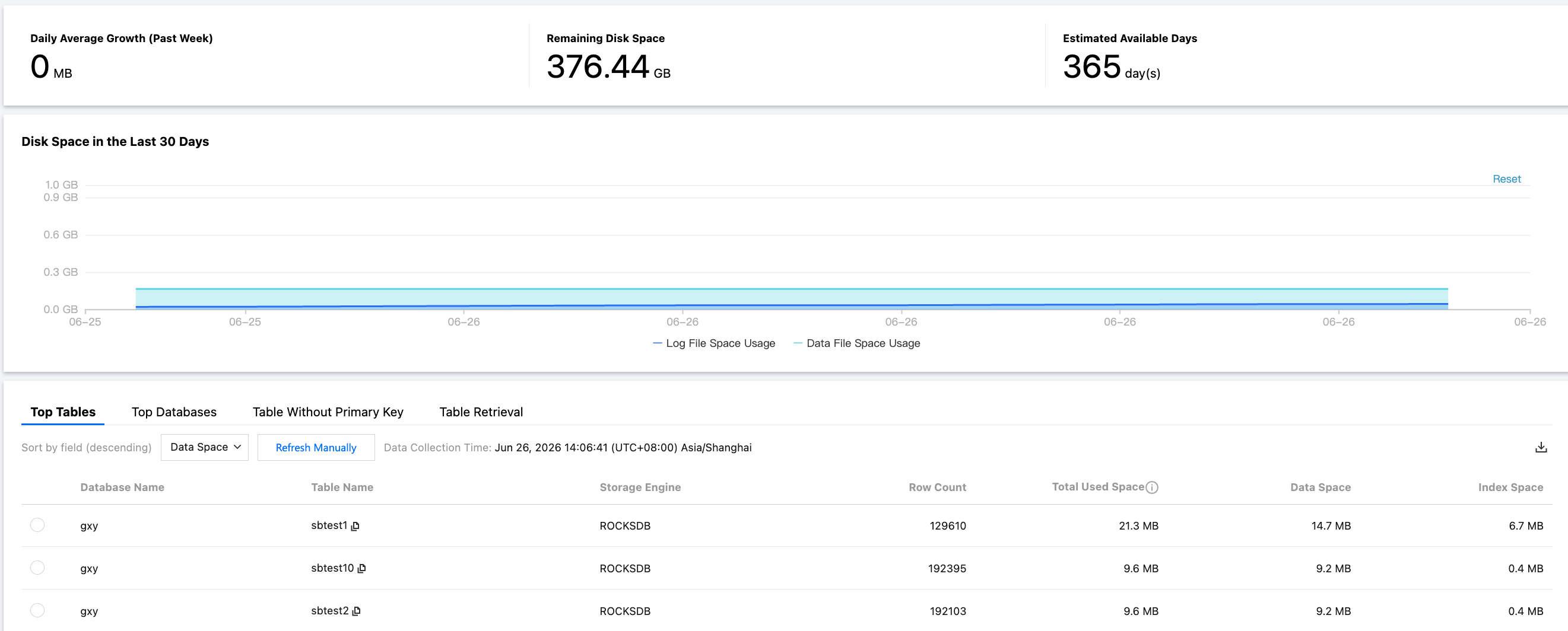
3. Navigate to the Space Analysis page, where you can view the following information.
Space Overview: The instance's current disk usage, remaining disk space, and estimated available days.
Space Trend: The trend changes in the space usage of data files and log files.
TOP Databases / TOP Tables: A list of databases and tables sorted in descending order by space usage, where you can view the data size, index size, and number of rows for each table.
Tables Without Primary Key: Lists tables without primary keys in the instance to facilitate data governance.
Table Retrieval: View table information and trend charts.
Note:
The metrics in the Disk Space Overview display the average usage across multiple nodes, while the TOP Table Space Details display the usage of a single replica.
피드백