tencent cloud

Tencent Cloud Observability Platform

Grafana

PDF
フォーカスモード
フォントサイズ
最終更新日: 2024-08-07 22:06:47
TMP is highly integrated with TencentCloud Managed Service for Grafana (TCMG). One TCMG instance can be bound by multiple TMP instances at the same time to visualized TMP data in a unified way.

Directions

TMP allows you to associate with a TCMG instance when creating a TMP instance. If you don’t associate with the TCMG instance when purchasing the TMP service, you can follow the instructions below for binding.

Associating with a TCMG instance

1. Log in to the TMP console.
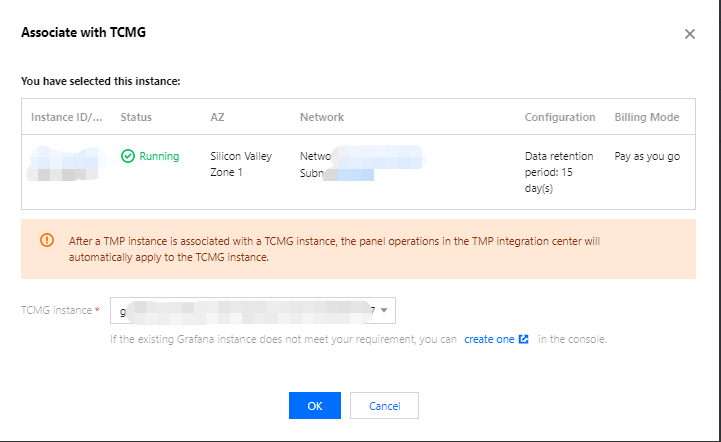
2. Find the corresponding TMP instance in the TMP instance list, and click More>Grafana>Associate with TCMG in the Operation column.
3. Select the TCMG instance in the pop-up window and click OK.


Note
You can only select the TCMG instance in the same VPC (private network) as the TMP instance. If there is no suitable TCMG instance, see Creating Instance to create one.
Disassociating from a TCMG instance

1. Log in to the TMP console.
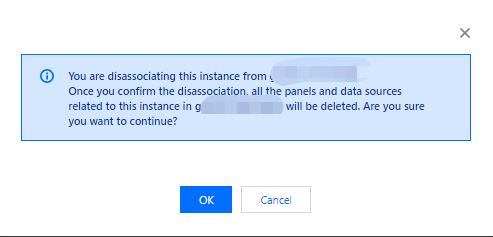
2. Find the corresponding TMP instance in the TMP instance list, and click More>Grafana>Disassociate from TCMG in the Operation column.
3. In the pop-up window, click OK.


Logging in to the TCMG instance

1. Log in to the TMP console.
2. Find the corresponding TMP instance in the TMP instance list, and click the Grafana icon to the right of the instance ID/name.

3. On the TCMG login page, enter your account and password to log in.
Note
For more TCMG operations such as configuration and image rendering, see TencentCloud Managed Service for Grafana (TCMG).


ヘルプとサポート

この記事はお役に立ちましたか?

フィードバック
