If you want to add a DNS record to a registered domain, you need to manage the domain at your DNS service provider to resolve it normally. This document describes how to change the DNS server address to specify the DNS service provider.
Directions
If your domain is registered in Tencent Cloud or has been transferred to Tencent Cloud, you can change the DNS server in the following steps:
1. Log in to the Domains console and enter the My Domains page.
2. Select the domain whose DNS is to be modified and click Manage as shown below:
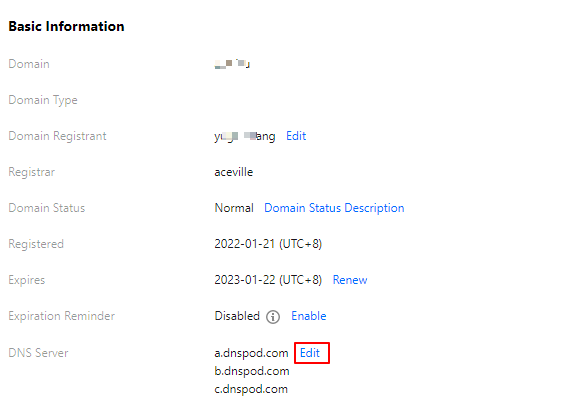
3. In the Basic Info section, click Modify next to DNS Server as shown below:
4. In the Modify DNS Server pop-up window, select the DNS server as shown below:
Use DNSPod: the DNS address of the DNSPod server will be automatically matched for the domain.
Custom DNS: enter the desired DNS server address.
Note:
The domain of a custom DNS server cannot be a private domain but must be an authoritative DNS server domain of the DNS service provider.