Using CLS via Kibana
Unduh
Mode fokus
Ukuran font
Scenarios
Log topics are compatible with some Elasticsearch APIs and DSL. You can use CLS through Kibana with these interfaces. This compatibility reduces migration complexity when you migrate from Elasticsearch to CLS.
Prerequisites
Note:
This feature is currently supported only for some users or log topics. To use it, contact us to enable the feature allowlist.
This feature supports only log topics. To use the corresponding DSL, you must enable indexing for logs. For details, see Index Configuration.
The compatible APIs of CLS are based on Elasticsearch 7.10 and support access only from Kibana 7.x editions.
Aggregation DSL is not supported for STANDARD_IA storage. Most statistical charts in Kibana are also not supported.
Deployment Architecture
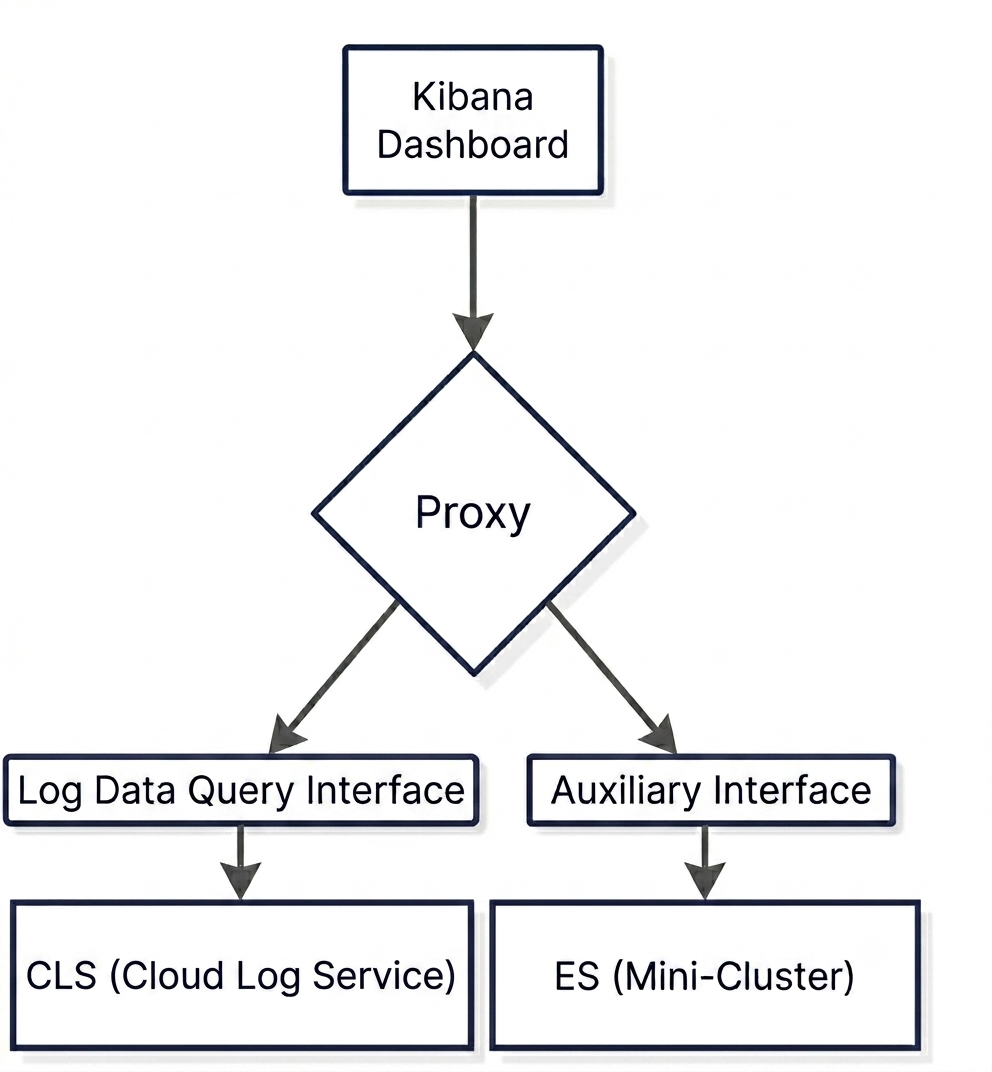
Kibana: It is used for querying data. You can deploy a new Kibana instance by following the operational steps, or you can use an existing Kibana instance. If you use an existing instance, you must modify the address that Kibana uses to access Elasticsearch to the Proxy address by following the operational steps.
Proxy: It distributes Kibana requests. Specifically, it routes log data query requests to CLS and other Kibana configuration requests to the ES cluster.
CLS: Log topics in CLS
ES: It is a mini-cluster used for storing Kibana configuration information. It has an extremely low data volume. You can deploy a new ES instance by following the operational steps, or you can use an existing ES instance.
Operation Steps
Procedure 1: Creating a Sub-User and Authorizing Kibana to Access CLS
1. We recommend that you create a separate sub-account and use its SecretId and SecretKey. This account should be granted only the following API permissions. For configuration instructions, see Sub-account Authorization.
{"version": "2.0","statement": [{"effect": "allow","action": ["cls:DescribeTopics","cls:SearchLog"],"resource": ["*"]}]}
Procedure 2: Deploying the Kibana Environment
1. When deploying the ES (mini-cluster), replace
{es_password} with the ES access password you need to set.docker run -d \\--name elasticsearch-7.10.2 \\-p 9200:9200 \\-e "discovery.type=single-node" \\-e "ES_JAVA_OPTS=-Xms1g -Xmx1g" \\-e "xpack.security.enabled=true" \\-e "ELASTIC_PASSWORD={es_password}" \\docker.elastic.co/elasticsearch/elasticsearch:7.10.2
2. Deploy the Proxy.
docker run -d \\--name cls-kibana-proxy \\-p 9201:9201 \\-e META_ES_ENDPOINT={es_address, http://ip:port} \\-e META_ES_USERNAME={es_user} \\-e META_ES_PASSWORD={es_password} \\-e CLS_REGION={region} \\-e CLS_SECRET_ID={SECRET_ID} \\-e CLS_SECRET_KEY={SECRET_KEY} \\-e CLS_SYNC_ENABLED=true \\-e CLS_SYNC_FILTERS=* \\gz-cls-images.tencentcloudcr.com/public/kibana-proxy:alpha-v0.6
docker run -d \\--name cls-kibana-proxy \\-p 9201:9201 \\-e META_ES_ENDPOINT={es_address, http://ip:port} \\-e META_ES_USERNAME={es_user} \\-e META_ES_PASSWORD={es_password} \\-e CLS_REGION={region} \\-e CLS_SECRET_ID={SECRET_ID} \\-e CLS_SECRET_KEY={SECRET_KEY} \\-e CLS_SYNC_ENABLED=true \\-e CLS_SYNC_FILTERS=* \\-e CLS_REGION_1={region_1} \\-e CLS_SECRET_ID_1={SECRET_ID} \\-e CLS_SECRET_KEY_1={SECRET_KEY} \\-e CLS_SYNC_FILTERS_1=* \\gz-cls-images.tencentcloudcr.com/public/kibana-proxy:alpha-v0.6
The variables are described as follows:
Variable | Required | Description |
META_ES_ENDPOINT | Yes | The access address for the ES (mini-cluster), in the format http://ip:port. |
META_ES_USERNAME | Yes | The username for accessing ES, with a default value of elastic. |
META_ES_PASSWORD | Yes | The password for accessing ES. |
CLS_REGION | Yes | |
CLS_SECRET_ID | Yes | Sub-account SecretId |
CLS_SECRET_KEY | Yes | Sub-account SecretKey |
CLS_SYNC_ENABLED | No | Whether to enable automatic synchronization. If automatic synchronization is enabled, log topics are automatically added to Kibana Index Pattern. The default value is false, which means automatic synchronization is not enabled. To enable it, configure the value as true. |
CLS_MAX_INDEX_PATTERNS | No | The maximum number of IndexPatterns in Kibana, with a default value of 1000. No new IndexPatterns are automatically added after this limit is exceeded. |
CLS_SYNC_FILTERS | No | When automatic synchronization is enabled, log topics that meet the filter criteria are synchronized to Kibana Index Pattern. Empty/Not configured: No log topics are synchronized. * : Synchronize all log topics. Filter criteria: Use a json string to specify the filter criteria. For supported filter criteria, see the Filters parameter in the Obtain Topic List API, for example, '{"logsetName": ["logset-dev"]}'. |
LOG_LEVEL | No | Log level: DEBUG, INFO, WARN, with INFO as the default. |
PROXY_AUTH | No | Whether to enable authentication for Proxy, with a default value of true. |
CLS_ES_ENDPOINT | No | The address of the CLS Elasticsearch-compatible API, which defaults to the public network address. Public network address: https://${region}.cls.tencentcs.com Private network address: https://${region}.cls.tencentyun.com Here, ${region} is the region abbreviation. Use the region where the log topic is located, for example, ap-guangzhou. |
CLS_API_ENDPOINT | No | The address of the CLS API, which defaults to the public network address. Public network address: https://cls.tencentcloudapi.com (Only non-financial zones are supported). Private network address: https://cls.internal.tencentcloudapi.com |
Note:
When there are multiple regions or accounts, append
_{auto-increment id} to the corresponding variable name, for example, CLS_REGION_1, CLS_REGION_2.3. Deploy Kibana.
3.1 Create the Kibana configuration file.
cat > ./kibana.yml << 'EOF'server.host: "0.0.0.0"# Elasticsearch Configurationelasticsearch.hosts: ["{proxy_address}"]elasticsearch.username: "{es_user}"elasticsearch.password: "{es_password}"elasticsearch.shardTimeout: 30sxpack.security.enabled: truexpack.data_enhanced.enabled: falseEOF
{proxy_address}: The Proxy access address, in the format
http://ip:port.{es_user}: The username for accessing the ES (mini-cluster), with a default value of elastic.
{es_password}: The password for accessing the ES (mini-cluster).
3.2 Start Kibana.
docker run -d \\--name kibana-7.10.2 \\-p 5601:5601 \\-v ./kibana.yml:/usr/share/kibana/config/kibana.yml:ro \\docker.elastic.co/kibana/kibana:7.10.2
1. Create the configuration file
values.yaml with the following content. Replace {es_password} with the ES access password you need to set, replace {region} with the region to which the log topic belongs, and replace {SECRET_ID} and {SECRET_KEY} with the sub-account credentials.elasticsearch:enabled: truepassword: "{es_password}"kibana-proxy:image:tag: "v0.9.0"env:CLS_SYNC_ENABLED: "true"CLS_MAX_INDEX_PATTERNS: "1000"clsRegions:- CLS_REGION: "{region}"CLS_SECRET_ID: "{SECRET_ID}"CLS_SECRET_KEY: "{SECRET_KEY}"CLS_SYNC_FILTERS: '*'
elasticsearch:enabled: truepassword: "{es_password}"kibana-proxy:image:tag: "v0.9.0"env:CLS_SYNC_ENABLED: "true"CLS_MAX_INDEX_PATTERNS: "1000"clsRegions:- CLS_REGION: "{region}" # Configuration for multiple regions/accountsCLS_SECRET_ID: "{SECRET_ID}"CLS_SECRET_KEY: "{SECRET_KEY}"CLS_SYNC_FILTERS: '*'- CLS_REGION: "{region}" # Configuration for multiple regions/accountsCLS_SECRET_ID: "{SECRET_ID}"CLS_SECRET_KEY: "{SECRET_KEY}"CLS_SYNC_FILTERS: '*'
The variables are described as follows:
Variable | Required | Description |
CLS_REGION | Yes | |
CLS_SECRET_ID | Yes | Sub-account SecretId |
CLS_SECRET_KEY | Yes | Sub-account SecretKey |
CLS_SYNC_ENABLED | No | Whether to enable automatic synchronization. If automatic synchronization is enabled, log topics are automatically added to Kibana Index Pattern. The default value is false, which means automatic synchronization is not enabled. To enable it, configure the value as true. |
CLS_MAX_INDEX_PATTERNS | No | The maximum number of IndexPatterns in Kibana, with a default value of 1000. No new IndexPatterns are automatically added after this limit is exceeded. |
CLS_SYNC_FILTERS | No | When automatic synchronization is enabled, log topics that meet the filter criteria are synchronized to Kibana Index Pattern. Empty/Not configured: No log topics are synchronized. * : Synchronize all log topics. Filter criteria: Use a json string to specify the filter criteria. For supported filter criteria, see the Filters parameter in the Obtain Topic List API, for example, '{"logsetName": ["logset-dev"]}'. |
CLS_ES_ENDPOINT | No | The address of the CLS Elasticsearch-compatible API, which defaults to the public network address. Public network address: https://${region}.cls.tencentcs.com Private network address: https://${region}.cls.tencentyun.com Here, ${region} is the region abbreviation. Use the region where the log topic is located, for example, ap-guangzhou. |
CLS_API_ENDPOINT | No | The address of the CLS API, which defaults to the public network address. Public network address: https://cls.tencentcloudapi.com (Only non-financial zones are supported). Private network address: https://cls.internal.tencentcloudapi.com |
Note:
For more deployment methods and instructions, see the examples folder in the compressed package, such as password-free mode deployment for Kibana and deployment using an external ES.
2. Run the following command in the TKE cluster.
helm install cls-kibana-proxy-stack https://cls-kibana-proxy-1254077820.cos.ap-guangzhou.myqcloud.com/cls-kibana-proxy-stack-0.0.1.tgz -f values.yaml -n cls --create-namespace
3. After the deployment is complete, enable external access for the Kibana service according to your cluster environment.
Procedure 3: Creating an Index pattern in Kibana
Note:
If automatic synchronization has been enabled in the Proxy configuration and CLS_SYNC_ENABLED=true, you do not need to perform this step.
1. Open a browser and access the Kibana address (for example, http://<your-kibana-host>:5601).
2. Enter the username and password to log in.
3. Click Stack Management in the left sidebar.
4. Locate the Kibana category in the left menu and click Index Patterns.
5. Click Create index pattern in the upper-right corner of the page.
6. In the Index pattern name input box, enter the log topic ID you want to query. For Timestamp field, select @timestamp.
7. Click the Create index pattern button to complete the creation.
Procedure 4: Querying Logs in Kibana
1. Click the left navigation menu button to open the navigation bar, and then click Discover.
2. In the left panel, select the Index pattern created in the previous step to start querying logs.
Bantuan dan Dukungan
Apakah halaman ini membantu?
Anda juga dapat Menghubungi Penjualan atau Mengirimkan Tiket untuk meminta bantuan.
masukan