Configure Alarms
Unduh
Mode fokus
Ukuran font
Configuring Alarms for CLS to COS Shipping Task
1. Log in to the TCOP console.
2. In the left navigation bar, select Alarm Management > Alarm Configuration > Alarm Policy, then click Create Policy.
3. Configure alarm policy. For detailed configuration instructions, see Creating Alarm Policy.
Enter policy name.
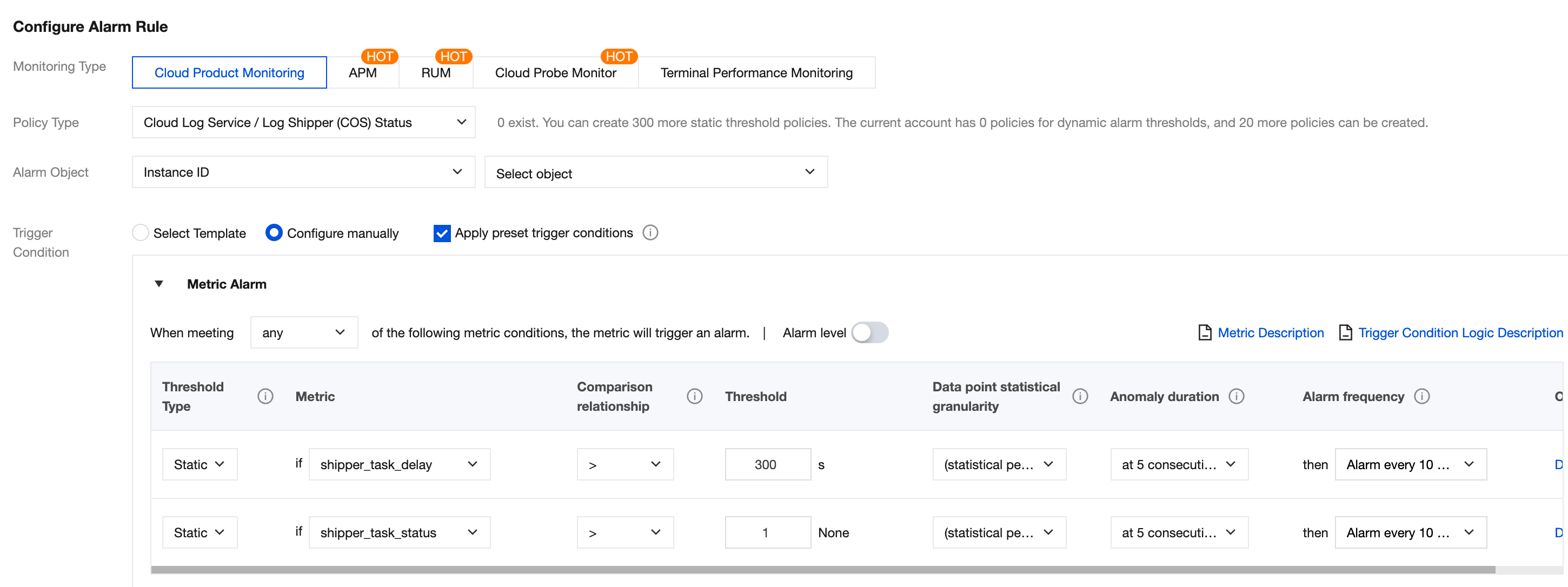
Monitoring Type: Select Cloud Product Monitoring.
Policy Type: Select Cloud Log Service/ Log Shipper(COS) Status.
Alarm Object: Select the log topic you deliver to COS.
Support modifying preset trigger conditions.
Note:
When the delivery task status is 1, it means the task is running properly. If exceptions occur (can be viewed in the delivery task status), the exception status code starts from 10001. Therefore, use "delivery task status > 1" for monitoring.
Bantuan dan Dukungan
Apakah halaman ini membantu?
Anda juga dapat Menghubungi Penjualan atau Mengirimkan Tiket untuk meminta bantuan.
masukan