Resource Functions
Unduh
Mode fokus
Ukuran font
res_local Function
Function Definition
Use the res_local function to pull environment variables from the advanced configuration within the current data processing task.
Syntax Description
res_local(param, default=None, type="auto")
Parameter Description
Parameter Name | Parameter Description | Parameter Type | Required | Default Value | Parameter Value Range |
param | The field name corresponding to the environment variable in advanced configuration | string | Yes | - | - |
default | Returns the value of this parameter when the field value does not exist. The default value is None. | string | Yes | None | - |
type | The data format for data output. auto (default value): Converts the original value to JSON format. If the conversion fails, the original value is returned. JSON: Converts the original value to JSON format. If the conversion fails, the value of the default parameter is returned. raw: Returns the original value. | string | Yes | auto | - |
Example
In the advanced configuration for data processing, an environment variable field named `time_session` with a value of 30 has been added.
Raw logs:
{}
Processing rules:
fields_set("time_session", res_local("time_session"))
Processing result:
{"time_session":"30"}
res_rds_mysql Function
Function Definition
Use the res_rds_mysql function to pull database table contents or SQL execution results from a cloud MySQL database. The first pull operation defaults to retrieving the full dataset from MySQL. This function can be used together with the t_table_map() function to achieve dimension table association.
Prerequisites
On the MySQL side: If the host IP address is restricted by the access account, allow the 169.254.% segment. For details, see MySQL-Create Account.
On the CLS data processing side: When creating a new processing task, enable the external data source switch and configure your MySQL access information.
Syntax Description
res_rds_mysql(alias, database="database_name", sql="select name from person_info", refresh_interval=0, base_retry_back_off=1, max_retry_back_off=60, update_time_key=None, use_ssl=False)
Parameter Description
Parameter Name | Parameter Description | Parameter Type | Required | Default Value | Parameter Value Range |
alias | Alias for the configured database information. | string | Yes | - | - |
database | Database name. | string | Yes | - | - |
sql | SQL statement for data retrieval. | string | Yes | - | - |
refresh_interval | Time interval for data pulling, in seconds. The default value is 0, indicating a full pull is performed only once. | number | No | 0 | - |
base_retry_back_off | Time interval for retrying data pulling after a failure, with a default value of 1 second. | number | No | 0 | - |
max_retry_back_off | Maximum time interval for retrying requests after data pulling fails. The default value is 60 seconds. Using the default value is recommended. | number | No | 60 | - |
update_time_key | Used for incremental data retrieval. If this parameter is not configured, a full update is performed. | string | No | - | - |
use_ssl | Whether to use SSL for secure connection. | bool | No | False | - |
Example
Example 1: Pulling Data from a Table
In MySQL, create a table named `test` and add the following data:

Raw logs:
[{"user_id": 1},{"user_id": 3}]
Processing rules:
// In the console, configure the alias for the external MySQL data source as `hm`, set the MySQL database to `test222`, and the table name to `test`.// Pull all data from MySQL and use the t_table_map function to complete dimension table association.t_table_map(res_rds_mysql(alias="hm",database="test222",sql="select * from test"),"user_id",["gameid", "game"])
Processing result:
[{"user_id":"1"},{"game":"wangzhe","gameid":"123","user_id":"3"}]
Example 2: Pulling Partial Data
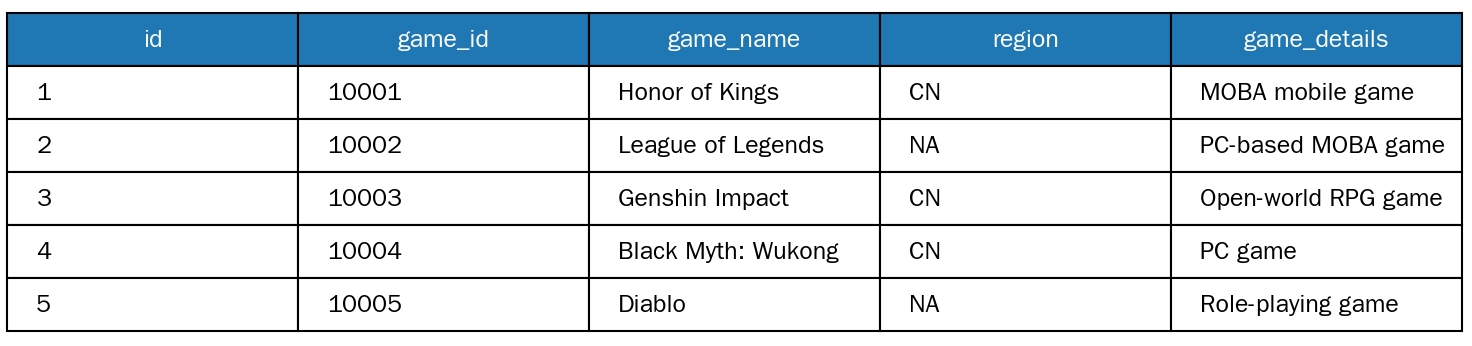
In MySQL, create a table named `test` and add the following data:
Raw logs:
[{"id": 1},{"id": 2},{"id": 3}]
Processing rules:
// In the console, configure the alias for the external MySQL data source as `hm`, set the MySQL database to `test222`, and the table name to `test`.//select * from test where region='CN', pull data where region='CN' from MySQL, and use the t_table_map function to complete dimension table association.t_table_map(res_rds_mysql(alias="hm",database="test222",sql="select * from test where region='CN'"),"id",["game", "game_details"])
Processing result:
[{"game_details": "MOBA mobile game""game_name": "Honor of Kings""id":"1"},{"id":"2"},{"game_details": "open-world RPG game""game_name": "Genshin Impact""id":"3"}]
Join MySQL Description
Two Data Pulling Methods
It supports two data ingestion methods: one-time ingestion and incremental data ingestion.
One-time ingestion: This method ingests all data from the MySQL data source in a single operation. It is suitable for scenarios where the data volume is fixed and no subsequent incremental updates are required, such as static configuration tables or historical archived data.
Incremental data ingestion: Users must specify the `update_time_key` field in the MySQL table (this field must record the data timestamp, which is used to mark the data generation/update time). The data processing task automatically uses the "maximum MySQL data timestamp" from the previous ingestion as the baseline and only ingests new or updated data with timestamps greater than or equal to this baseline. This method is suitable for scenarios requiring continuous synchronization of MySQL incremental data, such as real-time business tables or dynamic log association tables.
Core Logic of Data Association
Regardless of the ingestion method selected, CLS first caches the ingested MySQL data on the CLS side. It then performs a Join calculation based on the cached data and log data to ensure the stability and efficiency of the association process.
Performance Description and Scaling Recommendations
To ensure data processing efficiency, note the following:
Data volume limitation: It is recommended to keep the total data volume involved in the Join calculation within 1 million records. If the data volume exceeds this range, it may cause delays in the Join calculation, affecting the overall performance of the processing task.
Scaling support: If your MySQL data source has a large data volume (requiring long-term stable association of over 1 million records), you can contact Tencent Cloud sales to apply for resource scaling to meet your business data association requirements.
If the MySQL data volume is large, do not directly associate the production primary database with CLS. This avoids initiating overly complex SQL queries against the database through CLS, which could affect production environment stability. Instead, use a read-only instance.
Fee
Data Security
Create a dedicated database account for CLS to access MySQL. Minimize the resource and operational permissions associated with the account. CLS only requires query permissions and does not need edit or delete permissions. For configuration instructions, see Modify Account Permissions for TencentDB for MySQL. Securely store the account information and do not disclose it.
Bantuan dan Dukungan
Apakah halaman ini membantu?
Anda juga dapat Menghubungi Penjualan atau Mengirimkan Tiket untuk meminta bantuan.
masukan