Log Masking
Unduh
Mode fokus
Ukuran font
Scenario 1
Scenario Description
To optimize log writing standards, sensitive data in logs, such as user names, ID numbers, and bank card numbers that may be present in some of a company's logs, must be detected and counted.
Raw Log
[{"operation_time": "2025-04-12 15:32:01","user_info": "Zhang San applied to activate the service, ID number 522301199201230123","operation_detail": "Transaction amount: CNY 200"},{"operation_time": "2025-04-12 15:32:01","user_info": "Li Si applied to activate the service, ID number 522301199201230123, bank card number 6228880123456789123","operation_detail": "Transaction amount: CNY 100"},{"operation_time": "2025-04-12 15:32:01","user_info": "Wang Wu applied to activate the service, ID number 522***1992****0123, bank card number 6228****2345****123","operation_detail": "Transaction amount: CNY 500"}]
Scenario Analysis
Use data processing to detect sensitive information such as ID numbers and bank card numbers from raw logs. After sensitive information is detected, a new field, SENSITIVE_FLAGS, is added to the log. This field is used to populate the discovered sensitive information items, and the processed results are written to the target log topic. Subsequently, you can use SQL in the target log topic to count the types and quantities of sensitive information.
DSL Processing Function
//scope=ALL_FIELDS means searching all fields in the entire log.//sample_ratio=1 means that all logs are scanned for sensitive information, while 0.5 means that 50% of the logs are scanned.sensitive_detection(scope="ALL_FIELDS", sample_ratio=1, discover_items="CHINA_IDCARD,DEBIT_CARD")
Processing Result
[//Only the ID number is flagged as a sensitive item in the first data record.{"SENSITIVE_FLAGS":"CHINA_IDCARD","operation_detail": "Transaction amount: CNY 200","operation_time":"2025-04-12 15:32:01","user_info": "Zhang San applied to activate the service, ID number 522301199201230123",},//The second data record contains two types of sensitive items: ID number and bank card number.{"SENSITIVE_FLAGS":"CHINA_IDCARD,DEBIT_CARD","operation_detail": "Transaction amount: CNY 100","operation_time":"2025-04-12 15:32:01","user_info": "Li Si applied to activate the service, ID number 522301199201230123, bank card number 6228880123456789123",},//The third data record is safe and is therefore marked as SAFE.{"SENSITIVE_FLAGS":"SAFE","operation_detail": "Transaction amount: CNY 500","operation_time":"2025-04-12 15:32:01","user_info": "Wang Wu applied to activate the service, ID number 522***1992****0123, bank card number 6228****2345****123",}]
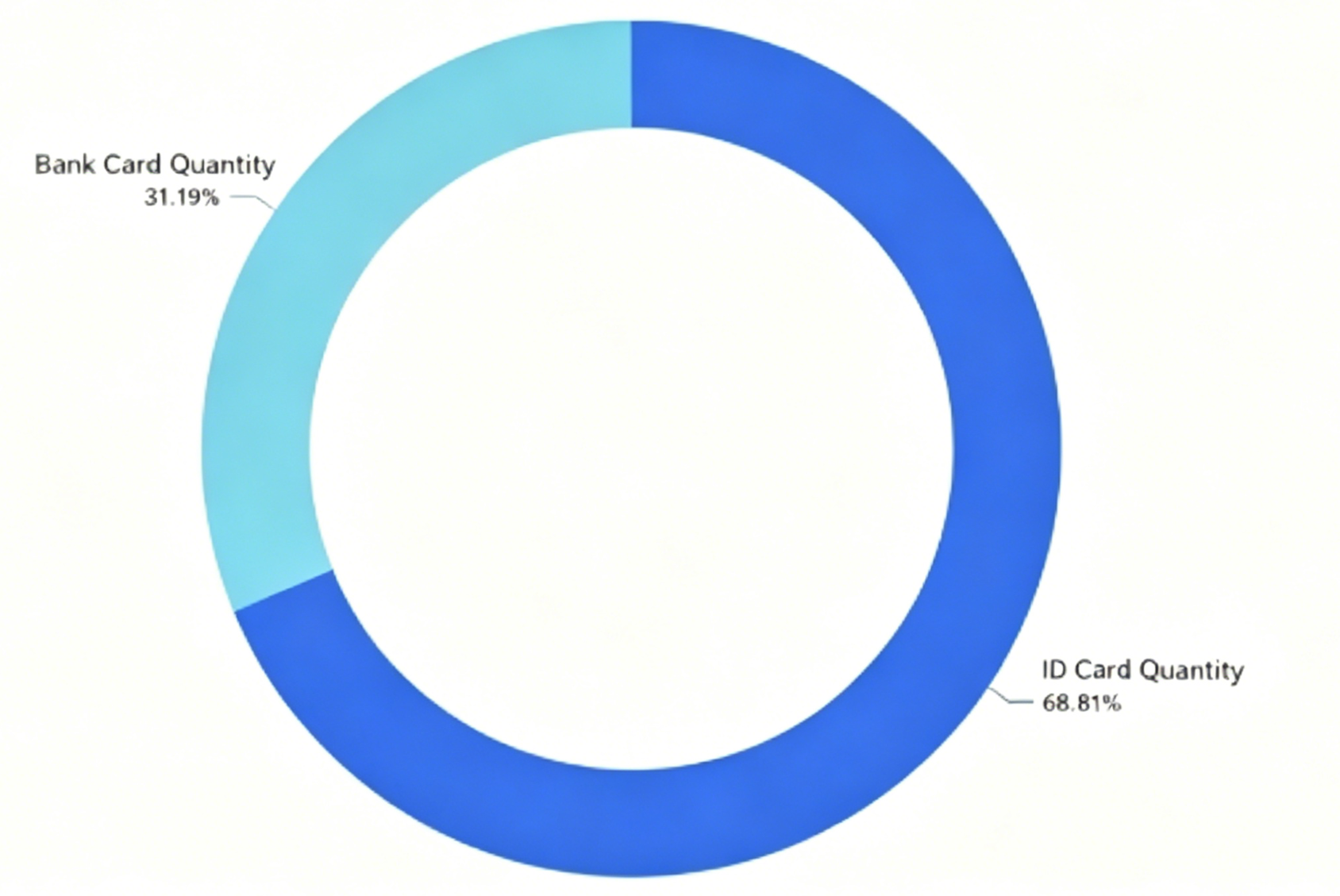
Sensitive Item Statistical Analysis
selectcase whenSENSITIVE_FLAGS like '%CHINA_ID%'then 'ID Number Count'whenSENSITIVE_FLAGS like '%DEBIT_CARD%'then 'Bank Card Number Count' else 'other'end as type ,count(*) as "Sensitive Items"group by type HAVING type != 'other'limit 10000
Statistical Analysis Results:
Use Case
Scenario Description
A user has collected logs to CLS. The Log data contains the user ID (dev@12345), the login IP address (11.111.137.225), and the mobile phone number (13912345678). The user wants to desensitize this sensitive information.
Scenario Analysis
The log itself is a structured log, so the fields can be desensitized directly.
Raw Log
{"Id": "dev@12345","Ip": "11.111.137.225","phonenumber": "13912345678"}
DSL Processing Function
fields_set("Id",regex_replace(v("Id"),regex="\\d{3}", replace="***",count=0))fields_set("Id",regex_replace(v("Id"),regex="\\S{2}", replace="**",count=1))fields_set("phonenumber",regex_replace(v("phonenumber"),regex="(\\d{0,3})\\d{4}(\\d{4})", replace="$1****$2"))fields_set("Ip",regex_replace(v("Ip"),regex="(\\d+\\.)\\d+(\\.\\d+\\.\\d+)", replace="$1***$2",count=0))
DSL Processing Function Details
1. Mask the Id field. The result is dev@***45.
fields_set("Id",regex_replace(v("Id"),regex="\\d{3}", replace="***",count=0))
2. Mask the Id field again. The result is **v@***45.
fields_set("Id",regex_replace(v("Id"),regex="\\S{2}", replace="**",count=1))
3. Mask the phonenumber field by replacing the middle 4 digits with ****. The result is 139****5678.
fields_set("phonenumber",regex_replace(v("phonenumber"),regex="(\\d{0,3})\\d{4}(\\d{4})", replace="$1****$2"))
4. Mask the IP field by replacing the octet with ***. The result is 11.***137.225.
fields_set("Ip",regex_replace(v("Ip"),regex="(\\d+\\.)\\d+(\\.\\d+\\.\\d+)", replace="$1***$2",count=0))
Processing Result
{"Id":"**v@***45","Ip":"11.***.137.225","phonenumber":"139****5678"}
Bantuan dan Dukungan
Apakah halaman ini membantu?
Anda juga dapat Menghubungi Penjualan atau Mengirimkan Tiket untuk meminta bantuan.
masukan