Key-Value Extraction Functions
Unduh
Mode fokus
Ukuran font
Overview
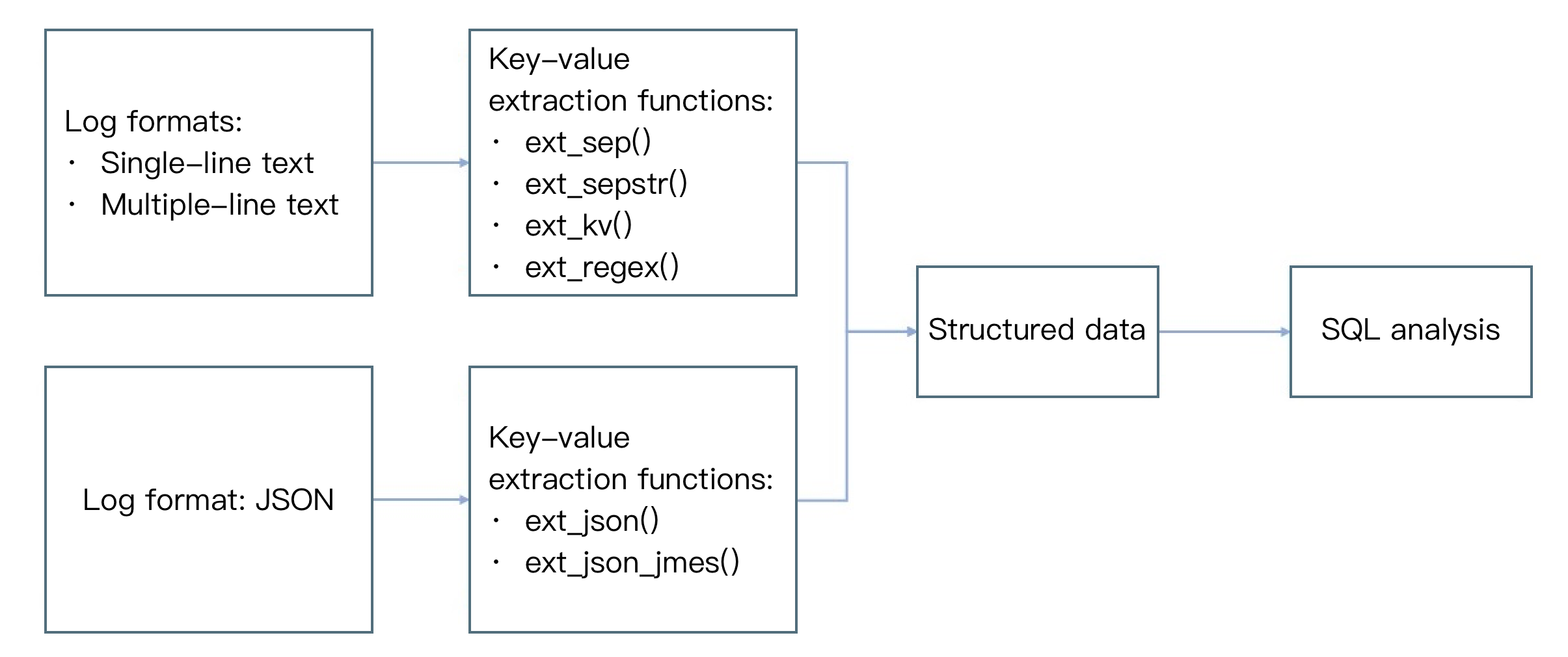
The figure below shows the common use cases of key-value extraction functions. After key-value extraction, logs are processed into structured data, which can be used for SQL analysis.
Function ext_sep()
Function Definition
This function is used to extract field value content based on a separator (single character).
Syntax description
ext_sep("Source field name", "Target field 1,Target field 2,Target field...", sep="Separator", quote="Non-segmentation part"", restrict=False, mode="overwrite")
Parameter Description
Parameter Name | Parameter Description | Parameter Type | Required | Default Value | Parameter Value Range |
field | Field to extract | string | Yes | - | Name of an existing field in the user log |
output | A single field name or multiple new field names concatenated with commas | string | Yes | - | - |
sep | Separator | string | No | - | Any single character |
quote | Characters that enclose the value | string | No | - | - |
restrict | Handling mode when the number of extracted values is inconsistent with the number of target fields entered by the user: True: ignore the extraction function and do not perform any extraction processing. False: try to match the first few fields | bool | No | False | - |
mode | Write mode of the new field | string | No | overwrite |
Sample
Example 1. Extract values from logs by using a comma as the separator.
Raw log:
{"content": "hello Go,hello Java,hello python"}
Processing rule:
// Use a comma as the separator to divide the `content` field into three parts, corresponding to the `f1`, `f2`, and `f3` fields separately.ext_sep("content", "f1, f2, f3", sep=",", quote="", restrict=False, mode="overwrite")// Delete the `content` field.fields_drop("content")
Processing result:
{"f1":"hello Go","f2":"hello Java","f3":"hello python"}
Example 2. Process the content string as a whole by using quote:
Raw log:
{"content": " Go,%hello ,Java%,python"}
Processing rule:
ext_sep("content", "f1, f2", quote="%", restrict=False)
Processing result:
// Though `%hello ,Java%` does contain a comma, it does not participate in separator extraction as a whole.{"content":" Go,%hello ,Java%,python","f1":" Go","f2":"hello ,Java"}
Example 3:
restrict=True indicates the number of divided values is different from the target fields, the function is not executed. Raw log:
{"content": "1,2,3"}
Processing rule:
ext_sep("content", "f1, f2", restrict=True)
Processing result:
{"content":"1,2,3"}
Function ext_sepstr()
Function Definition
This function is used to extract field value content based on multiple characters (string).
Syntax Description
ext_sepstr("Source field name","Target field 1,Target field 2,Target field...", sep="abc", restrict=False, mode="overwrite")
Parameter Description
Parameter Name | Parameter Description | Parameter Type | Required | Default Value | Parameter Value Range |
field | Field name to be extracted. | string | Yes | - | Name of an existing field in the user log |
output | Output field name. Only a single field is supported. | string | Yes | - | - |
sep | Separator (string) Note: When your delimiter contains special characters, such as . \\ * + ? ^ $ | () [] {} - /, you need to add an escape character. | string | No | , | - |
restrict | Handling mode when the number of extracted values is inconsistent with the number of target fields entered by the user: True: ignore the extraction function and do not perform any extraction processing. False: try to match the first few fields | bool | No | False | - |
mode | The writing mode of the new field. Forced overwrite by default. | string | No | overwrite |
Sample
Raw log:
{"message":"1##2##3"}
Processing rule:
// Use "##" as the separator to extract key-values.ext_sepstr("message", "f1,f2,f3,f4", sep="##")
Processing result:
// If the number of target fields is greater than the number of divided values, `""` is returned for the excessive fields.{"f1":"1","f2":"2","message":"1##2##3","f3":"3","f4":""}
Function ext_json()
Function Definition
This function is used to extract field values from JSON data.
Syntax Description
ext_json("Source field name",prefix="",suffix="",format="full",exclude_node="JSON nodes not to expand")
Parameter Description
Parameter Name | Parameter Description | Parameter Type | Required | Default Value | Parameter Value Range |
field | Field name to be extracted. | string | Yes | - | - |
prefix | Prefix of the new field. | string | No | - | - |
suffix | New field suffix. | string | No | - | - |
format | Full: The field name is in the format of the full path (parent node + connector sep + prefix + key current node + suffix). Simple: The non-full path (prefix + key current node + suffix). | string | No | simple | - |
sep | Concatenation character, used to concatenate node names | string | No | # | - |
depth | Depth to which the function expands the source field, beyond which nodes will not be expanded any more | number | No | 100 | 1-500 |
expand_array | Whether to expand an array node | bool | No | False | - |
include_node | Allowlist of node names that match the specified regular expression | string | No | - | - |
exclude_node | Blocklist of node names that match the specified regular expression | string | No | - | - |
include_path | Allowlist of node paths that match the specified regular expression | string | No | - | - |
exclude_path | Allowlist of node paths that match the specified regular expression | string | No | - | - |
retain | Retains some special symbols without escaping them, such as \\n and \\t. | string | No | - | - |
escape | Whether to escape data. Default value: True. If special symbols are contained, escaping cannot be performed. | bool | No | True | - |
Sample
Example 1: Extract the KV of all nodes as a new field without hierarchical extraction. This example shows multi-level nesting.
Raw log:
{"data": "{ \\"k1\\": 100, \\"k2\\": { \\"k3\\": 200, \\"k4\\": { \\"k5\\": 300}}}"}
Processing rule:
ext_json("data")
Processing result:
{"data":"{ \\"k1\\": 100, \\"k2\\": { \\"k3\\": 200, \\"k4\\": { \\"k5\\": 300}}}","k1":"100","k3":"200","k5":"300"}
Example 2. Perform extraction excluding sub_field1.
Raw log:
{"content": "{\\"sub_field1\\":1,\\"sub_field2\\":\\"2\\"}"}
Processing rule:
// `exclude_node=subfield1` indicates not to extract the node.ext_json("content", format="full", exclude_node="sub_field1")
Processing result:
{"sub_field2":"2","content":"{\\"sub_field1\\":1,\\"sub_field2\\":\\"2\\"}"}
Example 3: Add the prefix "prefix" to child nodes.
Raw log:
{"content": "{\\"sub_field1\\":{\\"sub_sub_field3\\":1},\\"sub_field2\\":\\"2\\"}"}
Processing rule 1:
//When sub_field2 is extracted, it is automatically prefixed with udf\\_ to become udf\\_\\_sub\\_field2.ext_json("content", prefix="udf_", format="simple")
Processing result 1:
{"content":"{\\"sub_field1\\":{\\"sub_sub_field3\\":1},\\"sub_field2\\":\\"2\\"}","udf_sub_field2":"2","udf_sub_sub_field3":"1"}
Processing rule 2:
//format=full indicates that the extracted field name has its own hierarchical relationship. When sub_field2 is extracted, its parent node name is automatically added to become #content#_sub_field2.ext_json("content", prefix="__", format="full")
Processing result 2:
{"#content#__sub_field2":"2","#content#sub_field1#__sub_sub_field3":"1","content":"{\\"sub_field1\\":{\\"sub_sub_field3\\":1},\\"sub_field2\\":\\"2\\"}"}
Example 4: Special characters are supported.
Raw log 1:
{"content": "{\\"sub_field1\\":1,\\"sub_field2\\":\\"\\\\n2\\"}"}
Processing rule 1:
ext_json("content",retain="\\n")
Processing result 1:
{"sub_field2":"\\\\n2","content":"{\\"sub_field1\\":1,\\"sub_field2\\":\\"\\\\n2\\"}","sub_field1":"1"}
Raw log 2:
{"content": "{\\"sub_field1\\":1,\\"sub_field2\\":\\"\\\\n2\\\\t\\"}"}
Processing rule 2:
ext_json("content",retain="\\n,\\t")
Processing result 2:
{"sub_field2":"\\\\n2\\\\t","content":"{\\"sub_field1\\":1,\\"sub_field2\\":\\"\\\\n2\\\\t\\"}","sub_field1":"1"}
Example 5: Customize whether to perform escaping.
Raw log:
{"message":"{\\"ip\\":\\"183.6.104.157\\",\\"params\\":\\"[{\\\\\\"tokenType\\\\\\":\\\\\\"RESERVED30\\\\\\",\\\\\\"otherTokenInfo\\\\\\":{\\\\\\"unionId\\\\\\":\\\\\\"123\\\\\\"},\\\\\\"unionId\\\\\\":\\\\\\"adv\\\\\\"}]\\"}"}
Processing rule:
ext_json("message", escape=False)fields_drop("message")
Processing result:
{"ip":"183.6.104.157", "params":"[{\\"tokenType\\":\\"RESERVED30\\",\\"otherTokenInfo\\":{\\"unionId\\":\\"123\\"},\\"unionId\\":\\"adv\\"}]"}
Function ext_json_jmes()
Function Definition
This function is used to extract field values from JSON data.
Syntax Description
ext_json_jmes ("source field name", jmes= "formula for extracting JSON", output= "target field", ignore_null=True, mode= "overwrite")
Parameter Description
Parameter Name | Parameter Description | Parameter Type | Required | Default Value | Parameter Value Range |
field | Field name to be extracted. | string | Yes | - | - |
jmes | Note: If the jmes contains special characters, such as . \\ * + ? ^ $ | () [] {} - /, you need to add an escape character. | string | Yes | - | - |
output | Output field name. Only a single field is supported. | string | Yes | - | - |
ignore_null | Whether to ignore a node whose value is null. The default value is True, ignoring fields whose value is null. Otherwise, an empty string is output. | bool | No | True | - |
mode | The writing mode of the new field. Forced overwrite by default. | string | No | overwrite |
Sample
Example 1: Extract node values (leaf nodes).
Raw log:
{"content": "{\\"a\\":{\\"b\\":{\\"c\\":{\\"d\\":\\"value\\"}}}}"}
Processing rule:
//jmes="a.b.c.d" means to extract the value of a.b.c.d.ext_json_jmes("content", jmes="a.b.c.d", output="target")
Processing result:
{"content":"{\\"a\\":{\\"b\\":{\\"c\\":{\\"d\\":\\"value\\"}}}}","target":"value"}
Example 2: Extract node value (non-leaf node).
Raw log:
{"content": "{\\"a\\":{\\"b\\":{\\"c\\":{\\"d\\":\\"value\\"}}}}"}
Processing rule:
//jmes="a.b.c.d" means to extract the value of a.b.c.ext_json_jmes("content", jmes="a.b.c", output="target")
Processing result:
{"content":"{\\"a\\":{\\"b\\":{\\"c\\":{\\"d\\":\\"value\\"}}}}","target":"{\\"d\\":\\"value\\"}"}
ext_regex() Function
Function Definition
Extract field values based on a regular expression.
Syntax Description
ext_regex ("source field name", regex="regular expression", output="target field 1, target field 2, target field.......", mode="overwrite")
Parameter Description
Parameter Name | Parameter Description | Parameter Type | Required | Default Value | Parameter Value Range |
field | Field name to be extracted. | string | Yes | - | - |
regex | If the regex expression contains a special character, escaping is required when inputting. Otherwise, a syntax error is prompted. | string | Yes | - | - |
output | Output field name. Only a single field is supported. | string | No | - | - |
mode | Write mode of the new field. Default value: overwrite | string | No | overwrite |
Sample
Example 1: Matching Numbers
Raw log:
{"content": "{\\"a\\":{\\"b\\":{\\"c\\":{\\"d\\":\\"value\\"}}}}"}
Processing rule:
ext_json_jmes("content", jmes="a.b.c.d", output="target")
Processing result:
{"content":"{\\"a\\":{\\"b\\":{\\"c\\":{\\"d\\":\\"value\\"}}}}","target":"value"}
Example 2: Named capture groups are used to automatically populate some field values.
Raw log:
{"content": "{\\"a\\":{\\"b\\":{\\"c\\":{\\"d\\":\\"value\\"}}}}"}
Processing rule:
ext_json_jmes("content", jmes="a.b.c", output="target")
Processing result:
{"content":"{\\"a\\":{\\"b\\":{\\"c\\":{\\"d\\":\\"value\\"}}}}","target":"{\\"d\\":\\"value\\"}"}
Function ext_regex()
Function Definition
This function is used to extract the value of a field by using a regular expression.
Syntax Description
ext_regex("Source field name", regex="Regular expression", output="Target field 1,Target field 2,Target field.......", mode="overwrite")
Parameter Description
Parameter Name | Parameter Description | Parameter Type | Required | Default Value | Parameter Value Range |
field | Field name to be extracted. | string | Yes | - | - |
jmes | string | Yes | - | - | |
kv_sep | Level-2 delimiter, separating keys and values. | string | Yes | - | - |
prefix | Prefix of the new field. | string | No | - | - |
suffix | New field suffix. | string | No | - | - |
mode | The writing mode of the new field. Forced overwrite by default. | string | No | overwrite |
Sample
The log contains two levels of separators: "|" and "=".
Raw log:
{"content": "a=1|b=2|c=3"}
Processing rule:
ext_kv("content", pair_sep="|", kv_sep="=")
Processing result:
{"a":"1","b":"2","c":"3","content":"a=1|b=2|c=3"}
ext_first_notnull() Function
Function Definition
Returns the first non-null and non-empty string result value from the parameters.
Syntax Description
ext_first_notnull (value 1, value 2, ...)
Parameter Description
Parameter Name | Parameter Description | Parameter Type | Required | Default Value | Parameter Value Range |
Variable Parameter List | Parameters or expressions that participate in the calculation. | string | Yes | - | - |
Sample
Raw log:
{"data1": null, "data2": "", "data3": "first not null"}
Processing rule:
fields_set("result", ext_first_notnull(v("data1"), v("data2"), v("data3")))
Processing result:
{"result":"first not null","data3":"first not null","data2":"","data1":"null"}
ext_grok Function
Function Definition
Extracts matched result values based on Grok. Grok is a pattern that combines multiple predefined regular expressions. Grok Formula Validation.
Note:
When your log contains special characters such as . \\ * + ? ^ $ | () [] {} - /, you must escape them in the grok syntax. For example, for the log entry "2024 Nov 9 -trump", the corresponding grok statement is: %{YEAR:year} %{MONTH:month} %{MONTHDAY:day} \\-%{WORD:trump}. The extraction result is: { "year": 2024, "month": "Nov", "day": 9, "President": "trump" }.
Syntax Description
ext_grok (field, grok="", extend="")
Parameter Description
Parameter Name | Parameter Description | Parameter Type | Required | Default Value | Parameter Value Range |
field | Field to extract | string | Yes | - | - |
grok | Expression | string | Yes | - | - |
extend | User Custom Grok expression. | string | No | - | - |
Sample
Example 1. Use default Pattern to extract date and string in quotation marks.
Raw log:
{"content": "1234abcd5678"}
Processing rule:
ext_regex("content", regex="\\d+", output="target1,target2")fields_drop("content")
Processing result:
{"target2":"5678","content":"1234abcd5678","target1":"1234"}
Example 2. Use custom Pattern to extract key-value pairs.
Raw log:
{"content": "1234abcd"}
Processing rule:
The `//extend` parameter defines custom patterns. For example, `ID1=%{WORD}-%{INT}` specifies that the ID1 pattern consists of a word, a hyphen, and an integer. Similarly, `ID2=%{WORD}-%{WORD}` indicates that the ID2 pattern consists of a word, a hyphen, and another word.ext_regex("content", regex="(?<target1>\\d+)(.*)", output="target2")fields_drop("content")
Processing result:
{"target2":"abcd","content":"1234abcd","target1":"1234"}
ext_grok Function
Parameter | Description | Parameter Type |
Common Pattern | field | Field to extract |
| pair_sep | Level-1 separator, separating multiple key-value pairs |
| kv_sep | Prefix of the new field |
| prefix | Prefix of the new field |
| suffix | Suffix of the new field |
| mode | Write mode of the new field. Default value: overwrite |
| HTTPDUSER | Match email address or user name. |
| INT | Match INT digits. |
| BASE10NUM | Match decimal number. |
| NUMBER | Match a number. |
| BASE16NUM | Match hexadecimal number. |
| BASE16FLOAT | Match hexadecimal floating-point number. |
| POSINT | Match positive integer. |
| NONNEGINT | Match non-negative integer. |
| WORD | Match letter, digit and underline. |
| NOTSPACE | Match non-spaced content. |
| SPACE | Match space. |
| DATA | Match newline character. |
| GREEDYDATA | Match zero or more newline characters. |
| QUOTEDSTRING | Match reference content. For example, if I am "Iron Man", Iron Man will be matched. |
| UUID | Match UUID. |
Networking | MAC | Match MAC address. |
| CISCOMAC | Match CISCOMAC address. |
| WINDOWSMAC | Match WINDOWSMAC address. |
| COMMONMAC | Match COMMONMAC address. |
| IPV6 | Match IPV6. |
| IPV4 | Match IPV4. |
| IP | Match IPV6 or IPV4. |
| HOSTNAME | Match HOSTNAME. |
| IPORHOST | Match IP or HOSTNAME. |
| HOSTPORT | Match IPORHOST or POSTINT. |
Paths | PATH | Match UNIXPATH or WINPATH. |
| UNIXPATH | Match UNIXPATH. |
| WINPATH | Match WINPATH. |
| URIPROTO | Match headers in URI, for example, http://hostname.domain.tld/_astats? application=&inf.name=eth0 will be matched with http. |
| TTY | Match TTY path. |
| URIHOST | Match IPORHOST and POSINT, for example, http://hostname.domain.tld/_astats? application=&inf.name=eth0, hostname.domain.tld will be matched. |
| URI | Match the URI in content. |
Date | MONTH | Match numeric format month or English abbreviations of months, or month in full spelling and other formats. |
| MONTHNUM | Match numeric format month. |
| MONTHDAY | Match the day of month. |
| DAY | Matches full or abbreviated English names of the week. |
| YEAR | Match year. |
Time | HOUR | Match hour. |
| MINUTE | Match minute. |
| SECOND | Match second. |
| TIME | Match complete time. |
| DATE_US | Match dates in Month-Day-Year or Month/Day/Year formats. |
| DATE_EU | Match dates in Day-Month-Year, Day/Month/Year, or Day.Month.Year formats. |
| ISO8601_TIMEZONE | Match ISO8601 formatted hour and minute. |
| ISO8601_SECOND | Match ISO8601 formatted second. |
| TIMESTAMP_ISO8601 | Match ISO8601 formatted timestamp. |
| DATE | Match US or EU formatted date. |
| DATESTAMP | Match complete date and time. |
| TZ | Match UTC. |
| DATESTAMP_RFC822 | Match RFC822 formatted date. |
| DATESTAMP_RFC2822 | Match RFC2822 formatted time. |
| DATESTAMP_OTHER | Match other formatted time. |
| DATESTAMP_EVENTLOG | Match EVENTLOG formatted time. |
| HTTPDERROR_DATE | Match HTTPDERROR formatted time. |
SYSLOG | SYSLOGTIMESTAMP | Match Syslog formatted time. |
| PROG | Match program content. |
| SYSLOGPROG | Match program and pid content. |
| SYSLOGHOST | Match IPORHOST. |
| SYSLOGFACILITY | Match facility. |
| HTTPDATE | Match date and time. |
LOGFORMATL | LOGFORMAT | Matches Syslog, TraditionalFormat format of Syslog logs by default. |
| COMMONAPACHELOG | Match commonApache logs. |
| COMBINEDAPACHELOG | Match combined Apache logs. |
| HTTPD20_ERRORLOG | Match HTTPD20 logs. |
| HTTPD24_ERRORLOG | Match HTTPD24 logs. |
| HTTPD_ERRORLOG | Match HTTPD logs. |
LOGLEVEL | LOGLEVEL | Matches the Log Level, such as warn, debug, info, and so on |
Bantuan dan Dukungan
Apakah halaman ini membantu?
Anda juga dapat Menghubungi Penjualan atau Mengirimkan Tiket untuk meminta bantuan.
masukan