Viewing Data Overview
Unduh
Mode fokus
Ukuran font
Overview
You can go to the tag1Statistictag1 page in the COS console to view the number of buckets/objects/requests, storage usage, traffic, and other data.
Note:
If a sub-account needs to view the statistics, it needs to have permission to access the bucket list. For more information, see Adding a Preset Policy in Accessing Bucket List Using Sub-Account.
Except for the number of buckets, other data is not real-time and has a delay of about 2 hours. The data is for monitoring purposes only. To view the accurate billing data, go to Billing Center.
Viewing Line Charts
Directions
1. Log in to the COS console and choose Resource Usage > Usage Overview in the left sidebar to go to the basic usage statistics page.
2. On the Usage Overview page, you can view the following information.
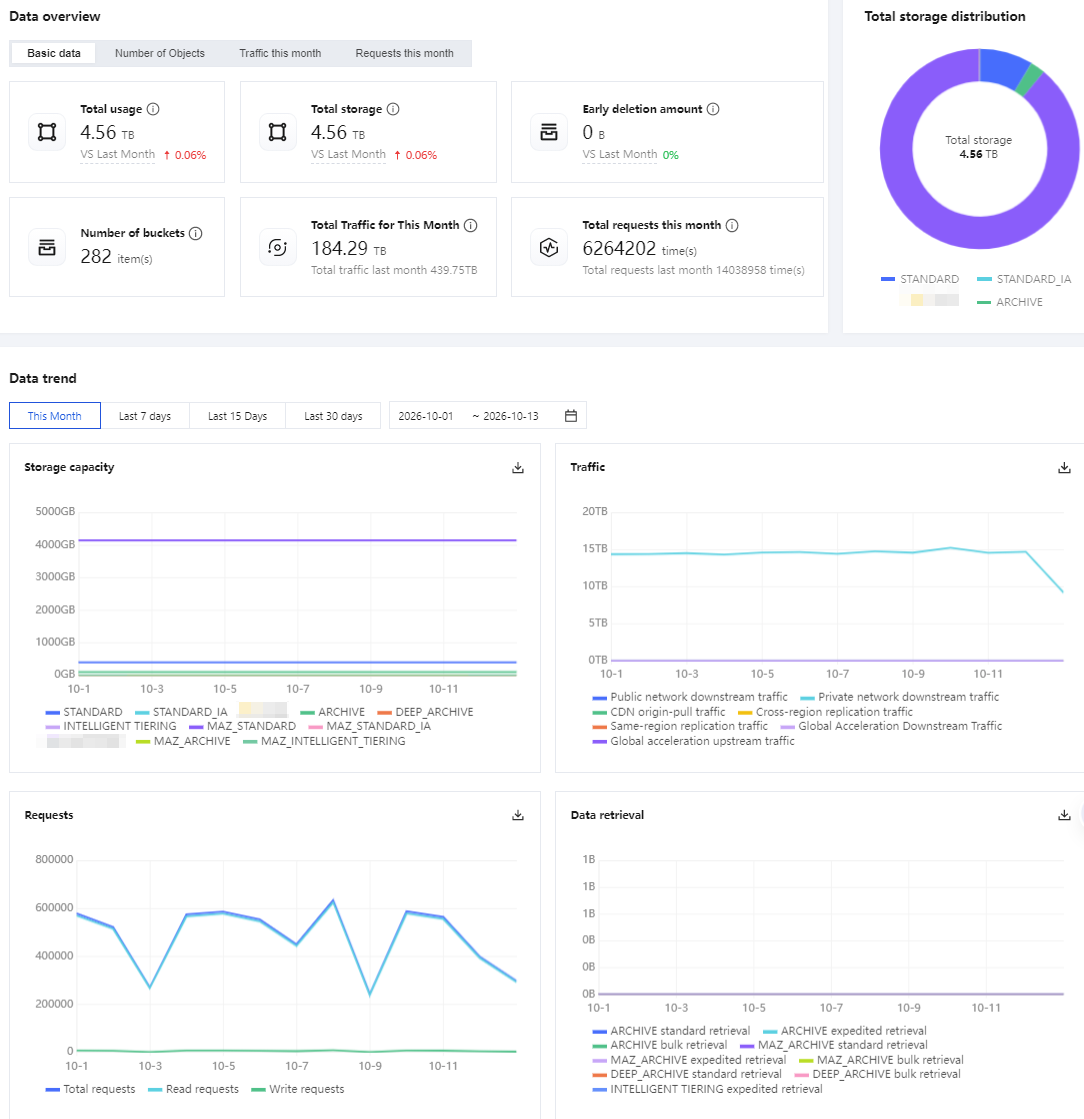
Data Overview
Basic Data:
Total usage: The total usage equals the sum of the total storage and the early deletion amount.
Total storage: The sum of the storage capacity of each storage type and the fragment capacity.
Early deletion amount: When an object is deleted before the minimum storage duration is reached, storage fees are charged for the remaining days. This metric represents the storage capacity of such objects. For more information, see Early Deletion Fees.
Number of buckets: The total number of buckets that have been created.
Total traffic this month: Total traffic = public network downstream traffic + private network downstream traffic + CDN origin-pull traffic + same-region replication traffic + cross-region replication traffic + global acceleration downstream traffic + global acceleration upstream traffic.
Total requests this month: Total requests = read requests + write requests.
Object Quantity: You can view the total number of objects in all created buckets and the number of objects in each storage class.
Traffic This Month: You can view the total traffic, public network downstream traffic, private network downstream traffic, CDN origin-pull traffic, same-region replication traffic, and cross-region replication traffic for the current month.
Requests This Month: You can view the total requests for this month, total requests for last month, read requests for this month, and write requests for this month.
Data Trends
Storage Capacity: You can view the storage capacity of STANDARD, MAZ_STANDARD, STANDARD_IA, MAZ_STANDARD_IA, INTELLIGENT_TIERING, MAZ_INTELLIGENT_TIERING, ARCHIVE, and DEEP_ARCHIVE. You can query the data for the past 90 days, and the time range for each query cannot exceed 31 days.
Traffic: Public/private downstream traffic,CDN origin-pull traffic and Global acceleration downstream traffic for STANDARD, MAZ_STANDARD, STANDARD_IA, MAZ_STANDARD_IA, INTELLIGENT_TIERING, and MAZ_INTELLIGENT_TIERING. You can view the data for the past 90 days, and the time range for each query cannot exceed 31 days.
Note:
Global acceleration downstream traffic is case-insensitive to storage type.
Requests: You can view the total number of requests, read requests, and write requests. You can query the data for the past 90 days, and the time range for each query cannot exceed 31 days.
Data Retrieval: The amount of data retrieved for STANDARD_IA, MAZ_STANDARD_IA, INTELLIGENT_TIERING, MAZ_INTELLIGENT_TIERING, ARCHIVE, and DEEP_ARCHIVE. For ARCHIVE, the amount is classified into expedited retrievals, standard retrievals, and bulk retrievals. You can view the data for the past 90 days, and the time range for each query cannot exceed 31 days.
3. You can click the download button in the upper-right corner of each chart to download the data.
Viewing Bucket-Level Data
Directions
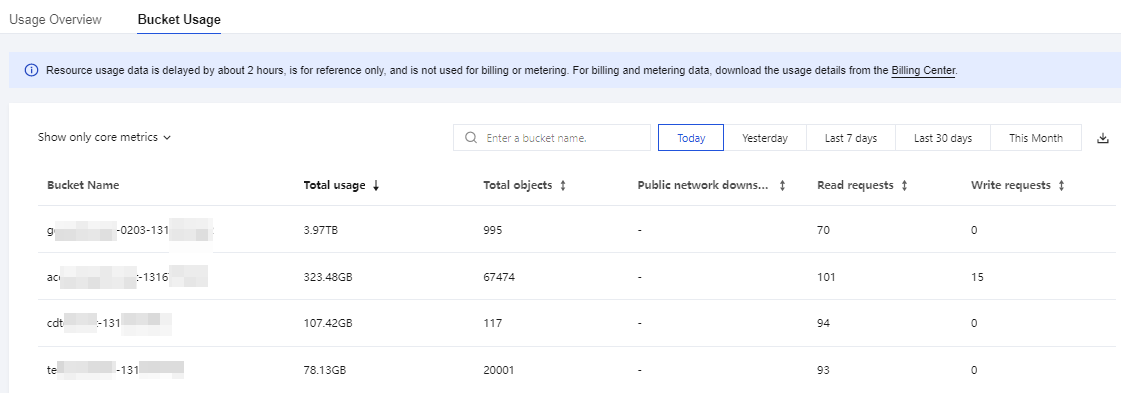
1. Log in to the COS console and click Resource Usage in the left sidebar. On the page, select Bucket Usage.
2. On the Bucket Usage page, you can switch between core metrics and all metrics. You can view all metrics with or without storage type distinction, and view statistics of each bucket for different time ranges, including total usage, total storage, early deletion volume, total number of files, data retrieval volume, traffic, and number of requests.
Bantuan dan Dukungan
Apakah halaman ini membantu?
Anda juga dapat Menghubungi Penjualan atau Mengirimkan Tiket untuk meminta bantuan.
masukan