Cold Data Archiving
Unduh
Mode fokus
Ukuran font
Feature Introduction
During continuous business operations, the volume of historical data such as orders, transactions, logs, and audits keeps growing, while its access frequency decreases significantly over time. This type of cold data occupies local or cloud disk resources over the long term, keeping storage costs high. Scaling out local storage cannot economically meet the requirements for long-term retention.
The TDSQL Boundless team has designed and implemented a cold data archiving feature on the LSM-tree storage engine. Users can offload cold data from local storage to COS by toggling a console switch and executing a simple SQL statement. This reduces data storage costs and matches data with different access patterns to the most suitable storage medium.
Key Strengths
Lower Cost: After cold data is offloaded to COS, which offers a lower unit price, you can significantly reduce the consumption of local high-performance storage, thereby substantially lowering costs.
Transparent Archiving: After you enable cold data archiving, archived tables are transparent to applications and support both read and write operations. Applications can still access cold data archived tables using standard SQL without modifying business code or middleware configurations. Users can specify tables/partitions for archiving to cold storage via DDL statements, and the cold data archiving process is clear and traceable.
Smooth Access: Frequently accessed hot data for read and write operations remains in local high-performance storage, unchanged. When data is written to a cold data archived table, it is first written to a local buffer and then asynchronously uploaded to COS, without affecting write latency. When data is read from a cold data archived table, read requests first attempt to hit the local cache before falling back to COS. In cache miss scenarios, query latency is slightly higher compared to hot data, making this approach more suitable for low-frequency access and data that requires long-term retention.
Higher Capacity: Storing cold data on COS inherently supports the long-term retention of massive data volumes. The capacity ceiling is no longer restricted by the specifications of a single node's local high-performance storage.
Data Reliability: After cold data is stored on COS, COS provides persistence and multi-replica capabilities. This mechanism does not rely on local storage. Therefore, the accessibility and integrity of cold data are not affected by local storage failures.
Supported Versions
Note:
Cold data archiving is an invite-only feature in version V21.6.3.0. Currently, it can be enabled only on a subset of instances that meet the requirements.
Single RG mode is not supported. Instances with a node specification of less than 4C (including 4C 8GB) cannot enable cold data archiving. This feature can be enabled only on instances with a node specification greater than 4C.
Single-replica instances are not supported. This feature can be enabled only on full-functional instances that have multiple replicas or are deployed across multiple AZs.
Serverless instances are not currently supported. This feature can be enabled only on provisioned resource instances with a kernel version of V21.6.3.0 or later.
Local disk instances are not currently supported. This feature can be enabled only on enhanced SSD CBS instances.
Instances with TDE transparent data encryption enabled are not currently supported. This feature can be enabled only on instances without TDE transparent data encryption enabled.
Instances that are part of a DR relationship are not currently supported. This means that neither the primary instance nor the DR read-only instance in a DR relationship can enable the cold data archiving feature. This feature can be enabled only on regular instances.
Instances with Binlog service enabled are not currently supported. Furthermore, the cold data archiving feature and the Binlog service are mutually exclusive; only one of them can be enabled.
Instances with the Read-Only Analysis Engine enabled are not currently supported. Furthermore, the Read-Only Analysis Engine and the cold data archiving feature are mutually exclusive; only one of them can be enabled.
HBase compatibility mode is not currently supported. Only MySQL compatibility mode is supported.
This feature can be enabled only on instances that are in the Running state.
Use Cases
The cold data archiving feature is designed to offload infrequently accessed historical data to COS, thereby reducing long-term storage costs. It is particularly suitable for the following scenarios: historical data archiving (such as orders, transaction records, logs, and audit data that require long-term retention), rolling cold migration for partition tables (where partitions are created daily/weekly/monthly, with recent partitions kept locally and historical partitions gradually migrated to cold storage), hot-and-cold hybrid storage (where hot and cold partitions within the same partition table use different storage tiers), and infrequently queried tables (business tables with long data retention periods, occasional queries, and relatively low requirements for real-time performance). This feature is not suitable for businesses that involve continuous high-frequency random read/write operations or are highly sensitive to query latency.
Note:
Cold data archiving is an invite-only feature in version V21.6.3.0. Currently, it has the following usage restrictions. This feature will be gradually improved. Please stay tuned for updates.
Cold data warming (data recall) is not currently supported. This means that tables or partitions that have been archived to cold storage cannot be migrated back to the original engine.
Automatic identification of cold data and automatic archiving to cold storage are not currently supported.
Backup and recovery are not currently supported. After the COS hot/cold tiering feature is enabled, instance backup and recovery are not supported, and creating disaster recovery instances is also not supported.
Bulk loading data via Bulk Load is not currently supported. Importing data using the LOAD DATA INFILE method is also not supported.
The table creation syntax
CREATE TABLE ... AS SELECT ... FROM ... is not currently supported.Fast Online DDL on cold tables is not currently supported. Only a limited subset of Online DDL operations is supported (specifically, those that go through the thomas write path).
Enabling the KV separation feature is not currently supported. If KV separation is already enabled locally, data cannot be archived to COS.
Enabling the large transaction feature is not currently supported.
Enabling the TDE transparent encryption feature is not currently supported.
Enabling the Binlog service is not currently supported.
Enabling a read-only analysis instance is not currently supported.
Changing the AZ of an instance is not currently supported. Other unsupported operations include adjusting the number of replicas, migration with specification change, and horizontal scale-in (reducing the number of nodes or disk space).
Scheduling tasks such as splitting, merging, or migrating cold RGs are not currently supported.
How It Works
The cold data archiving feature adds a local cold data buffer layer, CacheDB, and a cold data object storage layer, DurableDB, on top of the existing hot data storage (DataDB). All read and write requests are uniformly dispatched by the SQL access layer and then routed to the corresponding storage layer based on the hot/cold attribute of the RG to which the data belongs. The overall architecture is shown in the following diagram.
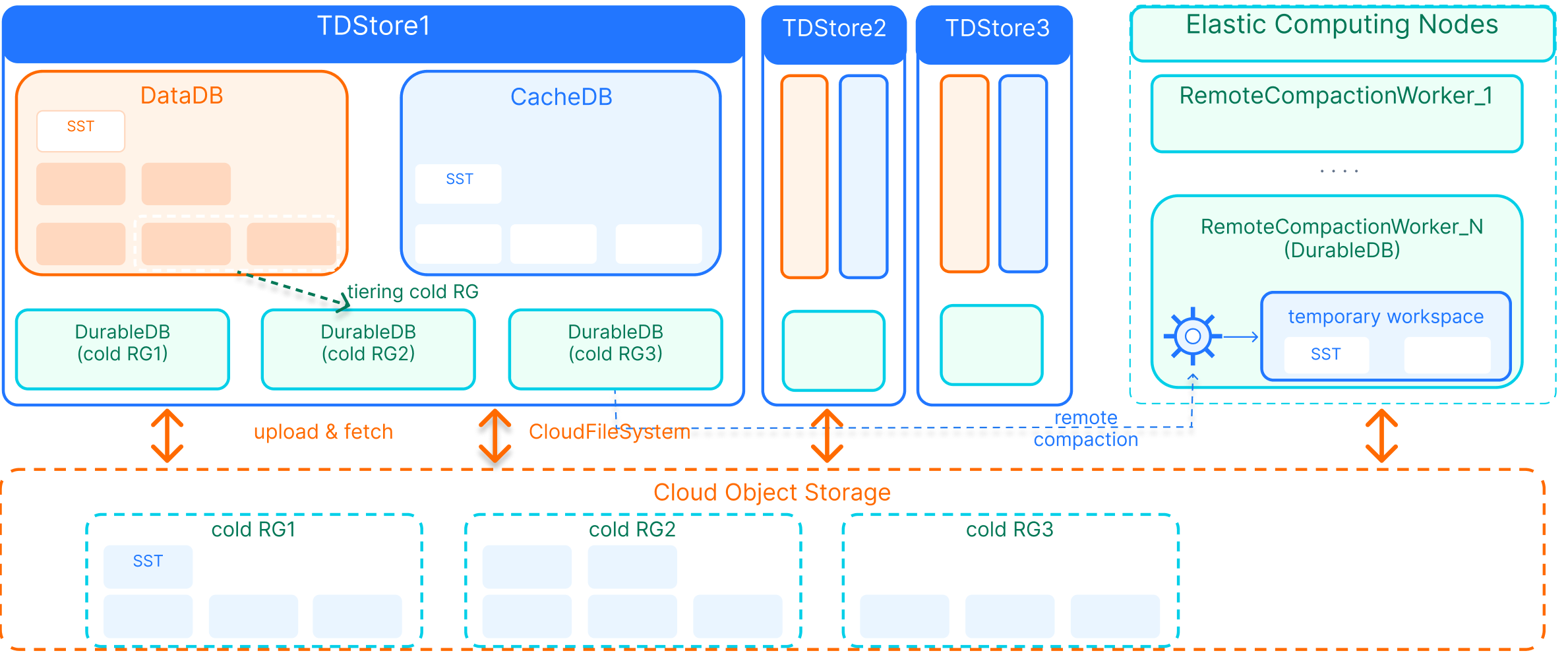
DataDB (Hot): It uses local SSDs or high-performance cloud disks to store data that has not been archived to cold storage. Its read/write performance remains the same as when the cold data archiving feature is not enabled.
CacheDB (Cold Buffer): It is shared by all cold data shards within a node and handles data recently written to cold data archiving tables as well as data being uploaded to COS. Its write path does not directly depend on the remote COS.
DurableDB (Cold Archive): It persists cold data to COS on a per-RG basis and serves as the final destination for cold data.
Local high-performance storage is responsible for delivering read/write experiences with lower latency and higher performance. COS is responsible for providing capacity with lower cost and higher elasticity. Together, they work in synergy to balance performance and cost.
Cold Data Read/Write
Note:
Retrieving cold data from COS introduces network transmission and deserialization overhead, resulting in higher query latency compared to accessing local hot data. Therefore, it is recommended for sporadic queries or offline analysis scenarios.
During the cold migration of an archiving table, new writes are first buffered locally and then asynchronously uploaded to COS. To the application, these writes appear to be synchronous.
Cold data writes follow a "local-first, remote-later" process: Write requests first go to the local buffer layer (CacheDB), are flushed to disk to form SST files, and then are asynchronously batched and uploaded to the object storage layer (DurableDB). Overall, this appears as synchronous writes to the application. SST files that have been successfully uploaded are asynchronously cleared from CacheDB. Cold data reads follow a "query-local-first, query-remote-later" process:
The system merges the views in the order of local buffer layer data (CacheDB) + object storage layer data (DurableDB), returning a complete and up-to-date result to the application. Recently written data is typically found in CacheDB first, while the full historical dataset is stored in DurableDB. When an SST data file needs to be read from DurableDB, it is first pulled to the local node and placed into the local COS file cache to accelerate subsequent accesses.
Data Tiering Process
You can trigger the cold migration for a table or partition by executing
ALTER TABLE ... STORAGE_TIER = OBJECT_STORAGE. The system proceeds in the following order:Phase | Phase | Description |
1 | Validating | Validate the target object, current shard status, and dependent parameters. |
2 | DrainingTransactions | Wait for active transactions on this shard to safely complete. |
3 | Preparing | Prepare the cold migration context and set the shard to the "migrating to cold storage" state. |
4 | ExportingSnapshot | Export snapshot data files from hot data storage. |
5 | Uploading | Upload snapshot data files to COS in batches and refresh the progress in real time. |
6 | Committing | Commit the cold migration result and officially mark the shard as a cold shard. |
7 | Done | Task completed |
During the cold migration of a table, write requests to that table are dual-written to both DataDB and CacheDB to ensure data integrity. If the migration succeeds, the data is already in CacheDB. If the migration fails and the table reverts to hot storage, the data remains in DataDB.
Usage
The cold data archiving feature introduces a new STORAGE_TIER attribute. After you enable the data archiving switch on the console instance details page, you can use the
ALTER TABLE ... STORAGE_TIER = OBJECT_STORAGE statement to migrate a table or partition to cold storage. For more details, see Enabling Cold Data Archiving and Manually Archiving Cold Data.Parameter Description
You can view the operational status of the tiered storage service and COS access on the current node by using
SHOW STATUS:Status Variables | Description |
tdstore_tiered_storage_service_state | Status of the tiered storage service for hot and cold data, returns tdstore_tiered_storage_enabled when the tiered storage service is enabled |
tdstore_tiered_storage_cos_provider_state | Status of COS access, returns enabled and the corresponding configuration summary when the COS access is enabled. |
Query Example:
SHOW STATUS LIKE 'tdstore_tiered_storage_service_state';SHOW STATUS LIKE 'tdstore_tiered_storage_cos_provider_state';
Bantuan dan Dukungan
Apakah halaman ini membantu?
Anda juga dapat Menghubungi Penjualan atau Mengirimkan Tiket untuk meminta bantuan.
masukan