tencent cloud

Cloud Log Service

COS Access Log Analysis

Download
Focus Mode
Font Size
Last updated: 2026-05-27 21:45:23

Overview

Cloud Object Storage (COS) access logs record information about users' access to COS resources, including object upload (PUT), object deletion (DELETE), and object getting (GET). By analyzing access logs, you can perform audit backtracking, such as deleting resource records and collecting statistics on popular resources. This document introduces how to analyze COS access logs.

Prerequisite

COS logs have been collected to Cloud Log Service (CLS). For more information, please see Importing COS Data.
If you have not enabled the feature, you can use the Demo log topic provided for free by CLS to experience it. For detailed steps, see Use Demo Log to Quickly Experience CLS.

Introduction to Access Logs

No.
Field
Description
Example
1
eventVersion
Log version
1.0
2
bucketName
Bucket name
examplebucket-1250000000
3
qcsRegion
Request region
ap-beijing
4
eventTime
Event time (request end time, which is a timestamp in UTC+0 time zone)
2018-12-01T11:02:33Z
5
eventSource
Access domain name
examplebucket-1250000000.cos.ap-guangzhou.myqcloud.com
6
eventName
Event name
UploadPart
7
remoteIp
Source IP
192.168.0.1
8
userSecretKeyId
User access KeyId
AKID********************************
9
reservedField
Reserved field
Displayed as -
10
reqBytesSent
Request bytes
83886080
11
deltaDataSize
Change in storage made by the request (in bytes)
808
12
reqPath
Requested file path
/folder/text.txt
13
reqMethod
Request method
put
14
userAgent
User agent (UA)
cos-go-sdk-v5.2.9
15
resHttpCode
HTTP return code
404
16
resErrorCode
Error code
NoSuchKey
17
resErrorMsg
Error message
The specified key does not exist.
18
resBytesSent
Bytes returned
197
19
resTotalTime
Total time used by the request (in milliseconds, i.e., the time between the last byte of the response and the first byte of the request)
4295
20
logSourceType
Source type of the log
USER (user access requests), CDN (CDN origin-pull requests)
21
storageClass
Storage class
STANDARD, STANDARD_IA, ARCHIVE
22
accountId
Bucket owner ID
100000000001
23
resTurnAroundTime
Time used by the request server (in milliseconds, i.e., the time between the first byte of the response and the last byte of the request)
4295
24
requester
Requester
Root account ID, sub-account ID, or - (anonymous access)
25
requestId
Request ID
NWQ1ZjY4MTBfMjZiMjU4NjRfOWI1N180NDBiYTY=
26
objectSize
Object size, in bytes
808. If you use multipart upload, objectSize will only be displayed when the upload is completed, and will be - during the multipart upload process
27
versionId
Object version ID
Random string
28
targetStorageClass
Destination storage class, recorded for replication requests
STANDARD, STANDARD_IA, ARCHIVE
29
referer
HTTP referer of the request
*.example.com or 111.111.111.1
30
requestUri
Request URI
"GET /fdgfdgsf%20/%E6%B5%AE%E7%82%B9%E6%95%B0 HTTP/1.1"

Preset Dashboard

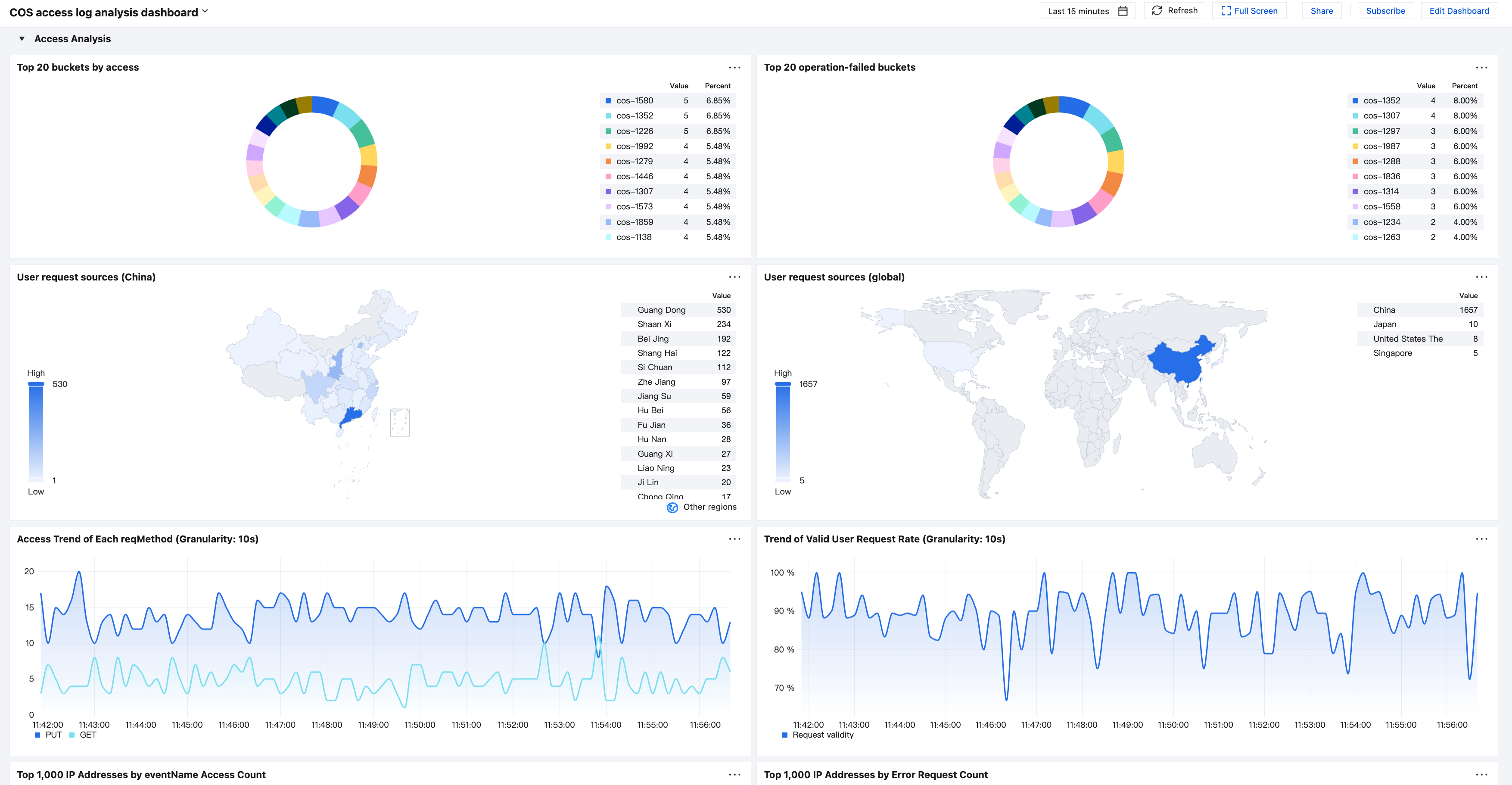
CLS has preset common COS log analysis methods as dashboards. You can quickly understand the current COS request status through this dashboard.
Click Edit Dashboard in the upper right corner of the dashboard to edit based on the preset dashboard.


Examples

Requirement

An object file cannot be accessed, and the cause needs to be located.

Solution

Go to the COS access log search page, and enter the object name as the keyword to search for logs.
json-log2019-05-09_00645d9a-1118-4d69-8411-cfd57ede9ea1_000

According to the time column chart, 14 logs are recorded on the last day. For the drill-down analysis of the 14 log records, click the quick analysis bar on the left to view the resHttpCode information.
According to the quick analysis, there are 6 request log records whose resHttpCode is not 200: resHttpCode is 403 for 5 log records and 204 for 1 log record. Click to search for these logs quickly.


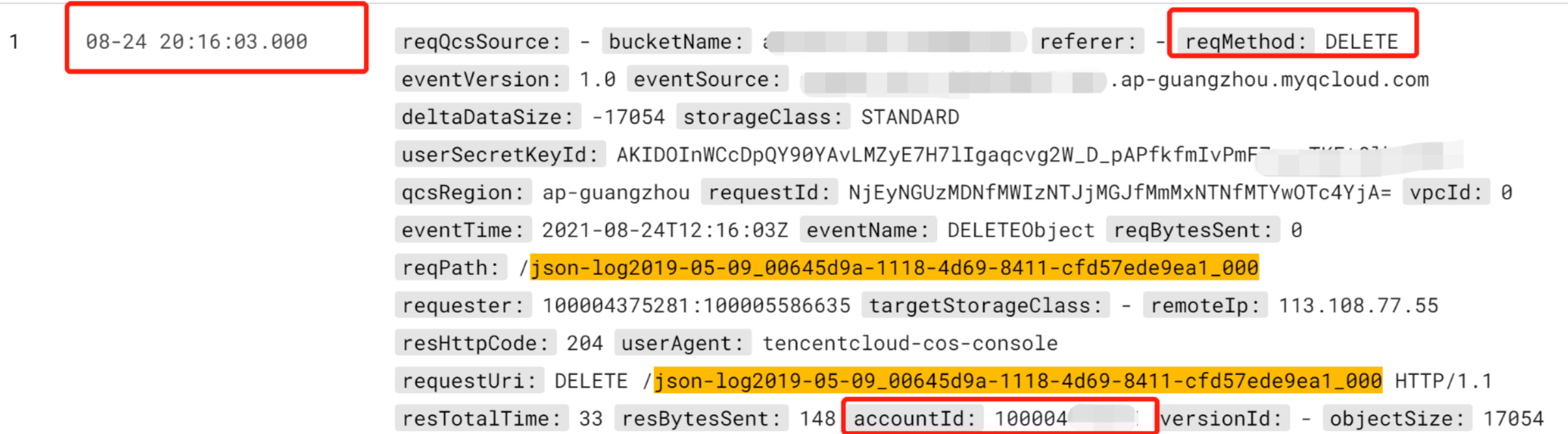
According to the logs, the 5 log records whose error code is Access Denied are object access failure logs. According to the logs whose resHttpCode is 204, object access failed because user 1000****** performed object deletion at around 20:16 on August 24 in the COS console.
Help and Support

Was this page helpful?

Help us improve! Rate your documentation experience in 5 mins.

Feedback