TencentDB Security Group Management
Download
Focus Mode
Font Size
Overview
Security group serves as a stateful virtual firewall with filtering feature for configuring network access control for one or more TencentDB instances. It is an important network security isolation tool provided by Tencent Cloud. Instances with the same network security isolation demands in one region can be put into the same security group, which is a logical group. TencentDB and CVM share the security group list and are matched with each other within the security group based on rules. For specific rules and limitations, see Security Group Overview.
Note:
TencentDB for MySQL security groups currently only support network access control for VPCs and public networks but not the classic network.
As TencentDB doesn't have any active outbound traffic, outbound rules don't apply to it.
Security groups are supported for source, read-only, and disaster recovery TencentDB for MySQL instances.
Configuring a security group for TencentDB
Step 1. Create a security group
1. Log in to the CVM console.
2. Select Security Group on the left sidebar, select a region, and click Create.
3. In the pop-up dialog window, configure the following items, and click OK.
Template: Select a template based on the service to be deployed on the TencentDB instance in the security group, which simplifies the security group rule configuration, as shown in the table below.
Template | Description | Description |
Open all ports | All ports are opened to the public and private networks. This may pose security issues. | - |
Open ports 22, 80, 443, and 3389 and the ICMP protocol | Ports 22, 80, 443, and 3389 and the ICMP protocol are opened to the public network. All ports are opened to the private network. | This template doesn’t take effect for TencentDB. |
Custom | You can create a security group and then add custom rules. For more information, see Add a security group rule. | - |
Name: Custom name of the security group.
Project: Select a project for easier management. By default, DEFAULT PROJECT is selected.
Remarks: A short description of the security group for easier management.
Tag: Configure tags for the security group; by default, there are no tags. You can add tags as needed. For tag details, see Documentation for the Tag Product.
Step 2. Add a security group rule
1. On the Security Group page, click Modify Rule in the Operation column on the row of the security group for which to configure a rule.
2. On the security group rule page, click Inbound Rules > Add Rule.
3. In the pop-up window, set the rule.
Type: Custom is selected by default. You can also choose another system rule template. MySQL(3306) is recommended.
Source or Target: Traffic source (inbound rules) or target (outbound rules). You need to specify one of the following options:
Source or Target | Description |
A single IPv4 address or an IPv4 range | In CIDR notation, such as 203.0.113.0, 203.0.113.0/24 or 0.0.0.0/0, where 0.0.0.0/0 indicates all IPv4 addresses will be matched. |
A single IPv6 address or an IPv6 range | In CIDR notation, such as FF05::B5, FF05:B5::/60, ::/0 or 0::0/0, where ::/0 or 0::0/0 indicates all IPv6 addresses will be matched. |
ID of referenced security group. You can reference the ID of: Current security group Other security group | Current security group indicates the CVM associated with the security group. Other security group indicates the ID of another security group under the same project in the same region. |
- |
Protocol Port: Enter the protocol type and port range or reference a protocol/port or protocol/port group in a parameter template.
Note:
To connect to a TencentDB for MySQL instance, you must open its port. You can log in to the TencentDB for MySQL console, click an instance ID to enter the instance details page.
TencentDB for MySQL uses private network port 3306 by default and supports customizing the port. If the default port is changed, the new port should be opened in the security group.
The TencentDB for MySQL public port is automatically assigned by the system and cannot be customized. After the public network access is enabled, it will be controlled by the ACL of the security group. When configuring the security policy, you need to open the private port 3306.
The security group rules displayed on the Security Group page in the TencentDB for MySQL console take effect for private and public (if enabled) network addresses of the TencentDB for MySQL instance.
Policy: Allow or Reject. Allow is selected by default.
Allow: Traffic to this port is allowed.
Reject: Data packets will be discarded without any response.
Remarks: A short description of the rule for easier management.
4. Click Complete.
Use case
Scenario: You have created a TencentDB for MySQL instance and want to access it from a CVM instance.
Solution: When adding security group rules, select MySQL(3306) in Type to open port 3306.
You can also set Source to all or specific IPs (IP ranges) as needed to allow them to access TencentDB for MySQL from a CVM instance.
| Inbound or Outbound | Type | Source | Protocol and Port | Policy |
| Inbound | MySQL(3306) | All IPs: 0.0.0.0/0
Specific IPs: Specify IPs or IP ranges | TCP:3306 | Allow |
Step 3. Configure a security group
A security group is an instance-level firewall provided by Tencent Cloud for controlling inbound traffic of TencentDB. You can associate a security group with an instance when purchasing it or later in the console.
Note:
Currently, security groups can be configured only for TencentDB for MySQL instances in VPC.
1. Log in to the TencentDB for MySQL console, click an Instance ID in the instance list, and enter the instance management page.
2. On the Security Group tab, click Configure Security Group.
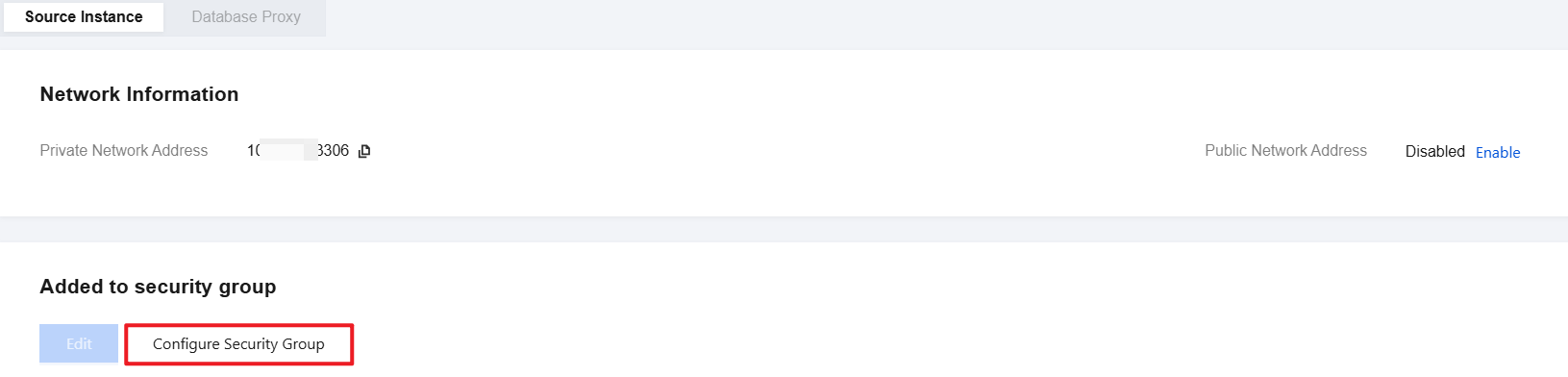
3. In the pop-up dialog box, select the security group to be bound and click OK.
Importing security group rules
1. On the Security Group page, click the ID/name of the target security group.
2. On the inbound rule or outbound rule tab, click Import Rule.
3. In the pop-up window, select an edited inbound/outbound rule template file and click Import.
Note:
As existing rules will be overwritten after importing, we recommend that you export the existing rules before importing new ones.
Cloning a security group
1. On the Security Group page, locate the target security group and click More > Clone in the Operation column.
2. In the pop-up window, select the target region and project and click OK. If the new security group needs to be associated with a CVM instance, do so by managing the CVM instances in the security group.
Deleting a security group
1. On the Security Group page, locate the security group to be deleted and click More > Delete in the Operation column.
2. In the pop-up window, click OK. If the current security group is associated with a CVM instance, it must be disassociated first before being deleted.
Help and Support
Was this page helpful?
You can also Contact sales or Submit a Ticket for help.
Help us improve! Rate your documentation experience in 5 mins.
Feedback