Tencent Cloud allows you to export created custom images to COS buckets.
Precautions
You have activated the COS service in the COS console.
You have created a bucket in the region where the custom image to export resides. For more information, see Creating Bucket.
Note
You cannot export commercial images such as Windows images.
For a custom image, the capacity of a system disk or data disk cannot be greater than 500 GB.
When the image of an entire CVM instance is exported, the CVM instance cannot contain more than 5 data disks.
Billing Description
If you use other services such as COS when using CVM, fees will be calculated according to the billing rules of the actually used services.
The fees are as described below:
Use Case
Billing
Document
Exporting an image to a COS bucket
Storage usage fees. Storing an image in a COS bucket will incur storage usage fees. COS will calculate the object size and charge fees based on the storage type and region of the target object.
Request fees. Exporting an image to a COS bucket will incur write request fees. COS will calculate the number of write requests and charge fees accordingly.
Traffic fees. Exporting an image to a COS bucket will generate upstream traffic. COS will calculate the traffic volume. Private network upstream traffic and public network upstream traffic are free of charge.
Request fees. Downloading an image from a COS bucket will incur write request fees. COS will calculate the number of write requests and charge fees accordingly.
Traffic fees. Downloading an image from a COS bucket will generate downstream traffic. COS will calculate the traffic volume. Private network downstream traffic is free of charge, while public network downstream traffic is not.
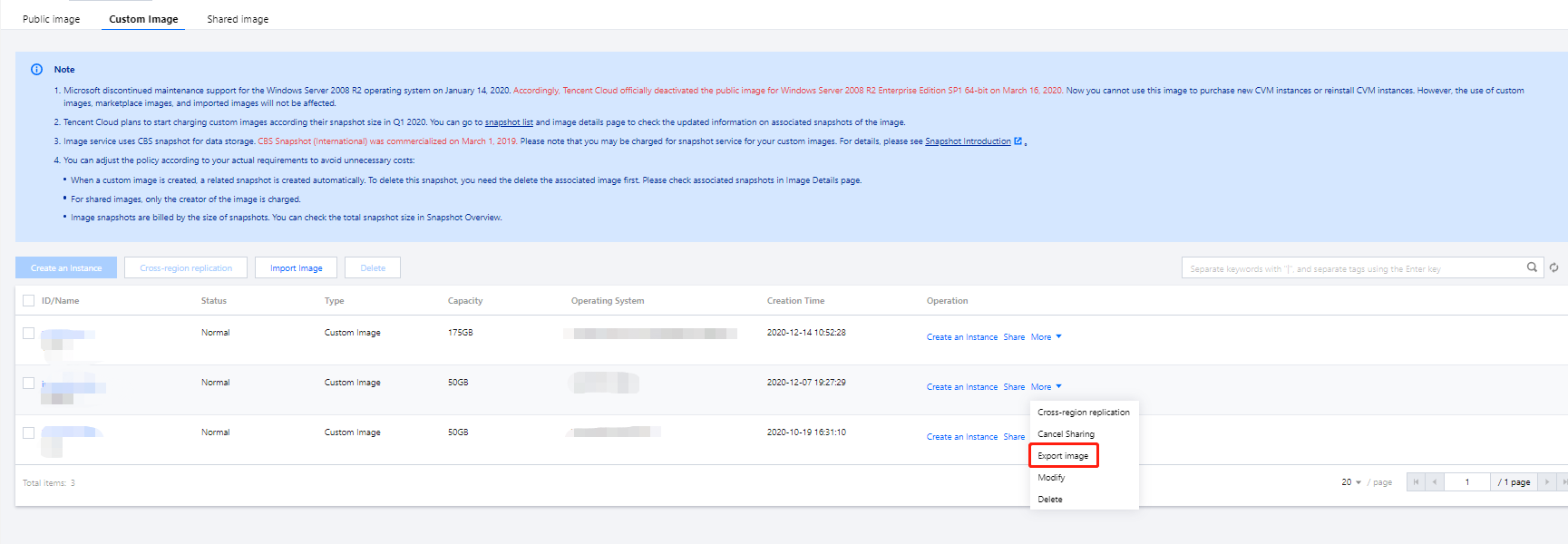
1. Log in to the CVM console and click Images in the left sidebar.
2. In the upper part of the Images page, select the region where the custom image to export resides and click the Custom Image tab.
3. Locate the image to export and choose More > Export Image.
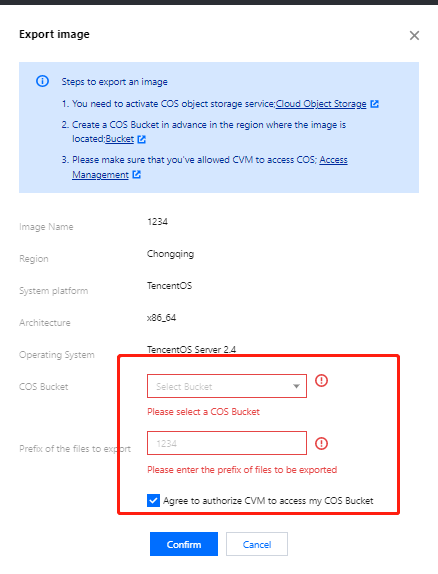
4. In the pop-up Export Image window, set parameters as follows:
COS Bucket: Select the bucket where the image to export resides. Make sure that the bucket is in the same region as the image to export.
Export File Prefix: Customize the prefix of the file to export.
Select to agree to authorize CVM to access my COS bucket.
5. Click OK to start exporting the image.
6. In the pop-up window, click OK.
The export duration depends on the size of the image file and the length of the export task queue. After the export task is completed, the image file will be stored in the destination bucket. You can go to the Bucket List page and click the ID of the destination bucket to go to the bucket details page. On the bucket details page, the image file just exported is displayed as Custom prefix_xvda.raw.
FAQs
1. How is the public network downstream traffic in COS generated and billed?
Public network downstream traffic is the traffic generated by data transfer from COS to the client over the internet. Traffic generated by downloading an object directly through an object link or by browsing an object at a static website endpoint is public network downstream traffic. For more information about the billing details, see Billable Items and Pricing | Cloud Object Storage.
2. Will I be charged for public network downstream traffic generated by downloading files through the COS console, tools, API, or SDK?
The traffic (private or public network traffic) generated by accessing COS is subject to the use case, and only access to COS from a Tencent Cloud product in the same region will be over the private network by default, with no public network downstream traffic fees incurred. For more information on how to identify private network access, see Overview > Private network access.
3. What is public network traffic in COS?
Public network downstream traffic is the traffic generated by data transfer from COS to the client over the internet. Downloading a file stored in COS in the COS console, accessing or downloading an object through a tool, object address, or custom domain name, and previewing an object in a browser will generate public network downstream traffic. For more information, see Overview > Private network access.
4. Will accessing COS over the private network incur fees?
Accessing COS over the private network will incur storage usage fees and request fees but not traffic fees. For more information about the billing details, see Billable Items.