This document describes how to troubleshoot instance login failures after you purchase Cloud Virtual Machine (CVM) instances, helping you locate and resolve CVM login failures.
This document describes how to determine possible causes of instance login failures after you purchase Cloud Virtual Machine (CVM) instances, helping you locate and resolve CVM login failures.
Possible Causes
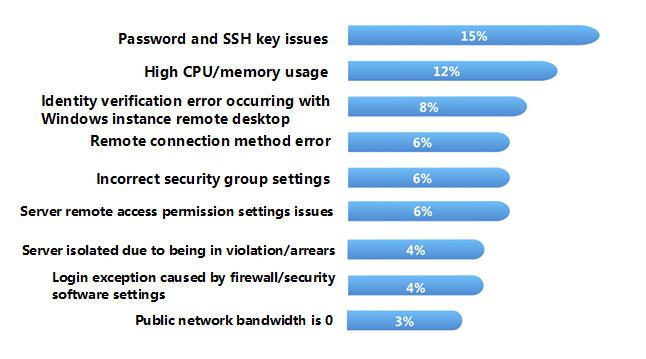
The following figure shows the primary causes of CVM instance login failures and their probabilities. If you cannot connect to an instance, we recommended you use the diagnosis tool and perform troubleshooting as instructed below.
Troubleshooting
Confirming the instance type
You must first determine whether your purchased instance is a Windows system instance or Linux system instance. The causes of login failures vary by instance types. According to your purchased instance type, refer to the following documentation to locate and resolve the issue.
Tencent Cloud provides Port Verification to help you determine possible causes of login failures. More than 70% of login issues can be checked and located by this tool.
Self-Diagnosis Tool
Problems that can be diagnosed include high bandwidth usage rate, zero public network bandwidth, high server workload, improper security group rules, DDoS attack blocking, security isolation, and account in arrears.
Port Verification Tool
This tool can diagnose security group- and port-related problems. If there is a security group configuration issue, you can use Open All Ports function of the tool to open all commonly used interfaces of the security group.
If you locate the cause of the issue using the tool, we recommend you follow the corresponding issue guidelines to resolve it.
Restarting Instance
After the diagnosis tool has located and managed the corresponding issue, or it is still not possible to locate the cause of the login failure using the diagnosis tool, you can restart the instance and connect remotely again to see whether the connection succeeds.
For information about how to restart an instance, see Restart Instance.
Other common causes of login failures
If you cannot locate the cause of the issue following the above-mentioned steps, or you receive the following error messages when logging in to the CVM, refer to the following solutions.