Configuration Directions and Notes on CC Protection Policies
다운로드
포커스 모드
폰트 크기
마지막 업데이트 시간: 2024-07-01 11:38:27
Anti-DDoS Advanced provides CC attack protection. The protection policy features protection level, cleansing threshold, precise protection, CC frequency limit, and so on. After connecting your business, you can configure CC attack protection policy as instructed in this document to use Anti-DDoS Advanced to safeguard your business.
Directions
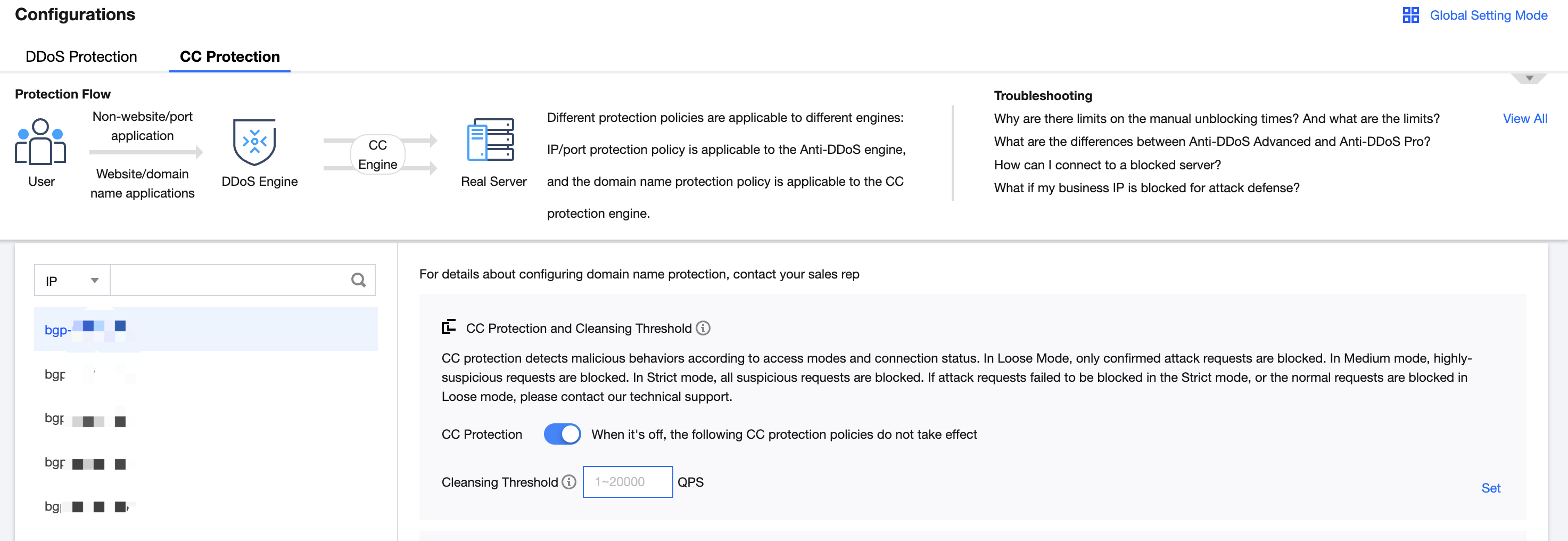
1. Log in to the new Anti-DDoS console, and click CC Protection on the left sidebar.
2. Select a domain name from the left list, such as 212.64.xx.xx bgpip-000002je > http:80 > www.xxx.com".
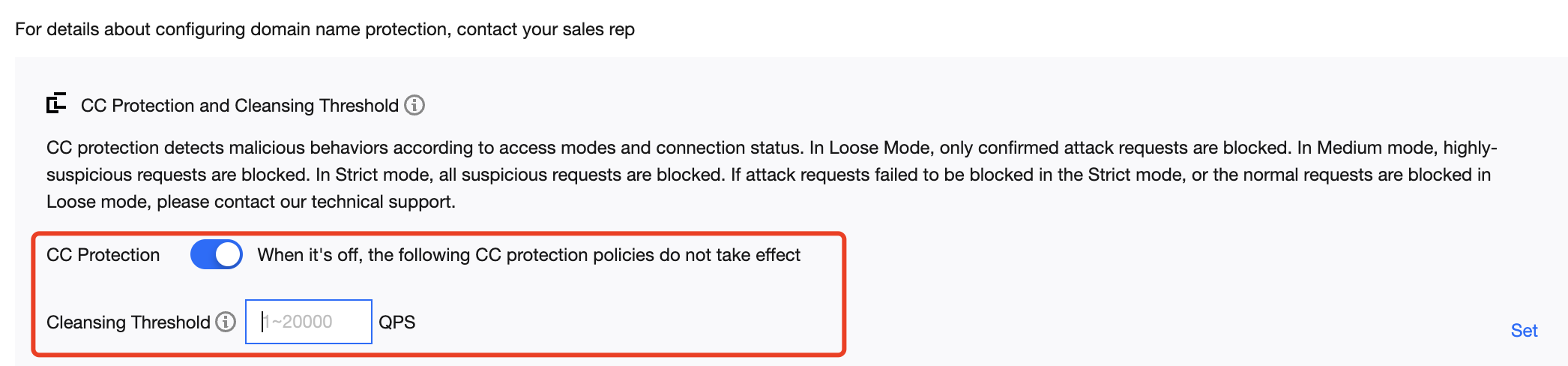
3. In the CC Protection and Cleansing Threshold section, toggle on the
switch and set a cleansing threshold.
Note:
The CC protection will be enabled once you set a cleansing threshold. A value that is 1.5 times your common business peak is recommended.
The cleansing feature will remain disabled if no threshold value is set, and the protection level, precise protection, and CC frequency limit you configured in the console will not be in effect even when your business is under CC attacks. For more information, see CC Protection and Cleansing Threshold.
4. Configure the precise protection policy.
When your business is under attack, we recommend deriving the attack characteristics from the specific attack request information obtained through packet capture, middleware access logs, and other protection devices to configure your precise protection policy based on your business.
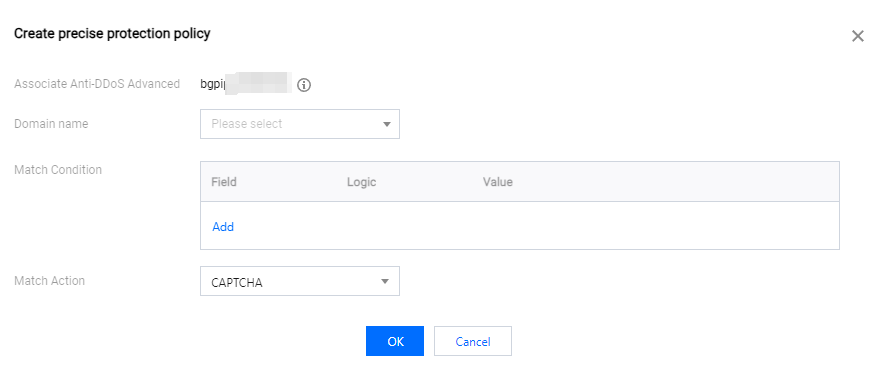
You can enable precise protection to configure protection policies combining multiple conditions of common HTTP fields, such as uri, ua, cookie, referer, and accept to screen access requests. For the requests that match the conditions, you can configure CAPTCHA to verify requesters or a policy to automatically discard the packets.
4.1 Click Set in the Precise Protection section to enter the precise protection rule list.
4.2 Click Create. In the pop-up window, enter the required fields, and click OK. For more information, see Precise Protection.
Note:
If a policy involves multiple HTTP fields, the policy can be matched if all conditions are met.
Anti-DDoS Advanced supports configuring precise protection for HTTPS businesses.
Field
Description
uri
The URI of an access request.
ua
The identifier and other information of the client browser that initiates an access request.
cookie
The cookie information in an access request.
referer
The source website of an access request, from which the access request is redirected.
accept
The data type to be received by the client that initiates the access request.
Match Action
Discard: Discards packets without verifying the requester.
CAPTCHA: Verifies the requester through algorithms.
5. Set the CC frequency limit.
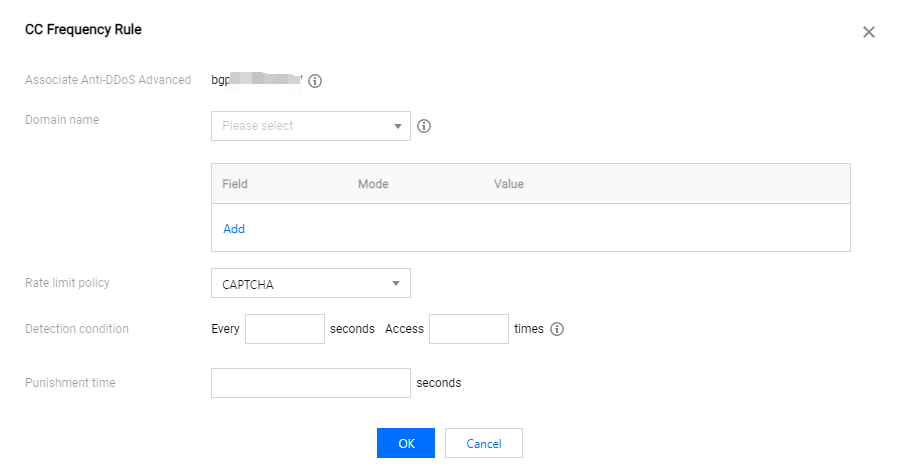
Anti-DDoS Advanced supports configuring CC frequency policy for connected web businesses to restrict the access frequency of source IPs. You can customize a frequency policy to apply CAPTCHA and discard on source IPs if any IP accesses a certain page too frequently in a short time.
5.1 Click Set in the CC Frequency Limit section enter the frequency limit rule list.
5.2 Click Add Rule. In the pop-up window, enter the required fields, and click OK. For detailed configurations, see CC Frequency Limit.
Note:
When configuring a CC frequency limit policy regarding the URI, you need to configure a frequency limit on the directory / first and the match mode must be Equal to. Then you can configure the URI access frequency limit on other directories.
If a source IP accesses the / directory of the domain name for more than the set number of times in the set period, the set action (CAPTCHA or Discard) will be triggered.
If a frequency limit policy is configured for the / directory of a domain name, the detection time of the domain name's other directories must be the same.
If the request URI contains any unfixed string, you can set the match mode to Include, so that URIs with the set prefix will be matched.
Field
Description
Cookie
The cookie information in an access request.
User-Agent
The identifier and other information of the client browser that initiates an access request.
Uri
The URI of an access request.
Rate limit policy
Discard: Discards packets without verifying the requester.
CAPTCHA: Verifies the requester through algorithms.
Detection condition
Set the access frequency based on your business, for which a value 2 to 3 times the common number of access requests is recommended. For example, if your website is accessed averagely 20 times per minute, you can configure the value to 40 to 60 times per minute or adjust it according to the attack severity.