Creating a User
Overview
Bastion Host provides a unified user management feature. Below is a detailed instruction on how to create users in the BH system.
Directions
1. Log in to the BH console.
2. In the left sidebar, choose User Mgmt > User.
3. On the User page, click Create user, and configure the following user information:
Note
Fields marked with * are required.
If you require LDAP authentication, Contact Us to enable the feature.
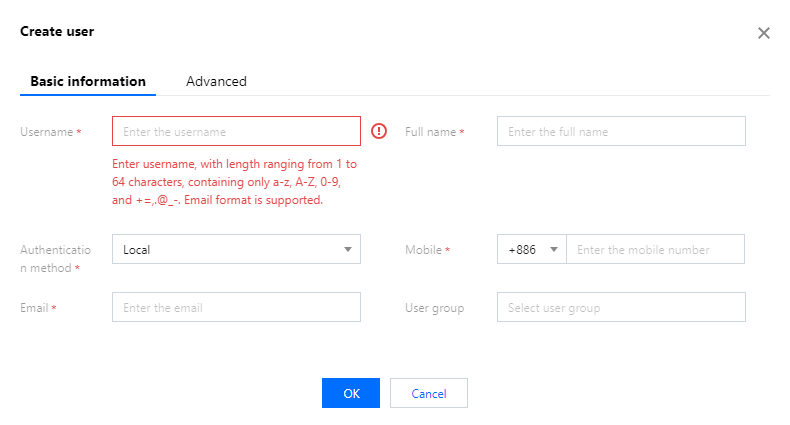
Parameter Name | Description |
Username | Enter the username. |
Full name | Enter the user's name. |
Authentication method | Select the user's authentication method, such as Local or LDAP. |
Mobile | Enter the user's mobile phone number, which will be used for login. |
Email | Enter the user's email address. |
User group | Select the user group the user belongs to. |
Department | Select the department the user belongs to. |
4. To restrict the user's validity period and access time, click Advanced Options.
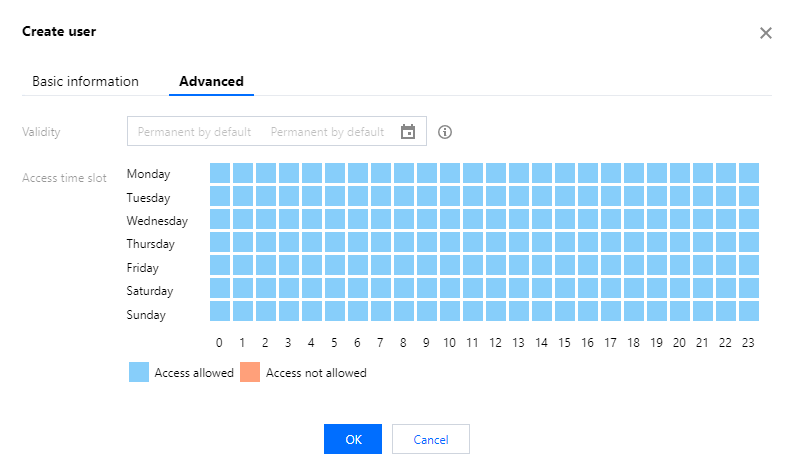
Parameter Name | Description |
Validity | Set the validity period for the user. |
Access time slot | Set the time during which the user is allowed to access the BH and assets (measured in hours). |
5. After configuring the user information, click OK to create the user.
Help and Support
Was this page helpful?
You can also Contact sales or Submit a Ticket for help.
Help us improve! Rate your documentation experience in 5 mins.
Feedback