tencent cloud

Tencent Cloud EdgeOne

Release Notes and Announcements
Release Notes
Security Announcement
Announcements
Product Introduction
Overview
Strengths
Use Cases
Comparison Between EdgeOne and CDN Products
Use Limits
Purchase Guide
Description of Trial Plan Experience Benefits
Free Plan Guide
Billing Overview
Billing Items
Subscriptions
Renewals
Instructions for overdue and refunds
Comparison of EdgeOne Plans
About "clean traffic" billing instructions
DDoS Protection Capacity Description
Getting Started
Choose business scenario
Quick access to website security acceleration
Quick deploying a website with Pages
Domain Service&Origin Configuration
Domain Service
HTTPS Certificate
Origin Configuration
Site Acceleration
Overview
Access Control
Smart Acceleration
Cache Configuration
File Optimization
Network Optimization
URL Rewrite
Modifying Header
Modify the response content
Rule Engine
Image&Video Processing
Speed limit for single connection download
DDoS & Web Protection
Overview
DDoS Protection
Web Protection
Bot Management
API Discovery(Beta)
Edge Functions
Overview
Getting Started
Operation Guide
Runtime APIs
Sample Functions
Best Practices
Pages
L4 Proxy
Overview
Creating an L4 Proxy Instance
Modifying an L4 Proxy Instance
Disabling or Deleting an L4 Proxy Instance
Batch Configuring Forwarding Rules
Obtaining Real Client IPs
Data Analysis&Log Service
Log Service
Data Analysis
Alarm Service
Site and Billing Management
Billing Management
Site Management
Version Management
General Policy
General Reference
Configuration Syntax
Request and Response Actions
Country/region and Corresponding Codes
Terraform
Overview
Installing and Configuring Terraform
Practical Tutorial
EdgeOne Skill User Guide
Automatic Warm-up/Cache Purge
Resource Abuse/hotlinking Protection Practical
HTTPS Related Practices
Acceleration Optimization
Scheduling Traffic
Data Analysis and Alerting
Log Platform Integration Practices
Configuring Origin Servers for Cloud Object Storage (Such As COS)
CORS Response Configuration
API Documentation
History
Introduction
API Category
Making API Requests
Site APIs
Acceleration Domain Management APIs
Site Acceleration Configuration APIs
Edge Function APIs
Alias Domain APIs
Security Configuration APIs
Layer 4 Application Proxy APIs
Content Management APIs
Data Analysis APIs
Log Service APIs
Billing APIs
Certificate APIs
Origin Protection APIs
Load Balancing APIs
Diagnostic Tool APIs
Custom Response Page APIs
API Security APIs
DNS Record APIs
Content Identifier APIs
Legacy APIs
Ownership APIs
Image and Video Processing APIs
Multi-Channel Security Gateway APIs
Version Management APIs
Data Types
Error Codes
FAQs
Product Features FAQs
DNS Record FAQs
Domain Configuration FAQs
Site Acceleration FAQs
Data and Log FAQs
Security Protection-related Queries
Origin Configuration FAQs
Troubleshooting
Reference for Abnormal Status Codes
Troubleshooting Guide for EdgeOne 4XX/5XX Status Codes
520/524 Status Code Troubleshooting Guide
521/522 Status Code Troubleshooting Guide
Tool Guide
Agreements
Service Level Agreement
Origin Protection Enablement Conditions of Use
TEO Policy
Privacy Policy
Data Processing And Security Agreement
Contact Us
Glossary

How to improve the Cache Hit Rate of EdgeOne

PDF
Focus Mode
Font Size
Last updated: 2025-11-18 14:57:18
This article introduces how to reasonably use various configurations on EdgeOne, combined with your actual business scenarios for tuning, and improve the cache hit rate of files within the site.

Background introduction

When your site is connected to EdgeOne and acceleration is enabled, when users access static resources such as images and videos, EdgeOne will cache the corresponding static files in the edge nodes. When other users initiate repeated requests, the edge nodes will directly respond to the requests, avoiding origin-pull requests.

If the cache hit rate is too low, it will cause a large number of user requests to go back to the origin, which will bring a lot of processing pressure to the origin site, reduce the user's access experience, and the site acceleration effect. You can optimize and improve the cache hit rate through the following configuration tuning.
Note:
If you need to view the current cache hit analysis, you can view it on the EdgeOne console through Data Analysis > Origin Offload Rate. For details, please refer to Analytics.

Optimization methods

1. Adjust the node cache TTL configuration

The configuration of the node cache TTL will directly affect whether EdgeOne caches the specified file resources and the corresponding cache time. If the file caching strategy is not cached or the cache time on the node is short, it will cause users to access without hitting the cache, frequently going back to the origin, and reducing the access experience.
By default, EdgeOne has enabled default caching rules for global sites. You can view the EdgeOne content caching rules to understand how EdgeOne's caching rules take effect. In order to improve the cache hit rate, it is recommended that you configure caching rules separately in the rule engine based on file extensions.

Suggested configuration

It is recommended that you configure personalized caching rules for different file types in different scenarios:
1. Files that are not updated frequently, such as download resources, video files, etc., it is recommended to configure a custom cache time on EdgeOne, with a cache time of 30 days or longer, and force caching through EdgeOne nodes; common download resources and video file formats are as follows:
Audio and video
mp4;mp3;ts;m4a;avi;m4s;ogg;mkv;mov;flv;rm;rmvb;swf;wav;wmv;rmi;aac
Compressed package
rar;7z;zip;gzip;dmg;gz;ios;tar;jar;br;bz2
Document
doc;docx;xls;xlsx;pdf;ppt;pptx
Application
apk;exe;bin
Others
vsv;iso;jar;swf;chunk;atlas
2. Frequently updated file content, such as image content, if the cache time is too long, it may cause users to access expired content due to cache hits. Therefore, it is recommended to configure a custom cache time on EdgeOne, with a general cache time configured according to business needs, which can be set between 1-7 days. Common image content formats are as follows:
Images
jpg;png;jpeg;webp;gif;heif;heic;kpg;ico
Web pages
html;htm;shtml;hml;js
3. Dynamic files, such as php, json files, etc., if cached, will cause users to access content that cannot be correctly responded to. Therefore, it is recommended to configure them separately on EdgeOne as not cached. Common dynamic file formats are as follows:
Dynamic resources
php;aspx;asp;jsp;do;dwr;cgi;fcgi;action;ashx;axd;json

Optimization example

When you view the resource hit rate in the cache analysis, you can view the specific file extensions on the right to see which types of resources have a large number of misses. For example, in the current cache distribution, there are many .mp4 format files that have not hit the cache.
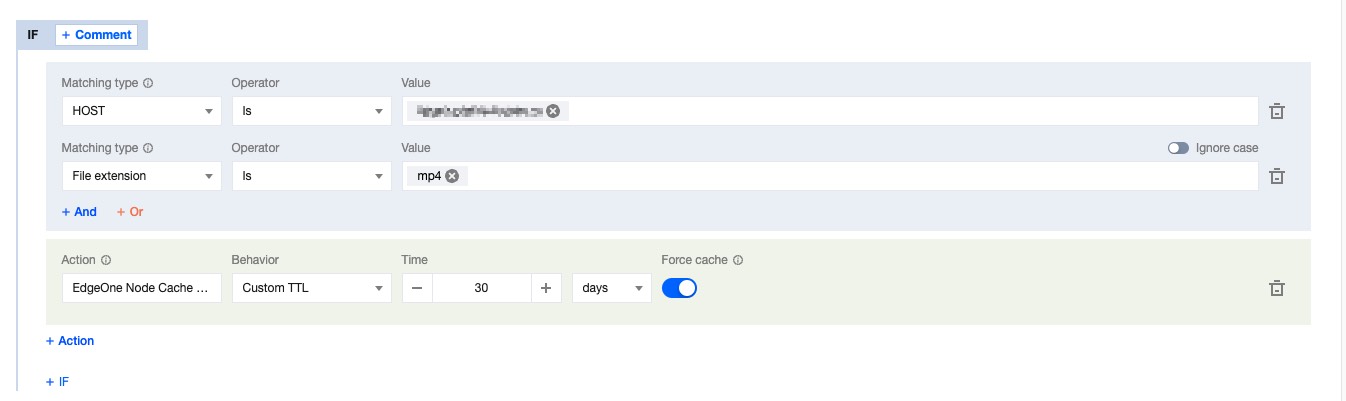
If you follow EdgeOne's default caching rules completely, the problem is that the response file failed to respond to the Cache-Control header. According to the default caching rules, the .mp4 file has a cache time of 2 hours on the node. Because the cache time is short, this file will frequently go back to the origin. If you need to cache this file, you can go to the rule engine, add a new rule, set the node cache TTL to custom cache for 30 days when the file extension is equal to mp4, and enable forced caching, that is, ignoring the CC header of the origin response, and the node forcibly caches the file. For detailed operation steps, please refer to: Node cache TTL.


2. Customize the cache key Cache Key to point the same type of request to a cache file

By default, EdgeOne will generate a unique identifier for the cache key based on the user's access Request URL and query string, which serves as the cache key for the file. When there are the same requests, the edge node will compare whether the request is consistent with the cache key in the cache to determine whether the cache is hit. If the URL carries dynamic parameter content that does not affect the file version, such as user identification ID, multiple caches will be established based on the different parameters, resulting in a decrease in cache hit rate. You can optimize this by customizing the cache key Cache Key.

Suggested configuration

When some parameters in the request URL do not affect the file version, it is recommended to improve the cache hit rate by retaining or ignoring the specified parameter content.

Optimization example

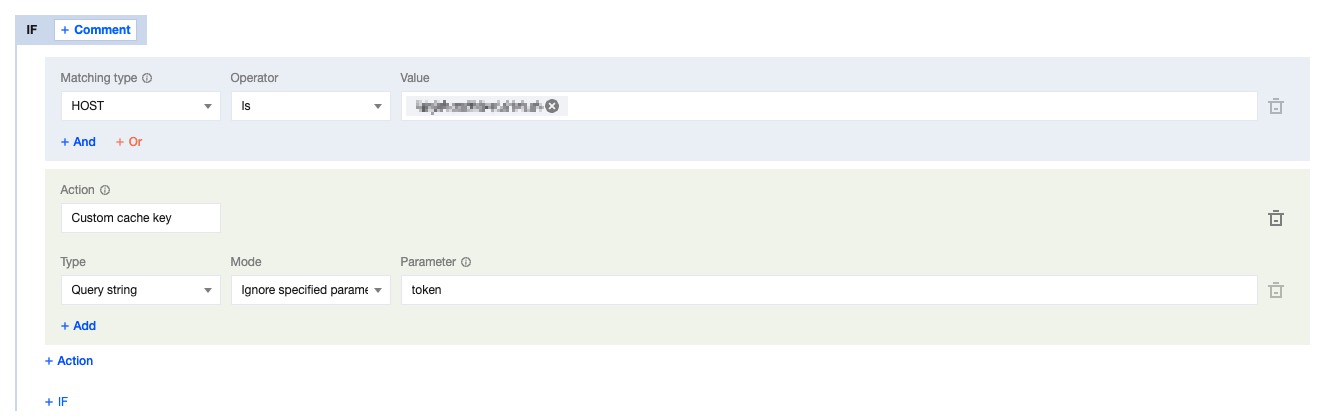
The current request URL is: https://image.example.com/test.jpg?version=1.1&token=1234567890, where the parameter version=1.1 will affect the content of the image, and token=1234567890 will not affect it. To improve the hit rate of the cache, you can ignore the token parameter in the custom Cache Key. For detailed operations, please refer to: Custom Cache Key.


3. URL Pre-Warming

URL Pre-Warming allows EdgeOne to cache files to edge nodes in advance. When users access the files, they can directly hit the cache, reducing the concurrent follow origin for the first time and improving the cache hit rate. When you add a new site to EdgeOne or release new popular resources, it is suggested to pre-warm the cache in advance. For detailed operations, please refer to: URL Pre-Warming.

4. Enable Cache Pre-Refresh

If your files are mainly popular files, and you need to ensure that the files can continuously have cache in the node, you can enable cache pre-refresh. Before the cache of the file in the node expires, when a user requests a file in the node, it will verify with the origin whether the file has been updated. If not, the cache time of the file in the node will be refreshed. For detailed operations, please refer to: Cache Pre-Refresh.

5. Make Reasonable Use of Vary Mechanism

When the origin responds with a Vary header, the CDN will cache the content based on the specified content in the Vary header. For a detailed explanation of the Vary principle, please see the Vary feature. If the current file does not need to be controlled by the Vary header to cache different versions, it is suggested that you avoid responding to this header in the origin response to reduce the number of cache versions created and improve the cache hit rate.


Learn more


Help and Support

Was this page helpful?

Help us improve! Rate your documentation experience in 5 mins.

Feedback