tencent cloud

Real User Monitoring

Product Introduction
Overview
Features
Use Cases
Purchase Guide
Billing Overview
Purchase Methods
Payment Overdue
Getting Started
Operation Guide
Application Connection
Data Overview
Page Performance
Performance Data Analysis
Exception Analysis
Page View
API Monitoring
Static Resource
Custom Speed Test
Custom Event
Application Management
Access Management
Alarm Policy
Connection Guide
Web Use Cases
Mini Program Use Cases
API Documentation
History
Introduction
API Category
Making API Requests
Console APIs
Business System and Project Information APIs
Page Performance APIs
Custom Speed Test APIs
Custom Event APIs
Monitoring APIs
Exception Analysis APIs
Page Visit APIs
Static Resource Monitoring APIs
Log APIs
Page Performance APIs
Data Types
Error Codes
FAQs
Product
Troubleshooting
Usage
Service Protocol
Privacy Policy
Data Processing And Security Agreement
RUM Service Level Agreement
Terminal Performance Monitoring Privacy Policy
Terminal Performance Monitoring Data Processing And Security Agreement

Business System

PDF
Focus Mode
Font Size
Last updated: 2024-01-22 19:25:42
This document describes how to use the business system feature. You can use business systems to manage your connected applications by group.

Directions

Creating business system

1. Log in to the RUM console.
2. On the left sidebar, click Application Management > Business System.
3. On the business system page, click Create Business System.
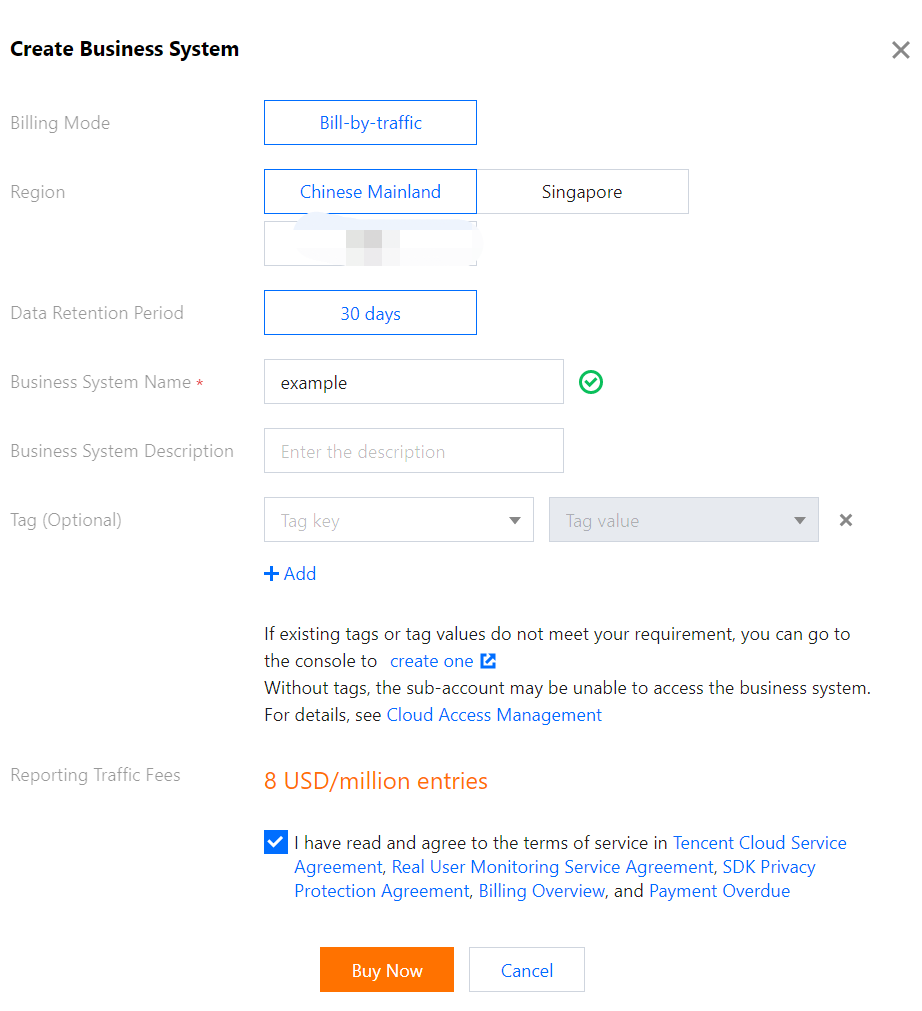
4. In the pop-up window, enter the business name and indicate your consent to the agreement.


Editing business system

You can click Edit in the Operation column to edit the business system name and description.

Tag

A tag is used to manage and control whether a sub-account user can access a business system connected to RUM. For detailed directions, see Resource Tag.
Help and Support

Was this page helpful?

Help us improve! Rate your documentation experience in 5 mins.

Feedback