tencent cloud
Ofertas mais recentes
Produtos
Soluções
Preços
Parceiros
Marketplace
Explore Mais
Prev
Next
Tag
Product Introduction
Overview
Features
Scenarios
Use Limits
Resource Types Supporting Tag APIs
Purchase Guide
Getting Started
Creating Tags and Binding Resources
Querying Resources by Tag
Operation Guide
Creating Tags
Tagging Resources
Unbinding Tags
Unbinding or Modifying Tags in Batches
Deleting Tags
Viewing Tagged Resources
Querying and Editing Resource Tags
Setting Tag Quotas
Exporting Resource Tags
Query Tag Modification Record
CreatedBy
Tag Policy
Exporting a Tag List
Use Cases
Designing Tags
API Documentation
History
Introduction
API Category
Making API Requests
Write APIs
Read APIs
Project APIs
Data Types
Error Codes
FAQs
Glossary
ドキュメント
Tag
Operation Guide
Tagging Resources
Tagging Resources
ダウンロード
フォーカスモード
フォントサイズ
最終更新日: 2024-12-10 15:18:07
Overview
This document describes how to tag resources in the console so that you can manage your resources centrally and by category.
Prerequisites
You have created a tag. For detailed instructions, please see
Creating Tags
.
Directions
1.
Log in to the
Tag console
.
2.
Click
Tag List
on the left sidebar.
3.
Find the key-value pair you created and click
Bind Resources
in the
Operation
column.

4.
On the
Bind Resources
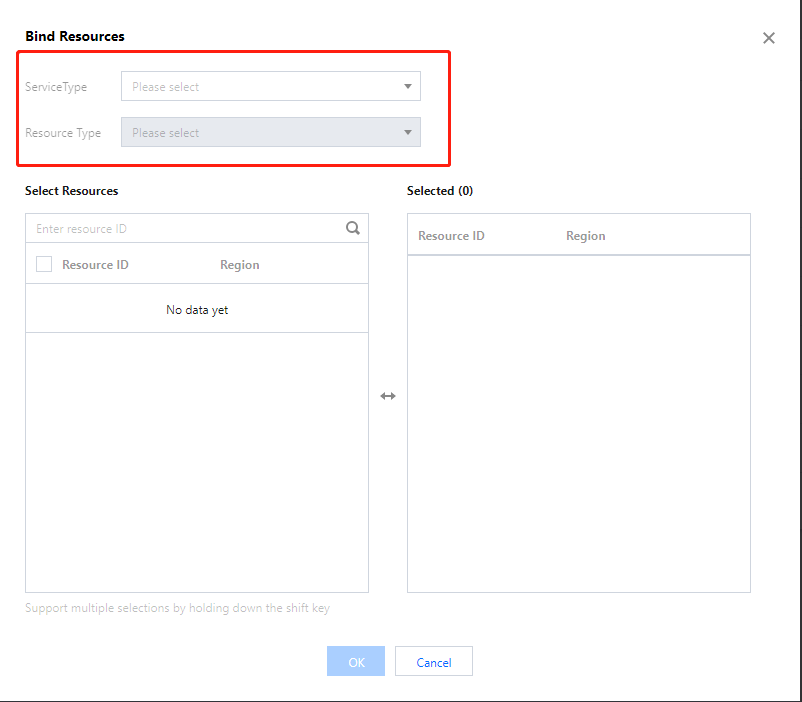
page, select a Tencent Cloud service and resource type and choose the resources to tag.
5.
Click
OK
to tag the resources.
Related Operations
Unbinding Tags
Viewing Tagged Resources
前の記事へ: Creating Tags
次の記事へ: Unbinding Tags
ヘルプとサポート
この記事はお役に立ちましたか?
はい
いいえ
営業担当者に
お問い合わせ
いただくか
チケットを提出
してサポートを求めることができます。
フィードバック
キーワードで検索
Search titles only
Enter keywords to search documentation