Solution 3: Using Mirrormaker for Migration
Baixar
Modo Foco
Tamanho da Fonte
Scenarios
This task describes how to migrate data from a self-built Kafka cluster to a TDMQ for CKafka (CKafka) cluster using Mirrormaker.
The Mirrormaker tool of Kafka enables backing up data from a self-built Kafka cluster to a CKafka cluster. The specific mechanism is as follows:
Mirrormaker uses a consumer to consume messages from a self-built Kafka cluster, then sends the data to a CKafka cluster via a producer. Finally, you switch the production/consumption configuration of the client to the access network of the cloud instance to complete data migration from the self-built Kafka cluster to the CKafka cluster.
Prerequisites
You have purchased a CKafka instance.
You have migrated topics to the cloud.
Operation Steps
1. Download the Mirrormaker tool and decompress it locally.
Note:
2. Configure the consumer.properties file.
# list of brokers used for bootstrapping knowledge about the rest of the cluster# format: host1:port1,host2:port2 ...bootstrap.servers=localhost:9092# consumer group idgroup.id=test-consumer-grouppartition.assignment.strategy=org.apache.kafka.clients.consumer.RoundRobinAssignor# What to do when there is no initial offset in Kafka or if the current# offset does not exist any more on the server: latest, earliest, none#auto.offset.reset=
Parameter | Description |
bootstrap.servers | List of broker access points for self-built instances. |
group.id | Consumer group ID used during data migration. It must not conflict with the names of the existing consumers of self-built instances. |
partition.assignment.strategy | Partition assignment policy, such as partition.assignment.strategy=org.apache.kafka.clients.consumer.RoundRobinAssignor. |
3. Configure the producer.properties file.
# list of brokers used for bootstrapping knowledge about the rest of the cluster# format: host1:port1,host2:port2 ...bootstrap.servers=localhost:9092# specify the compression codec for all data generated: none, gzip, snappy, lz4compression.type=none
Parameter | Description |
bootstrap.servers | Access network for cloud instances. You can copy it in the Network column in the Access Mode module on the instance details page in the console. |
compression.type | Data compression type. CKafka does not support the GZIP compression format. |
4. Start the Mirrormaker migration tool in the
.bin directory to start migration.sh bin/kafka-mirror-maker.sh --consumer.config config/consumer.properties --producer.config config/producer.properties --whitelist topicName
Note:
whitelist is a regular expression. Topics that match the regular expression name are migrated.
5. Run
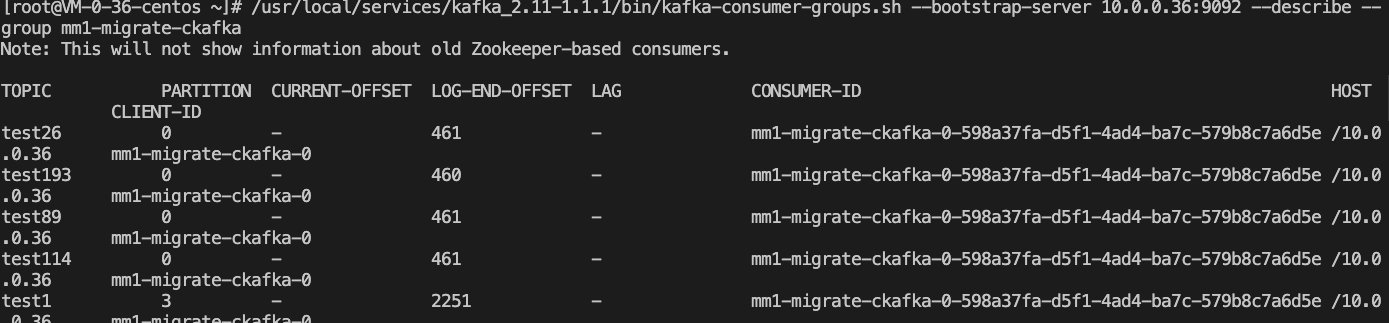
kafka-consumer-groups.sh in the .bin directory to view the consumption offset of the self-built cluster.bin/kafka-consumer-groups.sh --new-consumer --describe --bootstrap-server access point of the self-built cluster --group test-consumer-group
Note:
group refers to the consumer group ID used during data migration.
Subsequent Processing
After completing data migration, transfer the production and consumption configuration of the client to the access point of the cloud instance.
Ajuda e Suporte
Esta página foi útil?
Você também pode entrar em contato com a Equipe de vendas ou Enviar um tíquete em caso de ajuda.
comentários