Restoration Management
Baixar
Modo Foco
Tamanho da Fonte
Introduction
Tencent Cloud TKE Backup Center provides a productized solution for backing up and restoring business applications. This document describes how to perform a restore operation on a target cluster for which a backup task has already been created.
Prerequisite
A backup task has already been created in the source cluster.
Note:
If you plan to restore the business backed up from cluster A to cluster B, for clarity, cluster A is referred to as the source cluster, and cluster B is referred to as the recovery cluster.
Operation Limits
1. The cross-cluster backup and recovery capability requires that the component version installed in the target cluster be 1.1.0 or later. It is recommended that you update it promptly.
2. Currently, only kubernetes resource objects can be restored. Cloud resources such as CBS and CLB are not supported for restoration.
Directions
Creating a restoration task
1. Log in to the TKE console.
2. In the left navigation pane, choose Ops Center > Backup Center. Then, click Create Recovery Task in Recovery Management.
3. Enter restoration information.
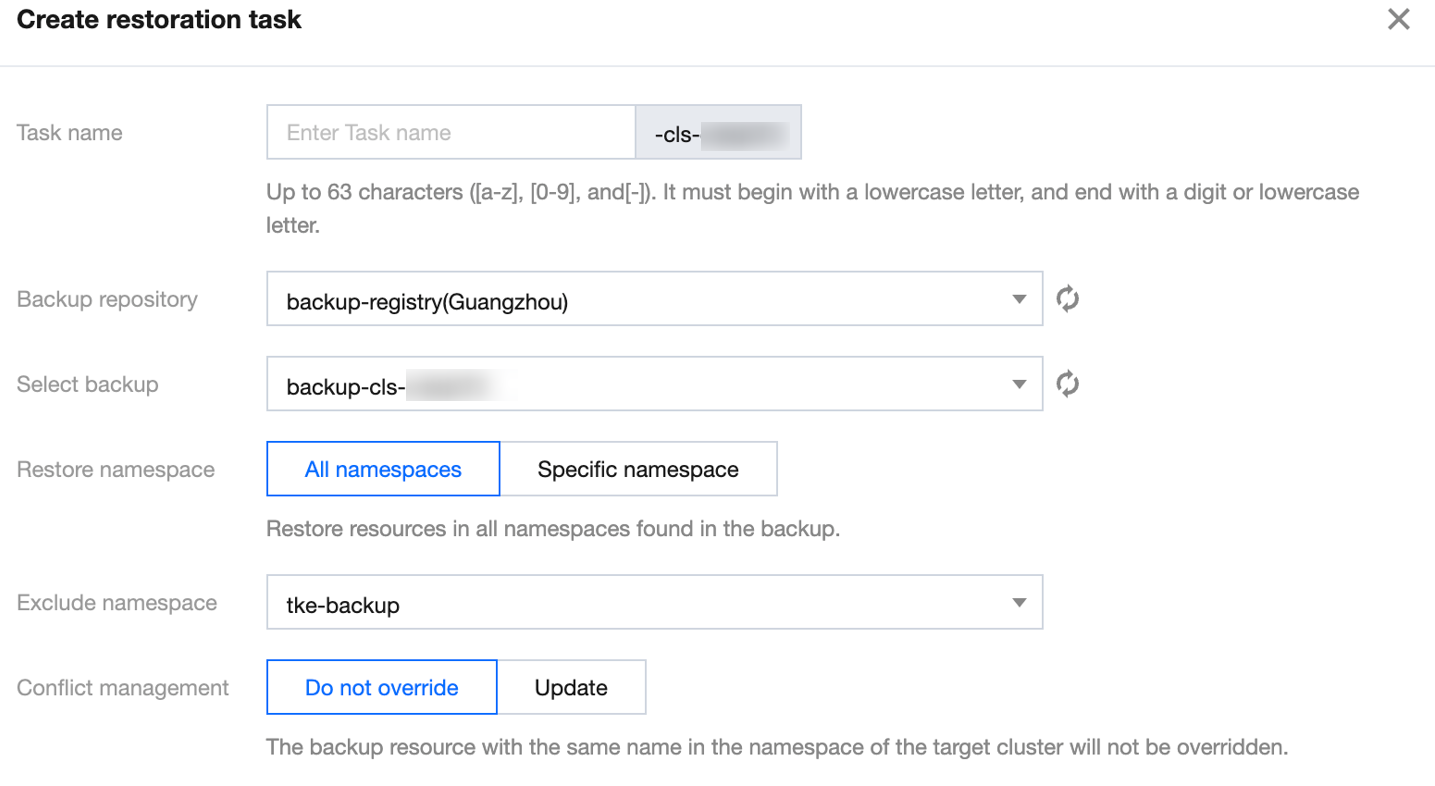
Field description:
Task name: Enter the restoration task name that meets the requirements prompted.
Backup repository: Select an existing backup repository. The backup data from the source cluster will be filtered based on the repository.
Select backup: Select the backup data to be restored. You can select backup tasks created by the current cluster or other clusters (that is, the source cluster) as the basis for restoration.
Restore namespace: This is used to restore the relevant applications found under the namespace of the backup data from the source cluster.
All namespaces: Restores the resource objects found in the backup data under all namespaces. You can use the Exclude option to filter them quickly.
Specify namespace: Select a specific namespace from the backup data to restore its resources.
Conflict treatment:
Do not overwrite (Recommended): If a backup resource with the same name exists in the namespace of the recovery cluster, the current recovery task will not overwrite the existing resource.
Update: If a backup resource with the same name exists in the namespace of the recovery cluster, the existing resource will be overwritten by the current recovery task.
4. Click OK.
Note:
Recovery tasks do not guarantee 100% success.
Deleting a backup task has no other impact. It does not delete the backup data stored in COS, and only removes the record of the recovery operation from the recovery list.
Viewing restoration status
Status | Description |
Initializing | The restoration task is being created. |
Executing | The restoration task is being implemented. |
Acceleration | The restoration operation is completed. |
Partially failed | Some resource objects are restored successfully, and others are failed. You can check "Status" in YAML to learn the number of successfully restored resource objects and the failure reasons. |
Failed | The restoration is failed. You can learn the failure reasons in the console or by checking "Status" in YAML. |
Cross-Cluster Backup and Restoration
1. During a recovery operation, the network modes (such as VPC-CNI and GR) of the source cluster and the recovery cluster must be consistent.
2. The restoration of cloud storage resources in the cluster, such as CBS/CFS/COS, is not currently supported. Pods that rely on storage may become Pending due to the unavailability of storage resources.
3. When business is restored from a standalone cluster to a managed cluster, the recovery task may fail due to differences in the deployment modes of some system components. To improve the success rate, it is recommended that you prioritize selecting "Specify namespace" and perform the operation in small, frequent batches during the recovery process.
4. Incompatible changes may exist between different Kubernetes versions (such as parameter deprecation and apiserver version changes). To improve the success rate, the Kubernetes version of the recovery cluster should be kept the same as or closely match that of the source cluster. For example, a source cluster on version 1.18 can be recovered to a target cluster on version 1.18/1.20.
5. It is recommended to check the resource status of the recovery cluster before a recovery operation is performed. Insufficient resources may cause Pods to become Pending.
6. If the source cluster and the target cluster are in different regions, network connectivity must be ensured. Otherwise, image pull failures may occur, resulting in Pods becoming Pending.
7. If the CLB bound to your Service resource has deletion protection enabled (meaning the CLB was not deleted along with the Service resource), the original CLB can be reused during Service resource recovery to restore the business.
Ajuda e Suporte
Esta página foi útil?
Você também pode entrar em contato com a Equipe de vendas ou Enviar um tíquete em caso de ajuda.
comentários