Private Network Access to Metadata-Accelerated Bucket
Download
Modo Foco
Tamanho da Fonte
Overview
This document details how to access Tencent Cloud COS Metadata Acceleration Buckets via Direct Connect using VPC Endpoint Service. The Metadata Acceleration feature is a high-performance file system feature launched by COS for big data services. Its underlying layer adopts excellent metadata management capabilities, supporting accessing object storage services via HDFS semantics, which can achieve hundreds of GBs-level bandwidth, hundreds of thousands of QPS, and millisecond-level latency.
Prerequisites
Before starting the configuration, ensure that the following conditions are met:
Network Environment: A cloud infrastructure supporting VPC access has been configured, managed by the Network and VPC team.
Endpoint Service: The Endpoint Service for COS and COS Metadata Acceleration has been created, managed by the COS Metadata-Acceleration team.
Allowlist Authorization: Your account UIN has been added to the Endpoint Service allowlist, managed by the COS Metadata-Acceleration team.
Metadata-Accelerated Bucket: A bucket with the metadata-acceleration feature enabled has been created.
Fee Instructions
Using Endpoint Service will incur additional fees charged by the VPC product. For detailed billing descriptions and examples, see Billing Overview.
Operation Steps
Create COS Endpoint
1. Log in to the VPC Console.
2. Switch to the region where the Metadata Acceleration Bucket you want to access is located. Click New and configure the following parameters to create the endpoint.
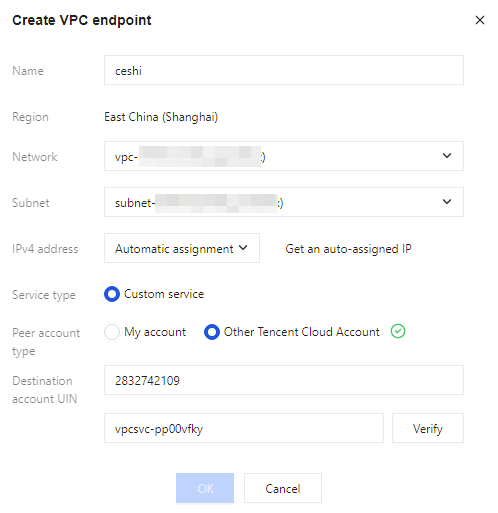
Name: Custom endpoint name.
Region: Select the same region as your bucket.
Affiliated Network: Select your VPC network.
Subnet: Select your subnet (the VIP created by the endpoint will be within this subnet range).
IP Address: Select Automatic Assignment.
Service Type: Select Private Service.
Peer Account Type: Select Other Account.
Peer Account UIN: Enter 2832742109. This is the UIN used by the COS endpoint service and remains unchanged.
Endpoint Service ID: Enter the endpoint service ID corresponding to the region where your bucket is located. The regions where COS has deployed endpoints and their corresponding service IDs are as shown in the following table:
Region | Endpoint Service ID | Region | ID of the Endpoint Service |
Beijing | vpcsvc-j7f6u7y8 | Beijing Finance | vpcsvc-hsuy2wpj |
Shanghai | vpcsvc-pp00vfky | Shanghai Finance | vpcsvc-pny969zd |
Guangzhou | vpcsvc-okzzl947 | Thailand | vpcsvc-i0q3t2v6 |
Chengdu | vpcsvc-la3dnfti | East US | vpcsvc-fdpg3nm1 |
Chongqing | vpcsvc-1snqqeih | Brazil | vpcsvc-5edkepjj |
Nanjing | vpcsvc-mmoajwvt | West US | vpcsvc-l6fn15sr |
Hong Kong (China) | vpcsvc-jejpq2xo | Germany | vpcsvc-r70hxf29 |
Japan | vpcsvc-q8mwrk38 | South Korea | vpcsvc-ocuykgps |
Singapore | vpcsvc-71louv91 | Indonesia | vpcsvc-8nrq4era |
Shanghai Autonomous Driving | vpcsvc-mu3yl0ov | - | - |
3. Verify and create. Click Validate to verify. After verification passes, click Confirm to create the endpoint. The system will automatically generate a VIP address. Please record this VIP for subsequent configuration.

Create an Endpoint for the COS Metadata Acceleration Service
1. Log in to the VPC Console.
2. Switch to the region where the metadata accelerated bucket you want to access is located, and create a new endpoint. For configuration instructions, refer to Create a COS Endpoint. Note that the COS metadata acceleration service uses different endpoint services. The regions where endpoints have been deployed and their corresponding service IDs are shown in the table below:
Region | ID of the Endpoint Service |
Beijing | vpcsvc-dabvvd8k |
Note:
If the region where your Metadata Accelerated Bucket is located does not have a corresponding endpoint service, you can contact us to add it.
3. Verify and create. Click Validate to verify. After verification passes, click Confirm to create the endpoint. The system will automatically generate a VIP address. Please record this VIP for subsequent configuration.
DNS Configuration
After completing the creation of the endpoint, you next need to configure DNS resolution in your local environment. In total, you need to configure resolution for two domain names:
1. DNS Resolution for the COS Metadata Acceleration Service
Domain name format: *.chdfs.<region>.myqcloud.com.
Target address: the VIP address generated by Create COS Metadata Acceleration Service Endpoint.
2. DNS Resolution for the Standard COS Object Storage Service
Format of the domain name: *.cos.<region>.myqcloud.com.
Target address: the VIP address generated by Create COS Endpoint.
Note:
The local hosts file does not support wildcard DNS resolution. If you are configuring via hosts, replace the "*" in the wildcard domain name with the specific bucket-appid. Example: .
10.0.0.12 examplebucket-1250000000.chdfs.ap-beijing.myqcloud.com
10.0.0.13 examplebucket-1250000000.cos.ap-beijing.myqcloud.com
Verification and Testing
1. Basic Connectivity Test
Verify the port connectivity of the endpoint VIP using the telnet command:
telnet <VIP> 80 # Verify the HTTP porttelnet <VIP> 443 # Verify the HTTPS port
2. Verification of Private Network Access
On your compute node, use the nslookup command to resolve the COS domain name and the domain name for metadata acceleration. If it returns the VIP of the endpoint, then it indicates that domain name resolution is successful.
3. Feature Test
Refer to the content of Mount Metadata-Accelerated Bucket to access the metadata-accelerated bucket from the compute node and check whether the feature is functioning properly.
Ajuda e Suporte
Esta página foi útil?
Você também pode entrar em contato com a Equipe de vendas ou Enviar um tíquete em caso de ajuda.
comentários