Setting Password Complexity
Download
Modo Foco
Tamanho da Fonte
Scenarios
The access password for a Distributed Cache instance is the first line of defense for data security. To meet enterprise security compliance requirements and reduce the risk of unauthorized access due to weak passwords, Distributed Cache (Redis-compatible) provides the Custom Password Complexity feature. After you enable this feature, you can customize the password validation rules, including the minimum length and the required number of uppercase letters, lowercase letters, digits, and special characters. Subsequently, all password creation, modification, and reset operations for accounts under that instance are validated against the configured rules. Passwords that do not meet the complexity requirements cannot be set, thereby eliminating weak passwords at the source.
Feature List
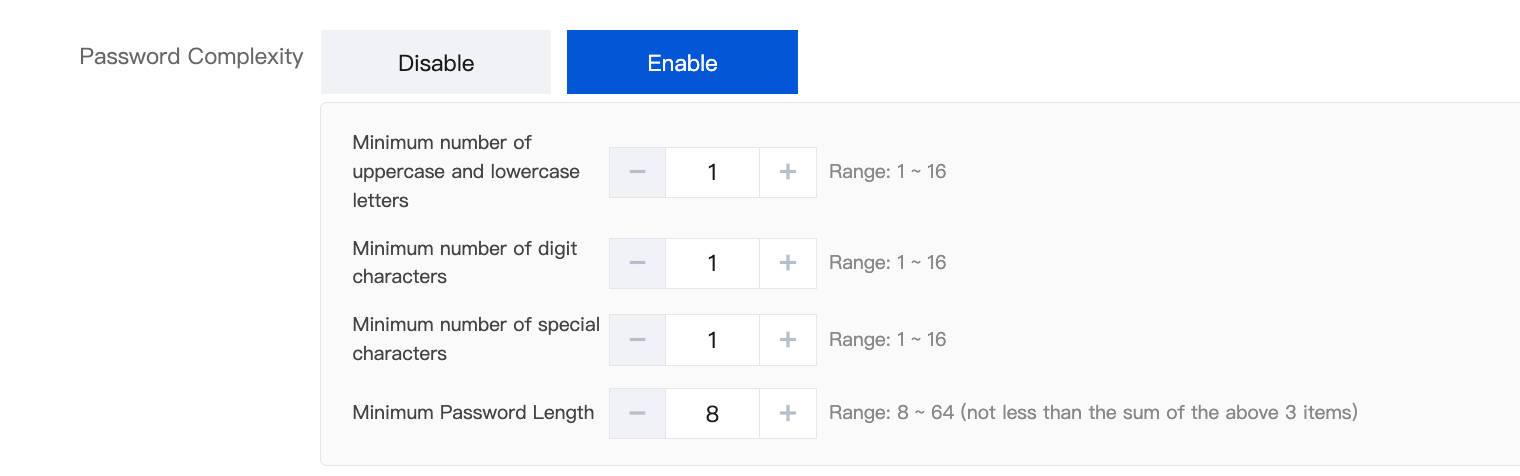
After you enable password complexity, you can configure the following parameters. The system then validates passwords against these parameters item by item. The password complexity feature can be enabled both on the purchase page when a new instance is created and on the details page for an existing instance:
Parameter | Description | Default Value | Value Range |
Minimum number of lowercase and uppercase characters | Minimum total number of uppercase and lowercase letters in a password. | 1 | 1 ~ 16 |
Minimum number of numeric characters | Minimum number of Arabic numerals in a password. | 1 | 1 ~ 16 |
Minimum number of special characters | Minimum number of special characters in a password. | 1 | 1 ~ 16 |
Minimum password length | Minimum allowed number of characters in a password. The value must be greater than the sum of the above three items. | 8 | 8 ~ 64 |
Directions
The password complexity feature can be enabled from two entry points: on the purchase page when a new instance is created, or on the Account Management page for an existing instance.
Enabling on the Purchase Page When an Instance is Created
1. Log in to the Distributed Cache purchase page and configure parameters such as the instance edition, specifications, and network.
2. On the Password Complexity page, select Yes and configure the parameters (the minimum number of lowercase letters, uppercase letters, digits, special characters, and the minimum password length). Then, set an instance password that meets the complexity requirements according to the rules and complete the subsequent order placement process.
Enabling Custom Password Complexity
1. Log in to the Distributed Cache console. At the top of the page, select the Region where your target instance is located.
2. In the instance list, click the target instance ID to go to the instance details page.
3. Select the Account Management tab and click Password Complexity.
4. In the pop-up Password Complexity dialog box, select Enable to display the password complexity configuration parameters.
Min. number of lowercase and uppercase letters: The minimum total number of lowercase and uppercase letters in a password.
Min. number of digit characters: The minimum number of digits in a password.
Min. number of special characters: The minimum number of special characters in a password.
Min. Password Length: The minimum length of a password. Its value must be greater than the sum of the three items above.
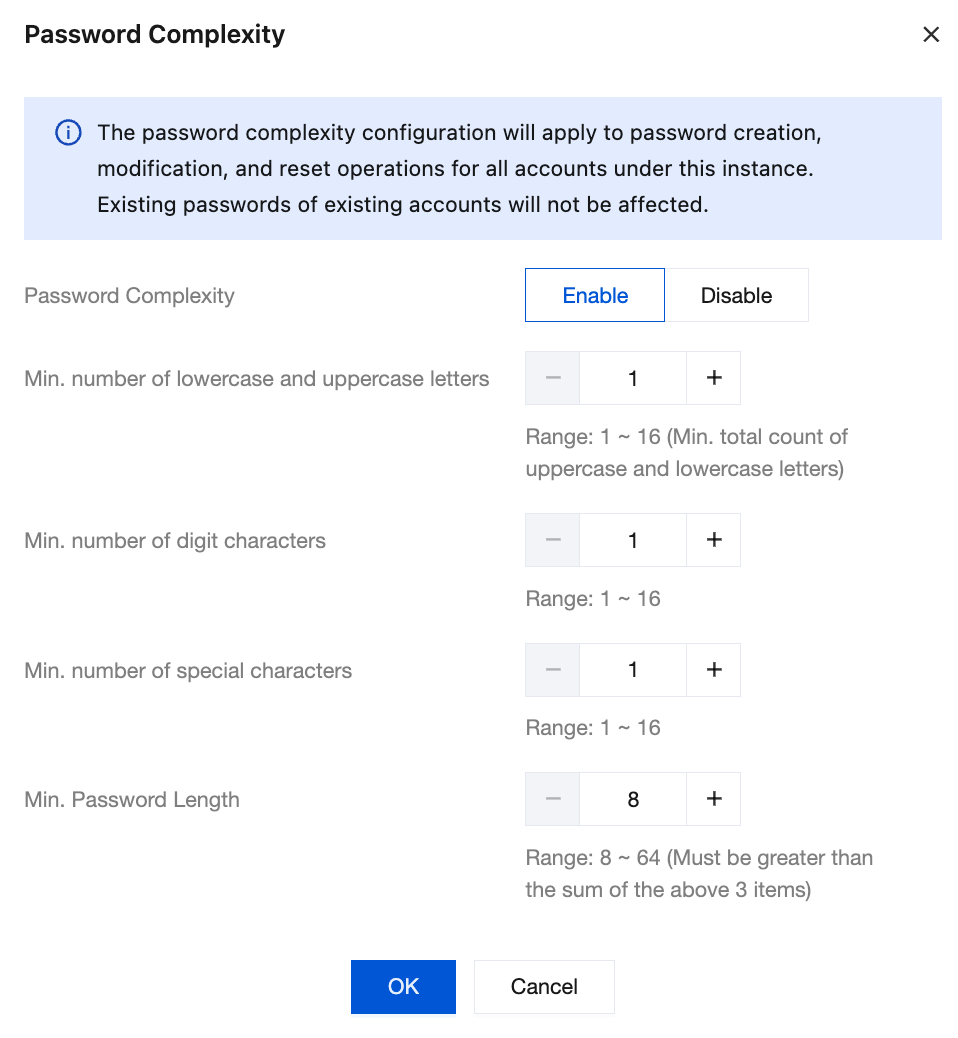
5. After confirming that the information is correct, click OK. The configuration takes effect immediately.
Disabling Custom Password Complexity
1. Log in to the Distributed Cache console and select the region where your target instance is located.
2. In the instance list, click the target instance ID to go to the instance details page.
3. Select the Account Management tab and click Password Complexity.
4. In the pop-up Password Complexity dialog box, select Disable and click OK to disable the custom password complexity feature for the current instance.
Notes
After you disable the custom password complexity feature, all parameters you have configured are automatically restored to their default values. When you enable the feature again, you must reconfigure the parameters.
This feature only validates password complexity during the password setting process. It does not affect the normal read/write operations or existing connections of the instance. Modifying the complexity rules does not force a change to the password currently in use by the instance.
Securely store the new password that meets the complexity requirements. If you need to change the instance access password, see Reset Password.
Ajuda e Suporte
Esta página foi útil?
Você também pode entrar em contato com a Equipe de vendas ou Enviar um tíquete em caso de ajuda.
comentários