This article describes how to configure the Full-Link Analysis feature in the Distributed Cache console, helping you create CLS logsets and obtain the dedicated reporting channel credentials (VIP, VPORT, Token) for monitoring data.
2. In the Monitoring data delivery section, you can see that the Reporting Status is Disabled. Click
.
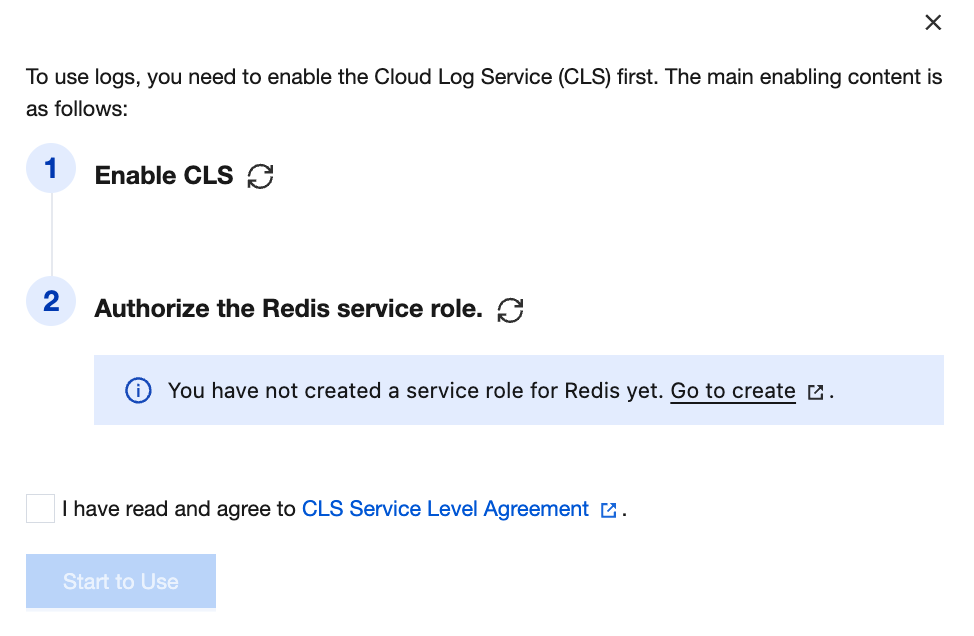
3. If this is the first time the cloud account has activated CLS, service role authorization is required. As shown below, click Go to create to learn about the roles and authorization policies. Click Grant, select I have read and agree to the terms, then click Start to Use.
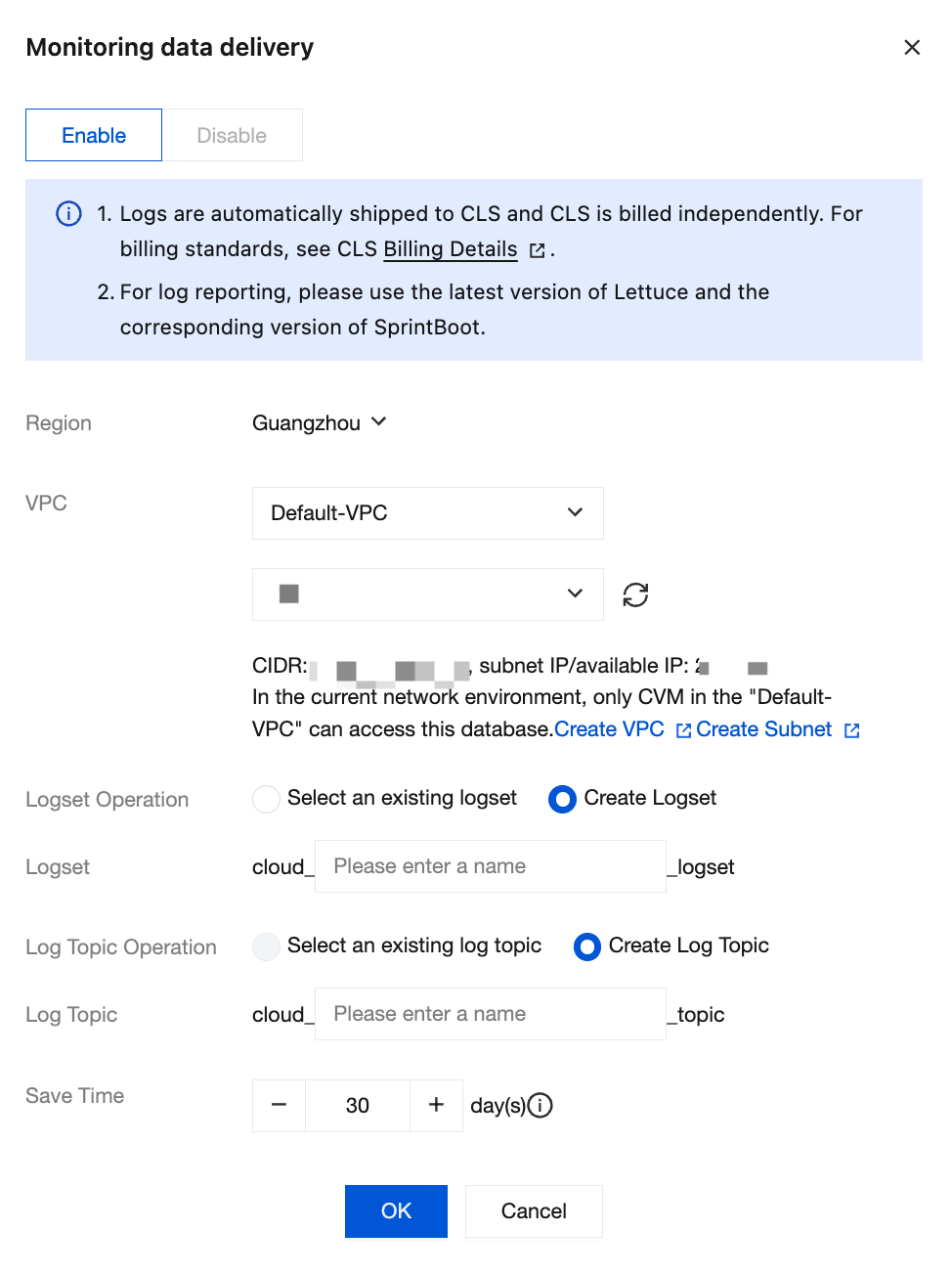
4. In the small window of Monitoring data delivery, configure the parameters for log shipping.
Parameter
Note
Example
VPC
Select a specific VPC and its subnet.
VPCs are Region-specific (such as Guangzhou), while subnets are AZ-specific (such as Guangzhou Zone 1). A VPC can be divided into one or more subnets. Subnets within the same VPC are interconnected via the private network by default, whereas different VPCs (regardless of whether they are in the same Region) are isolated from each other on the private network by default. For details, see VPC Product Overview.
It is recommended that you select the same VPC in the same region as the cloud database instance.
-
Region
Select the region for log shipping. Cross-region shipping is supported.
Guangzhou
Logset Operation
A logset is a logical container for log data, serving to categorize logs. A logset can contain multiple log topics.
Select an existing logset: refers to selecting a logset that has already been created. That is, before delivery is enabled, you have created a logset in the CLS console. In this case, you can select the existing one. For specific operations, see Create Logset.
Create Logset: Create a new logset, which is a newly created shipped logset for the monitoring data of TencentDB for Redis®.
Creates logsets.
Logset
Logset Operation is set to Select an existing logset: Filter the target logset in the drop-down list. You can search and select the appropriate logset.
Logset Operation is set to Create Logset: Edit the logset name in the input box according to the naming requirements to create a new logset. The naming format is cloud_custom-name_logset, where the custom part supports any characters and has no length restriction.
cloud_redis_monitor_logset
Log Topic Operation
Each log topic falls under a specific logset and is used to distinguish log data from different sources or types within the same logset. The log topic serves as the fundamental unit for log data search and analysis. You can either select an existing log topic or create a new one.
Select an existing log topic: This option is configurable only when Logset Operation is set to Select an existing logset. For log topic operations, see Log Topic.
Create Log Topic: Create a new log topic under the selected logset.
Log Topic
Log Topic Operation is set to Select an existing log topic: Select a log topic under the chosen logset from the drop-down list. You can search for the desired log topic.
Log Topic Operation is set to Create Log Topic: Create a new log topic under the selected logset. The naming format for the log topic is cloud_custom_topic, where the custom part supports any characters and has no length restriction.
cloud_latency_avg_topic
Save TIme
Select the retention period for the delivered data. The default is 30 days. You can set the retention period from 1 to 3,600 days. Data will be automatically cleared upon expiration.
If an existing log topic is selected, the retention period will align with that of the existing log topic by default.
Place the mouse over
to see the prompt information, click Managing Log Topics, and modify the selected log topic based on the description of Log Topic.
30
5. Click OK to complete the creation. Wait for the configuration to finish. On the Business Full-Link Analysis page, you can view the created log information, along with its monitoring data reporting address and Token, as shown in the following figure.