iptables Forwarding
Overview
Tencent Cloud Distributed Cache supports public network access in Chengdu, Beijing, Shanghai, and Guangzhou regions. To use public network access in other regions, you can use a CVM instance with a public IP for port forwarding to access Tencent Cloud Distributed Cache over the public network.
Note:
Because iptables-based forwarding may be unstable, we recommend that you do not access instances over the public network in the production environment.
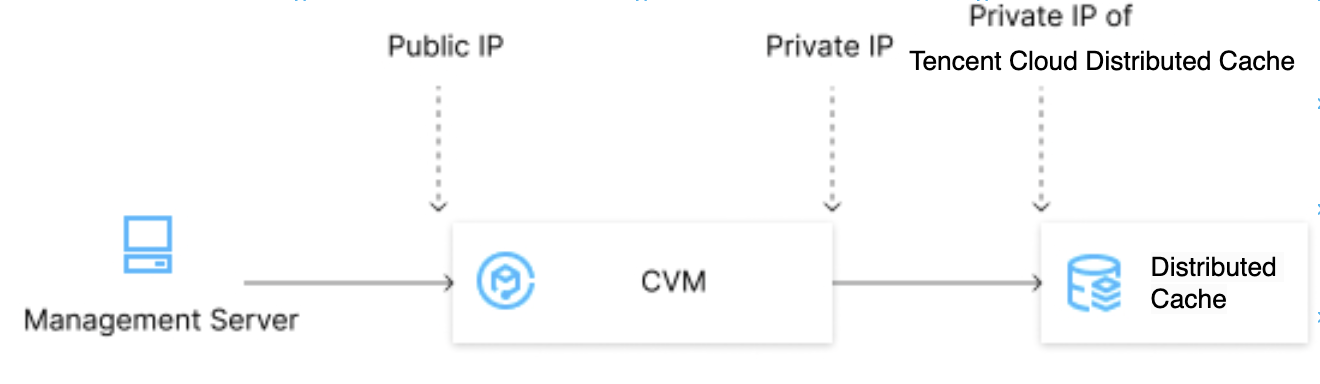
Directions
1. Log in to a CVM instance and enable the IP forwarding feature. For more information, see Logging In to Linux Instance (Web Shell).
Note:
The CVM and TencentDB instances must be under the same account and in the same VPC in the same region, or both in the classic network.
echo 1 > /proc/sys/net/ipv4/ip_forward
Running Environment
Operating System: Ubuntu 24.04.3 LTS / x86_64
Runtime Version: GNU bash, version 5.2.21(1)-release (x86_64-pc-linux-gnu)
2. Configure the forwarding rule. The sample code below forwards access requests originally to
26.xx.x.2:10001 (CVM instance public address with a custom port as desired) to the Tencent Cloud Distributed Cache instance with the private address 10.0.0.5:6379:iptables -t nat -A PREROUTING -p tcp --dport 10001 -j DNAT --to-destination 10.0.0.5:6379iptables -t nat -A POSTROUTING -d 10.0.0.5 -p tcp --dport 6379 -j MASQUERADE
Running Environment
Operating System: Ubuntu 24.04.3 LTS / x86_64
Runtime Version: GNU bash, version 5.2.21(1)-release (x86_64-pc-linux-gnu)
3. Configure the security group to open the public port of the CVM instance. We recommend that you configure a security group rule to allow only the source which needs to connect to the instance.
4. To connect to the Distributed Cache instance in the private network using a public network address (
26.xx.xx.2:10001 in the sample code), you can use the same command as the private network connection command. For more information, see Connecting to Tencent Cloud Distributed Cache Instances > Connecting via Client Tool.5. After connecting to the Tencent Cloud Distributed Cache instance, run the
info command. If the database information is returned, the connection is successful.Ajuda e Suporte
Esta página foi útil?
Você também pode entrar em contato com a Equipe de vendas ou Enviar um tíquete em caso de ajuda.
comentários