CVM Access to Internet Through EIP
Baixar
Modo Foco
Tamanho da Fonte
An EIP is a region-level static public IP. It can connect a VPC-based CVM instance to the public network. This document describes how to bind an EIP to a CVM instance for public network access.
Overview
A VPC-base CVM instance, if you do not allocate a public IP when purchasing it, it cannot access to the public network.
However you can bind an EIP to the CVM instance to access the public network.
Directions
Step 1. Apply for an EIP
Note:
1. Log in to the VPC console.
2. Click IP and ENI > Public IP/EIP to enter the public IP page.
3. At the top of the Public IP/EIP page, select the same region as the CVM instance and click Apply.
4. In the Apply for EIP pop-up window, configure the parameters as needed and click OK.
Step 2. Bind an EIP to the CVM instance
1. On the Public IP/EIP page, select More > Bind on the right of the EIP.
2. In the Bind resources pop-up window, select CVM instance, select your CVM instance ID, and click OK.
Step 3. Verify the public network access through the EIP
1. Go to the CVM console, click Login on the right of the CVM instance, and enter the password to access the CVM UI.
2. Run
ping www.qq.com to test the data connectivity. If data is returned, the CVM instance can access the public network.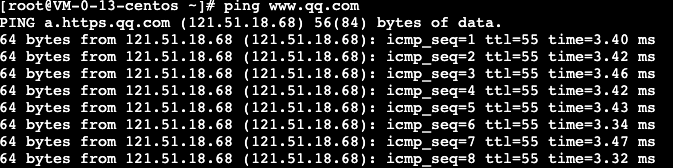
Ajuda e Suporte
Esta página foi útil?
Você também pode entrar em contato com a Equipe de vendas ou Enviar um tíquete em caso de ajuda.
comentários