For scenarios involving industry-end device access, such as connected vehicles, live streaming devices, and MFi devices, dedicated IoT SIM cards are typically used for network connectivity. These dedicated IoT SIM cards require pre-registration with the carrier for the domain names/IP addresses they need to access (known as the "allowlist"). Addresses not on the allowlist will be inaccessible.
This guide helps you configure the allowlist required for the Cloud Jutong Multiple Network Acceleration (Tencent Cloud Jutong) service, ensuring that your devices can properly connect to the acceleration gateway.
Solution Overview
This guide provides two configuration options based on the number of entries in your IoT SIM card allowlist:
Solution
Use Cases
Recommendation Level
Option 1: Full Configuration
Allowlist entries are unrestricted.
Top Choice (★★★)
Option 2: Restricted Configuration
Allowlist entries are limited.
Recommended (★★☆)
II. Prerequisites for Configuration
Before you start configuring the allowlist, confirm the following information:
1. Confirm the device operation region.
Confirm the primary cities or regions where your devices operate, such as specific cities in East China or South China. This information will affect the subsequent selection of regions or gateway nodes.
2. Confirm the maximum number of entries for the IoT SIM card allowlist.
Contact your IoT SIM card carrier to determine the maximum number of entries that can be added to the allowlist. If there is no limit, we recommend selecting Option 1.
III. Mandatory Allowlist Entries: Controller Domain Names
Regardless of which option you choose, you must add all four of the following controller domain names to the allowlist. After a device starts up, it must first connect to the controller to complete registration and scheduling. The absence of any one of these domain names may prevent the device from connecting properly.
Domain Name
Description
register.multipath.tencent-cloud.com
Primary domain name for the registry center
register-backup.multipath.tencent-cloud.com
Backup domain name for the registry center
reg-rest-pre.multipath.tencent-cloud.com
REST domain name for the pre-release environment
reg-rest.multipath.tencent-cloud.com
REST domain name for the production environment
Note:
If your carrier supports wildcard domain names, you can use a single entry, such as *.multipath.tencent-cloud.com, to cover all the domain names listed above. The exact wildcard domain name format must be confirmed with your carrier, as rules may vary between carriers.
IV. Solution 1: Full Configuration (Recommended)
Use Cases
The number of allowlist entries is unlimited or sufficiently large. This is the simplest and most effective solution. After you add all regional allowlists, no configuration is required in the console. The SDK automatically selects the optimal gateway node and carrier line based on proximity, eliminating the need for manual specification.
Step 1: Adding Controller Domain Names
Add all four domain names (or the wildcard domain name) from Section 3 to the allowlist.
Step 2: Adding All Access Point IP Addresses
Add the IP addresses from all regions to the allowlist.
V. Solution 2: Restricted Configuration (Recommended When the Number of Entries Is Limited)
Use Cases
The allowlist has a limited number of entries, so you cannot add IP addresses from all regions.
How It Works
When a device starts acceleration, it first connects to the Tencent Cloud controller. The controller then delivers the available gateway IP addresses to the device, and the device subsequently connects to these gateways. By default (that is, when no configuration exists for accessible gateways in the console), the controller delivers gateway IP addresses from all regions. If your allowlist does not include all IP addresses, the device may receive an IP address that is not on the allowlist, resulting in a connection failure.
To resolve this issue, you can configure "Accessible Gateways" in the Tencent Cloud console. This configuration informs the controller which regional allowlists you have added. Consequently, the controller will only deliver gateway IP addresses from those regions to the device and will not deliver IPs from other regions. Since all IP addresses received by the device are on the allowlist, connection failures will not occur.
Step 2: Obtaining the IP List for the Specified Region and Adding It to the Allowlist
Determine the region(s) to access based on your device's operational area (typically one or more regional nodes closest to the operational area). Obtain the required information by contacting us, and add all obtained IP addresses to the IoT SIM card allowlist.
Attention:
Ensure that you add all carrier line IP addresses (BGP, China Mobile, China Telecom, China Unicom) for each node in the specified region to the allowlist. You cannot add IP addresses from only one carrier.
Step 3: Configuring the Access Region Scope
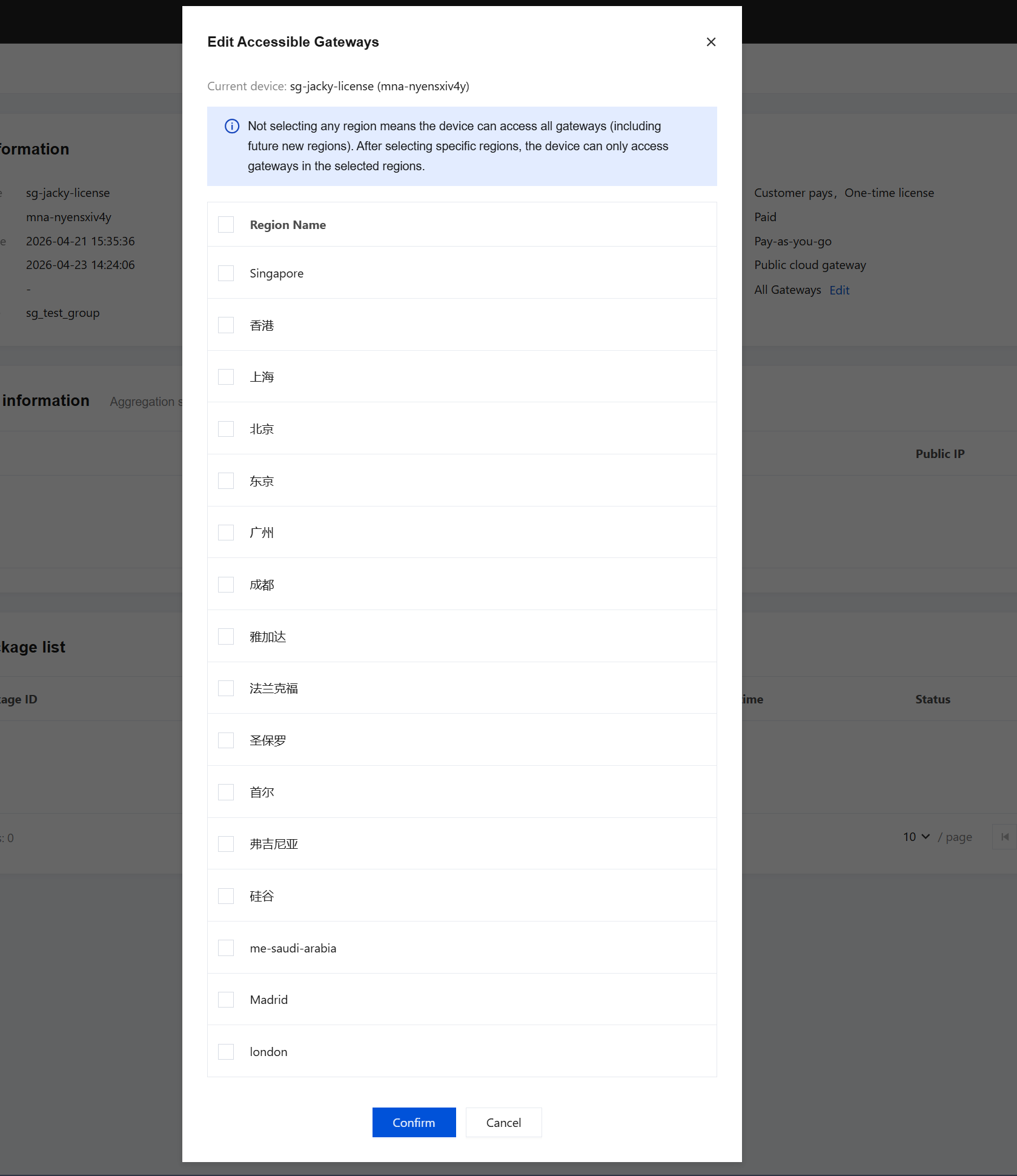
Select the region for "Accessible Gateways" in the Tencent Cloud console. Confirm that the IP addresses for the selected region have been added to the allowlist in Step 2. Otherwise, if the device receives an IP address that is not on the allowlist, connectivity will fail.
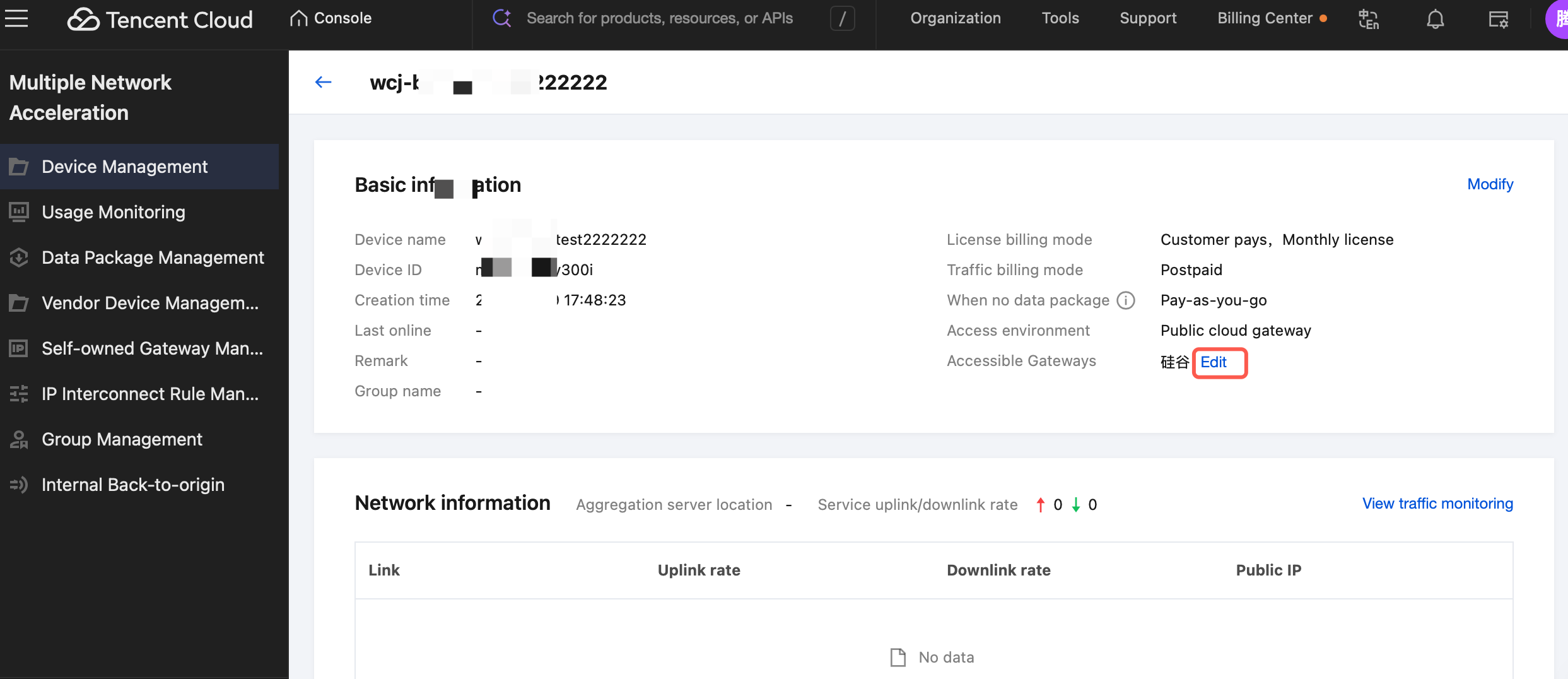
In the Tencent Cloud console > Multiple Network Acceleration (Tencent Cloud Jutong) > Device Management, locate the accessible gateway and click Edit.
In the pop-up window, select the region you want to access, as shown in the following figure:
Note:
After configuration is complete, the SDK will only select these permitted regions during automatic scheduling and will not connect to gateways in other regions. Furthermore, selecting all only represents all current IP addresses. Newly added regions will not be automatically accessed.
Example: Internet of Vehicles Scenario, Vehicles Operating in Hangzhou
Background: The vehicle is equipped with dual SIM cards (China Mobile + China Telecom) and primarily operates in and around Hangzhou.
Specific operations
1. Add all four controller domain names to the allowlist.
2. Obtain the five IP addresses corresponding to the Hangzhou node (either provided by an engineer or self-queried). Add all five IP addresses (including BGP*1/China Unicom*2/China Telecom*1/China Mobile*1) to the allowlist.
3. In the Tencent Cloud console, configure the accessible region restriction to "Hangzhou".
The total number of allowlist entries is 4 domain names + 5 IP addresses = 9 entries.
Attention:
If the operational area of the devices is later expanded to other cities, adjust the regional scope in the Tencent Cloud console and add the IP addresses of the newly added regions to the allowlist.
VI. FAQs
1. Do I Need to Add the IP Addresses of Business Servers to the Allowlist?
Not required. The allowlist only governs the segment from the device to the Tencent Cloud acceleration gateway. After data reaches the gateway, the gateway's own network accesses your business server, and the IoT card is no longer used.
Note:
If some traffic on your device bypasses the acceleration gateway and directly accesses other servers via the IoT card, you must manually add those addresses to the allowlist. This guide only covers the allowlist related to the acceleration service.
2. Can I Add Fewer Domain Names?
Not allowed. All four controller domain names must be added. After startup, a device must first connect to the controller to complete registration and scheduling. The absence of any domain name may result in a failure to connect normally. If wildcard domains are supported, you can use *.multipath.tencent-cloud.com to cover them all with a single entry.
3. Can I Add Only the Lines of a Specific ISP Within the Specified Region/Node?
Not recommended. Add all IP addresses for all carrier lines under the corresponding region or node. The SDK automatically selects the corresponding line based on the carrier of the IoT card. If the IP address for a specific line is missing, cards from that carrier may fail to accelerate normally.
4. What Should I Do If I Need to Expand the Device Operation Region?
Option 1: No action required. You have added all IP addresses to the allowlist, and the gateway IPs for the new region are already included. The SDK will be automatically routed to the new region.
Option 2:
1.1 Add the IP addresses of the new region to the allowlist.
1.2 Select the region in the console.
5. What Should I Do If Tencent Cloud Regions/Nodes Increase?
Option 1: Add the IP addresses of the new region to the allowlist. No console configuration is required, as the SDK's scheduling scope automatically includes the new region.
Option 2: If you need to use the new region.
1.1 Add the IP addresses of the new region to the allowlist.
1.2 Select the region in the console.
6. Will the IP Address Change?
IP addresses are relatively stable. However, if nodes are scaled out or adjusted, Tencent Cloud will notify you in advance to update them. We recommend that you periodically confirm with your assigned engineer whether any IP addresses have changed.