Configuring Cluster TLS Certificates
Baixar
Modo Foco
Tamanho da Fonte
Scenarios
In the digital era, message middleware carries critical data for enterprise core business processes, such as transaction instructions and user privacy information. Therefore, the capability to encrypt message transmission content becomes particularly important. Based on its open-source foundation, Tencent Cloud TDMQ for RocketMQ supports the feature of configuring TLS certificates on the server side. You can easily bind certificates maintained in the Tencent Cloud SSL Certificates console to your RocketMQ cluster through simple operations in the console.
In scenarios with high requirements for encrypted communication, such as cross-public network communication or financial/government compliance scenarios, you can refer to the following operations to enable the TLS encryption switch and configure the server-side TLS certificate as needed.
Note:
Currently, only 5.x clusters support TLS certificate configuration. If your current 5.x cluster does not have an entry for TLS certificate configuration, submit a ticket to contact Tencent Cloud. The service team will upgrade your cluster to the latest version.
Prerequisites
You have created a TDMQ for RocketMQ cluster, which is in the Running status.
Ensure that a usable TLS certificate is prepared. The certificate can be your own or purchased from the Tencent Cloud SSL Certificates console. When using TLS encrypted communication, ensure that the bound TLS certificate is in an available state, such as not expired and with a correct file format. For more operations in the SSL Certificates console, refer to the SSL Certificates Usage Guide.
Operation Steps
1. Log in to the TDMQ for RocketMQ console.
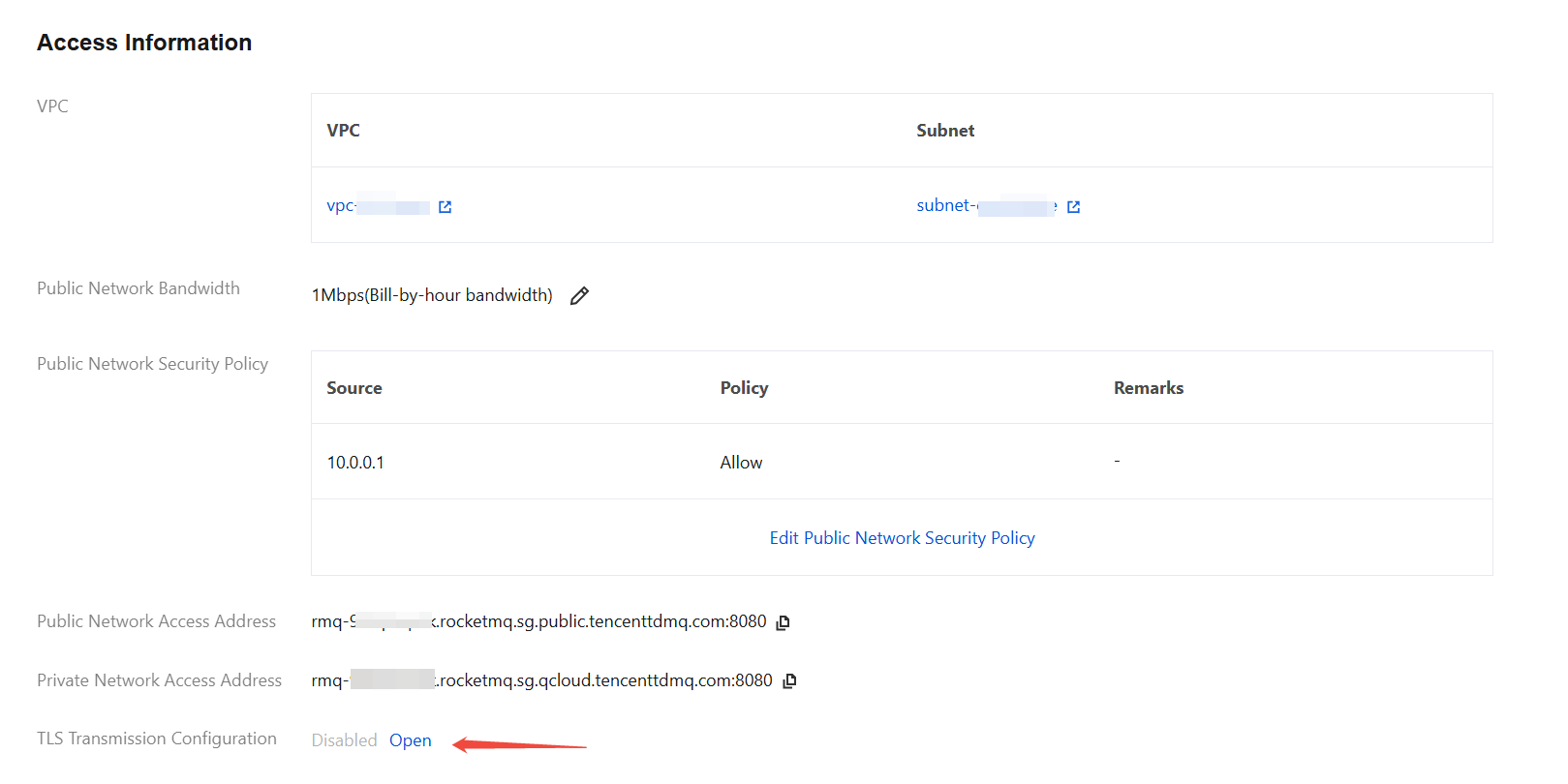
2. On the Cluster Details page, in the Access Information section, you can see the TLS Transmission Configuration item. When not configured, the switch is displayed as disabled, as shown in the following figure:
3. After Open is clicked, TLS certificate configuration is enabled. When using this feature for the first time, you need to authorize TDMQ for RocketMQ to query certificates uploaded or purchased by your current account in the Tencent Cloud SSL Certificates console. Please select the authorization.
4. After authorization is completed, select the target server certificate. Once selected, the certificate will be deployed on the TDMQ for RocketMQ server and subsequently used for transmission encryption. You can also add new certificates in the Tencent Cloud SSL Certificates console. For more SSL certificate management features, see the SSL Certificates Usage Guide.
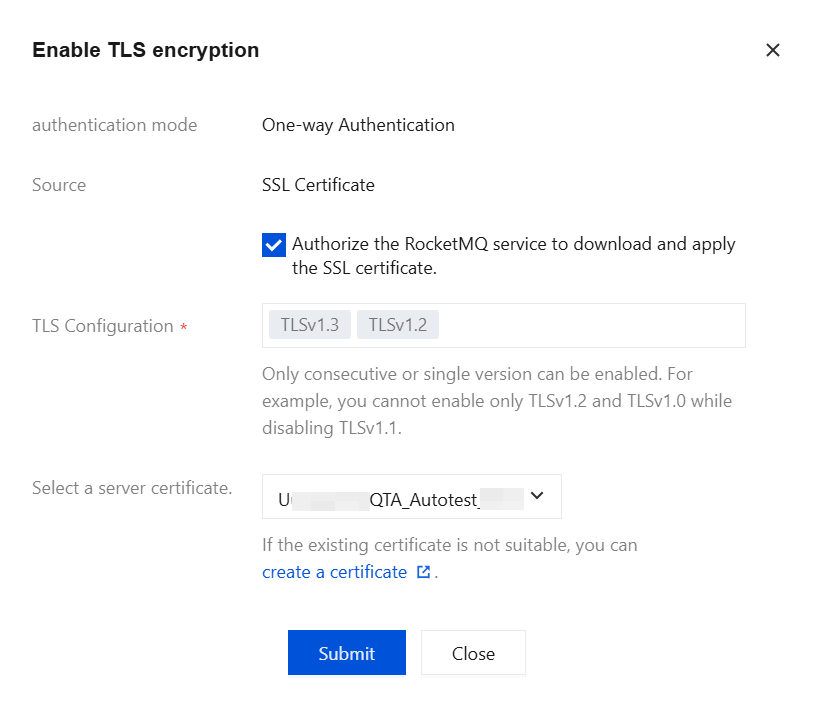
5. After clicking Submit, you can view the relevant certificate information in the Access Information section on the cluster details page. Please regularly check the certificate's validity period. The page will also display the certificate's expiration date before it is due to expire.
6. Click Unbind again to delete the TLS certificate configuration for the current cluster.
Enabling TLS on the Client
After the cluster certificate is configured, the method for the client to enable TLS is as follows:
Add JVM startup parameters.
-Dtls.enable=true \\-Dtls.test.mode.enable=false \\-Dtls.client.authServer=true \\-Dtls.client.trustCertPath={CA certificate path}
// Authentication is not currently supported.Java ClientConfiguration clientConfiguration = ClientConfiguration.newBuilder().setEndpoints(endpoints).setCredentialProvider(credentialsProvider).enableSsl(true) // Enable TLS.build();
Ajuda e Suporte
Esta página foi útil?
Você também pode entrar em contato com a Equipe de vendas ou Enviar um tíquete em caso de ajuda.
comentários