Audience List (React Native)
다운로드
포커스 모드
폰트 크기
LiveAudienceState is a specialized module within AtomicXCore designed to manage audience information in live streaming rooms. With LiveAudienceState, you can implement a robust audience list and management system for your live streaming application.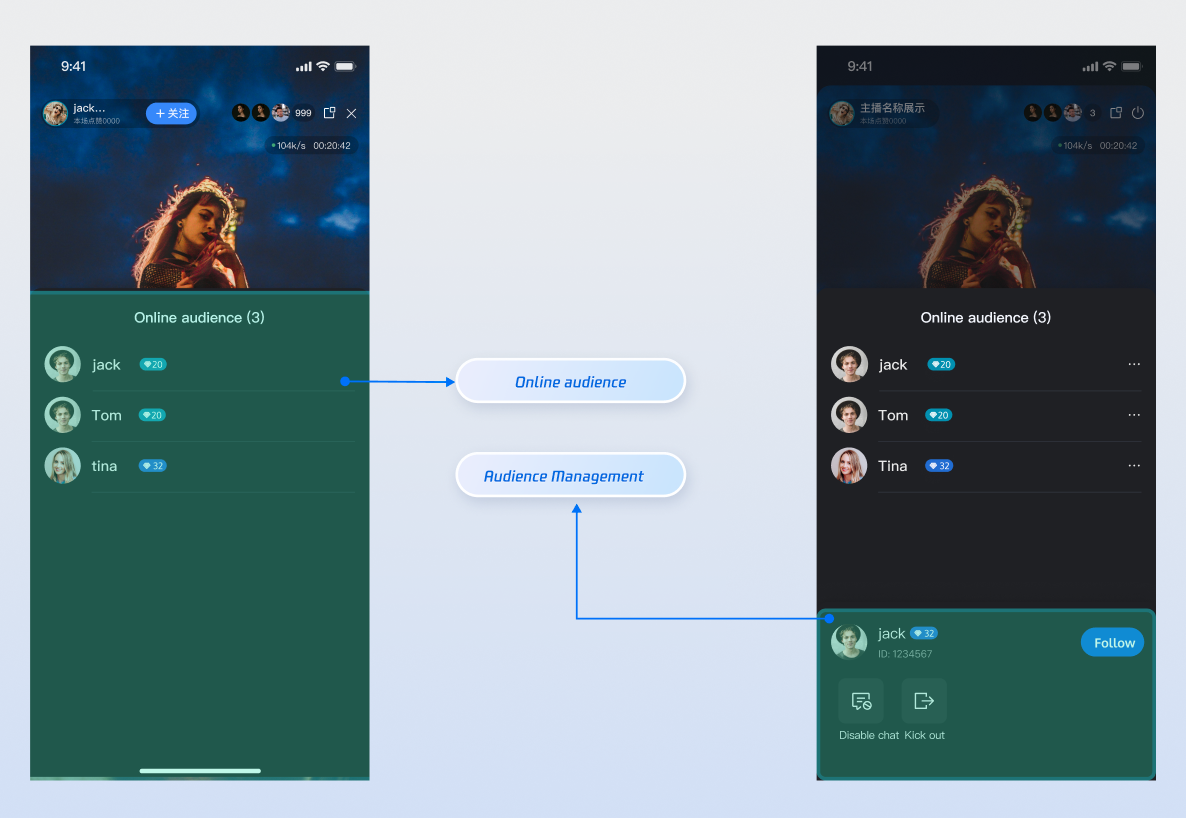
Core Features
Real-time Audience List: Access and display detailed information about all current audience members in the live room.
Audience Count Statistics: Retrieve the real-time, accurate total number of audience members in the live room.
Audience Activity Monitoring: Subscribe to events to instantly detect audience join and leave actions.
Administrator Privileges: Hosts can promote regular audience members to administrators or revoke their administrator status.
Room Management: Hosts or administrators can remove regular audience members from the live room.
Implementation Steps
Step 1: Integrate Components
Step 2: Initialize and Fetch the Audience List
Create a
LiveAudienceState instance bound to the current live room's liveID, and proactively fetch the audience list for the initial UI display.import { useEffect } from 'react';import { useLiveAudienceState } from 'react-native-tuikit-atomic-x/lib/module/atomic-x/state/LiveAudienceState';const liveID = 'xxx'; // The liveID for the current voice room or live stream// Retrieve the LiveAudienceState instance for the current liveIDconst { fetchAudienceList, audienceList } = useLiveAudienceState(liveID);useEffect(() => {fetchAudienceList({liveID: liveID, // The current live room's liveIDonSuccess: () => {// On success, reactive data updates automaticallyconsole.log('Successfully fetched audience list for the first time');},onError: (error) => {console.log('Failed to fetch audience list for the first time', error);},});}, []);// Listen for real-time updates to audienceList for UI refreshuseEffect(() => {console.log(audienceList);}, [audienceList]);
Step 3: Monitor Audience State
Subscribe to
LiveAudienceState events and reactive data to receive full list snapshots and real-time join/leave notifications, enabling dynamic UI updates.import { useEffect } from 'react';import { useLiveAudienceState } from 'react-native-tuikit-atomic-x/lib/module/atomic-x/state/LiveAudienceState';const liveID = 'xxx'; // The liveID for the current voice room or live stream// Retrieve the LiveAudienceState instance for the current liveIDconst { audienceList, audienceCount, addAudienceListener, removeAudienceListener } = useLiveAudienceState(liveID);// Listen for real-time updates to audienceList for UI refreshuseEffect(() => {console.log(audienceList);}, [audienceList]);// Listen for real-time updates to audienceCount for UI refreshuseEffect(() => {console.log(audienceCount);}, [audienceCount]);// Subscribe to audience join and leave eventsuseEffect(() => {const onAudienceJoined = (event) => {const newAudience = JSON.parse(event);console.log(`Audience member ${newAudience.userName} joined the live room`);};const onAudienceLeft = (event) => {const departedAudience = JSON.parse(event);console.log(`Audience member ${departedAudience.userName} left the live room`);};addAudienceListener('onAudienceJoined', onAudienceJoined);addAudienceListener('onAudienceLeft', onAudienceLeft);// Remove listeners when the component unmountsreturn () => {removeAudienceListener('onAudienceJoined', onAudienceJoined);removeAudienceListener('onAudienceLeft', onAudienceLeft);};}, []);
Step 4: Manage Audience Members (Remove and Set Administrator)
As a host or administrator, you can manage audience members within the live room.
4.1 Remove an Audience Member from the Live Room
Use the
kickUserOutOfRoom API to remove a specific user from the live room.import { useLiveAudienceState } from 'react-native-tuikit-atomic-x/lib/module/atomic-x/state/LiveAudienceState';const liveID = 'xxx'; // The liveID for the current voice room or live stream// Retrieve the LiveAudienceState instance for the current liveIDconst { kickUserOutOfRoom } = useLiveAudienceState(liveID);const kickOut = () => {kickUserOutOfRoom({liveID: 'xxx', // The current live room's liveIDuserID: userIDToKick, // The userID of the member to removeonSuccess: () => {console.log(`Successfully removed user ${userID} from the room`);// The onAudienceLeft event will be triggered after successful removal},onError: (error) => {console.log(`Failed to remove user ${userID} from the room`, error);},});};
4.2 Set or Revoke Administrator Status
Use the
setAdministrator and revokeAdministrator APIs to grant or remove administrator status for a user.import { useLiveAudienceState } from 'react-native-tuikit-atomic-x/lib/module/atomic-x/state/LiveAudienceState';const liveID = 'xxx'; // The liveID for the current voice room or live stream// Retrieve the LiveAudienceState instance for the current liveIDconst { setAdministrator, revokeAdministrator } = useLiveAudienceState(liveID);// Promote a user to administratorconst promoteToAdmin = () => {setAdministrator({liveID: 'xxx', // The current live room's liveIDuserID: userIDToAdmin, // The userID of the member to promoteonSuccess: () => {console.log(`Successfully promoted user ${userID} to administrator`);},onError: (error) => {console.log(`Failed to promote user ${userID} to administrator`, error);},});};// Revoke administrator status from a userconst revokeAdmin = () => {revokeAdministrator({liveID: 'xxx', // The current live room's liveIDuserID: userIDRevokeAdmin, // The userID of the member to revoke admin statusonSuccess: () => {console.log(`Successfully revoked administrator status for user ${userID}`);},onError: (error) => {console.log(`Failed to revoke administrator status for user ${userID}`, error);},});};
Advanced Features
Displaying Welcome Messages for Audience Entry in Live Comments
When a new audience member enters the live room, a welcome message is automatically shown in the live comments/chat area, for example: "Welcome [User Nickname] to the live room!"
Implementation
By subscribing to the
onAudienceJoined event in LiveAudienceState, you can receive real-time notifications when a new audience member joins. Extract the nickname and use the appendLocalTip API from BarrageState to immediately add a local welcome message.import { useEffect } from 'react';import { useLiveAudienceState } from 'react-native-tuikit-atomic-x/lib/module/atomic-x/state/LiveAudienceState';import { useBarrageState } from 'react-native-tuikit-atomic-x/lib/module/atomic-x/state/BarrageState';const liveID = 'xxx'; // The liveID for the current voice room or live stream// Retrieve the LiveAudienceState instance for the current liveIDconst { addAudienceListener } = useLiveAudienceState(liveID);// Retrieve the BarrageState instance for the current liveIDconst { appendLocalTip } = useBarrageState(liveID);useEffect(() => {addAudienceListener('onAudienceJoined', (event) => {const parsed = typeof event === 'string' ? JSON.parse(event) : event;const audienceData = typeof parsed.audience === 'string' ? JSON.parse(parsed.audience) : (parsed.audience || parsed);const name = audienceData.userName || audienceData.nickname || audienceData.userID || 'unknown';// Construct a local tip message (refer to the SDK's actual message structure)const welcomeTip = {textContent: `Welcome ${name} to the live room!`,sender: {userID: audienceData.userID || '',userName: name,avatarURL: audienceData.avatarURL || '',},messageType: 0,sequence: Math.floor(Date.now() / 1000),timestampInSecond: Math.floor(Date.now() / 1000),liveID: liveID,};// Use BarrageStore's API to add the message to the live comments listappendLocalTip({liveID,message: welcomeTip,onSuccess: () => {console.log(`Audience member ${name} joined the live room`);},onError: (error) => {console.log('Failed to insert live comment', error);},});});}, []);
API Documentation
For comprehensive details on all public APIs, properties, and methods in LiveAudienceState and related classes, refer to the official API documentation for the AtomicXCore framework. The relevant States referenced in this documentation are as follows:
State | Description | API Documentation |
LiveAudienceState | Audience management: Retrieve real-time audience list (ID / name / avatar), track audience count, monitor join/leave events. | |
BarrageState | Live comments: Send text/custom comments, maintain comment list, track comment status in real time. |
FAQs
How is the online audience count (audienceCount) updated in LiveAudienceState? What are the timing and frequency?
The
audienceCount is not always updated strictly in real time. The update process works as follows:Active Room Entry/Exit: When a user joins or leaves the live room normally, audience count notifications are triggered immediately. You will see changes reflected in
audienceCount with no delay.Unexpected Disconnects: If a user disconnects due to network issues, app crashes, or similar events, the system uses a heartbeat mechanism to determine their status. Only after missing heartbeats for 90 consecutive seconds will the user be considered offline, at which point a count change notification is triggered.
Update Mechanism and Rate Limiting:
Whether triggered immediately or after a delay, all audience count notifications are broadcast as messages within the room.
Each room has a message rate limit of 40 messages per second.
Important Note: During periods of high message volume—such as "live comment storms" or rapid gift sending—if the room exceeds the 40 messages/second limit, the rate control mechanism prioritizes delivery of core messages (like live comments). As a result, audience count update messages may be dropped.
What does this mean for developers?
audienceCount is a highly accurate, near real-time estimate. However, in extremely high-concurrency scenarios, brief delays or occasional data loss may occur. We recommend using audienceCount for UI display purposes only—not as the sole source for billing, statistics, or other scenarios requiring absolute precision.피드백