Enrichment Functions
다운로드
포커스 모드
폰트 크기
Function t_table_map
Function definition
Map to the target table, return field values based on the input field name. Simply put, it associates logs with the dimension table.
Syntax Description
t_table_map(data, field, output_fields, missing=None, mode="fill-auto")
Parameter Description
Parameter Name | Parameter Description | Parameter Type | Required | Default Value | Parameter Value Range |
data | Target table (dimension table) | table | Yes | - | - |
field | Map the source field to the table in logs. If the corresponding field does not exist in logs, perform no operation. Supports String and String List. | any | Yes | - | - |
output_fields | Mapped fields, such as ["province", "pop"]. Supports String and String List. | any | Yes | - | - |
missing | When no match field is found, assign the parameter value to the output field output_fields. | String | No | - | - |
mode | Field coverage mode. Default is fill-auto. | String | No | fill-auto |
Example
Example 1: Enriching Multiple New Fields From MySQL
Create a new table test in MySQL and add the following data:

Raw log:
[{"user_id": 1},{"user_id": 3}]
Processing rule:
res_rds_mysql is used for obtaining dimension table data from MySQL.
//On the console, set the alias configuration of external data MySQL to hm, the db of mysql to test222, and the table name to test//Pull all data from MySQL and use the t_table_map function to join dimensional tablest_table_map(res_rds_mysql(alias="hm",database="test222",sql="select * from test"),"user_id",["gameid", "game"])
Processing result:
[{"user_id":"1"},{"game":"wangzhe","gameid":"123","user_id":"3"}]
Example 2: Renaming Enriched Fields When Associated Field Names Differ
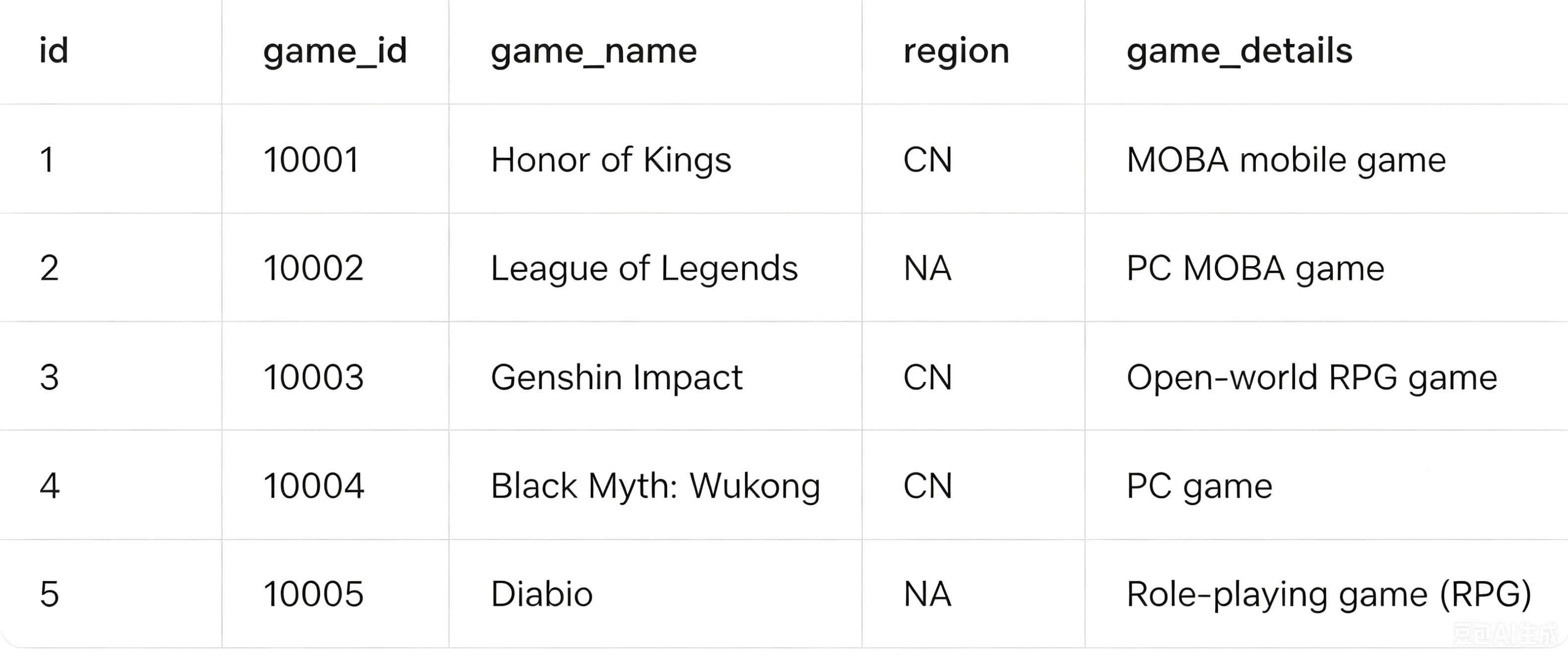
The log field Pid is associated with the id field in MySQL, but with a different name. The enriched game_details field from MySQL is renamed to game_info in logs.
Create a new table test in MySQL and add the following data:
Raw log:
[{"Pid": 1},{"Pid": 2},{"Pid": 3}]
Processing rule:
//On the console, set the alias configuration of external data MySQL to hm, the db of mysql to test222, and the table name to test//Pull some data from MySQL and use the t_table_map function to join dimensional tables//The log field Pid relates to the id field in MySQL, with different names//Enrich the game_details field from MySQL, rename to game_info in logst_table_map(res_rds_mysql(alias="hm",database="test222",sql="select * from test where region='CN'"),[["Pid", "id"]],["game_name",["game_details","game_info"]])
Processing result:
[{"Pid":"1""game_info":"MOBA mobile game""game_name":"Honor of Kings"},{"Pid":"2"},{"Pid":"3""game_info":"open world RPG game""game_name":"Genshin Impact"}]
Function enrich_table
Function definition
This function uses CSV structure data to match fields in logs and, when matched fields are found, the function adds other fields and values in the CSV data to the source logs.
Syntax Description
enrich_table("csv source data", "csv enrichment field", output="target field1, target field2, target field...", mode="overwrite")
Parameter Description
Parameter Name | Parameter Description | Parameter Type | Required | Default Value | Parameter Value Range |
data | For the input CSV data, the first line is column name and other lines are corresponding values. For example: region,count\\nbj, 200\\ngz, 300. | String | Yes | - | - |
fields | Name of the column to be matched. The field name in the CSV matches the field with the same name in the actual log. A single field name or multiple new field names concatenated with English half-width commas. | String | Yes | - | - |
output | Output field list. A single field name or multiple new field names concatenated with English half-width commas. | String | Yes | - | - |
mode | Write mode of the new field. | String | No | overwrite | - |
Example
Raw log:
{"region": "gz"}
Processing rule:
enrich_table("region,count\\nbj,200\\ngz,300", "region", output="count")
Processing result:
{"count":"300","region":"gz"}
enrich_dict Function
Function Definition
The Dict structure is used to match the field values in the log. When the value of the specified field is the same as the Key in the Dict, the Value corresponding to this Key will be assigned to another field in the log.
Syntax Description
enrich_dict ("JSON dictionary", "source field name", output=target field name, mode="overwrite")
Parameter Description
Parameter Name | Parameter Description | Parameter Type | Required | Default Value | Parameter Value Range |
data | Input dict data, which must be the escape string of JSON object, for example: {\\200\\":\\"SUCCESS\\". | String | Yes | - | - |
fields | Name of the field to be matched. When the key in dict is the same as the value corresponding to the specified field, the match succeeds. A single field name or multiple new field names concatenated with English half-width commas. | String | Yes | - | - |
output | Target field list. After successful matching, the function writes the corresponding values in the dict data to the target field list. The value can be a single field name or multiple new field names concatenated with commas. | String | Yes | - | - |
mode | Write mode of the new field. | String | No | overwrite |
Example
Raw log:
{"status": "500"}
Processing rule:
enrich_dict("{\\"200\\":\\"SUCCESS\\",\\"500\\":\\"FAILED\\"}", "status", output="message")
Processing result:
{"message":"FAILED","status":"500"}
피드백