Enabling TDE
다운로드
포커스 모드
폰트 크기
Scenarios
TencentDB for PostgreSQL provides the Transparent Data Encryption (TDE) feature. Transparent encryption means that data encryption and decryption operations are transparent to users. This feature supports real-time I/O encryption and decryption for data files. Data is encrypted before being written to disk and decrypted when it is read from disk into memory, meeting compliance requirements for data-at-rest encryption.
Prerequisites
The TDE encryption feature can only be enabled during instance creation and cannot be disabled once enabled.
The encryption feature is supported only when the kernel version is PostgreSQL v10.17_r1.2, v11.12_r1.2, v12.7_r1.2, v13.3_r1.2, or v14.2_r1.0.
You must first activate the Key Management Service (KMS). If it is not activated, you can purchase the KMS Key Management Service in advance via Activate KMS.
If you use a sub-account for operations, you must create a service role to authorize TencentDB for PostgreSQL to access KMS. You can use the root account to access this link to create the role.
The sub-account must have the permissions for "cam:PassRole", "kms:GetServiceStatus", and "kms:GetRegions". If it lacks these permissions, you can use the root account to grant them to the operating account.
Note:
The keys used for encryption are generated and managed by Key Management Service (KMS). TencentDB for PostgreSQL does not provide the keys or certificates required for encryption.
The Transparent Data Encryption (TDE) feature incurs no additional charges. However, the Key Management Service (KMS) may incur additional fees. For details, see Billing Overview.
When your account is in arrears, you cannot obtain keys from KMS, which may cause tasks such as migration and upgrade to fail. For details, see Arrears Explanation.
Notes
The Transparent Data Encryption (TDE) feature cannot be disabled once enabled. If the key authorization is revoked, restarting the database will cause it to become unavailable.
After you enable the TDE encryption feature, data backups are also encrypted. If a backup file is leaked, you do not need to worry about data leakage. To restore data from a backup, use the Clone Instance feature of TencentDB for PostgreSQL.
After the TDE encryption feature is enabled, the security of static data is enhanced but the read/write performance when accessing the encrypted database is impacted. Please decide whether to enable the TDE encryption feature based on your actual requirements. According to actual tests, the average performance degradation is between 2% and 3%.
If a primary instance is associated with a read-only instance, the encryption feature is automatically enabled on the read-only instance, and the read-only instance cannot be managed.
After you enable the TDE encryption feature, your account balance must be greater than or equal to 0. Otherwise, the instance migration will fail because KMS cannot be accessed.
To prevent accidental scenarios such as instance misdeletion, Tencent Cloud has implemented a key deletion protection measure. If an instance is configured with data encryption, the key is not unbound immediately after the instance is isolated or deactivated. Instead, deletion of the key from KMS is supported only after the instance has been in the recycle bin for three days following its deactivation.
Operation Steps
1. Log in to the TencentDB for PostgreSQL purchase page and enable the database encryption feature in the Enable Encryption option.
2. In the dialog box that pops up, select a key and click Encrypt.
Note:
Instances with the data encryption feature enabled do not support restoration to a self-built database on another host using physical backups.
The data encryption feature cannot be disabled once enabled.
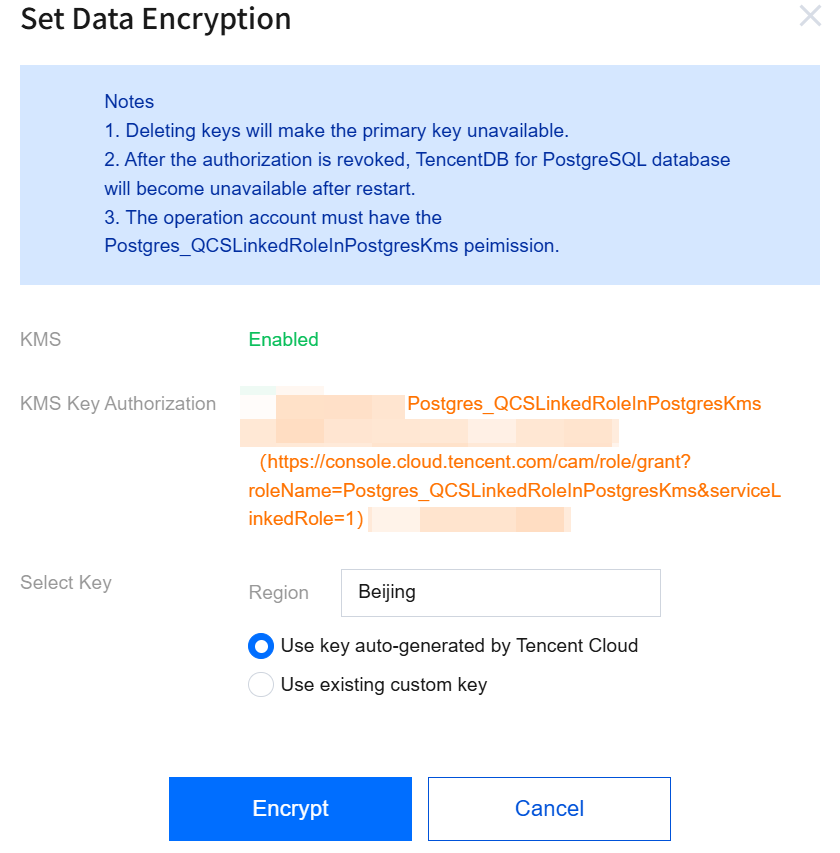
KMS: If the KMS Key Management Service is not enabled, you need to purchase the KMS Key Management Service.
KMS Key Authorization: If you are prompted that authorization is not granted, you can click the authorization link to go to the role authorization page, enabling TencentDB for PostgreSQL to use the service role to operate the KMS Key Management Service.
Select Key:
Select the region for the KMS Key Management Service based on the region of your instance. If the prompt "No KMS region is available" appears, it indicates that the current region does not support KMS, and encryption cannot be enabled.
When you select Use key auto-generated by Tencent Cloud, Tencent Cloud automatically generates the key.
When you select Use existing custom key, you can select a key that you created.
Note:
If you do not have a custom key, you can click "click here to create one" to create a key in the KMS console. For details, see Create a Key.
피드백