You can purchase quality traffic packages based on your requirements, and the quality traffic packages are shared among same-region instances with Quality Traffic Package enabled.
Quality traffic packages are used only to offset the consumption of public network bandwidth traffic from Hong Kong (China) and Singapore to the Chinese mainland. Other public network bandwidth traffic is charged based on the original billing mode.
Quality traffic packages can be used to offset traffic consumption for multiple instances simultaneously.
You can purchase multiple quality traffic packages for combined use.
If you purchase multiple quality traffic packages, the system prioritizes using the quality traffic package with the earliest expiration date to offset traffic consumption. If multiple packages have the same expiration date, the system prioritizes using the package with smaller residual traffic quota.
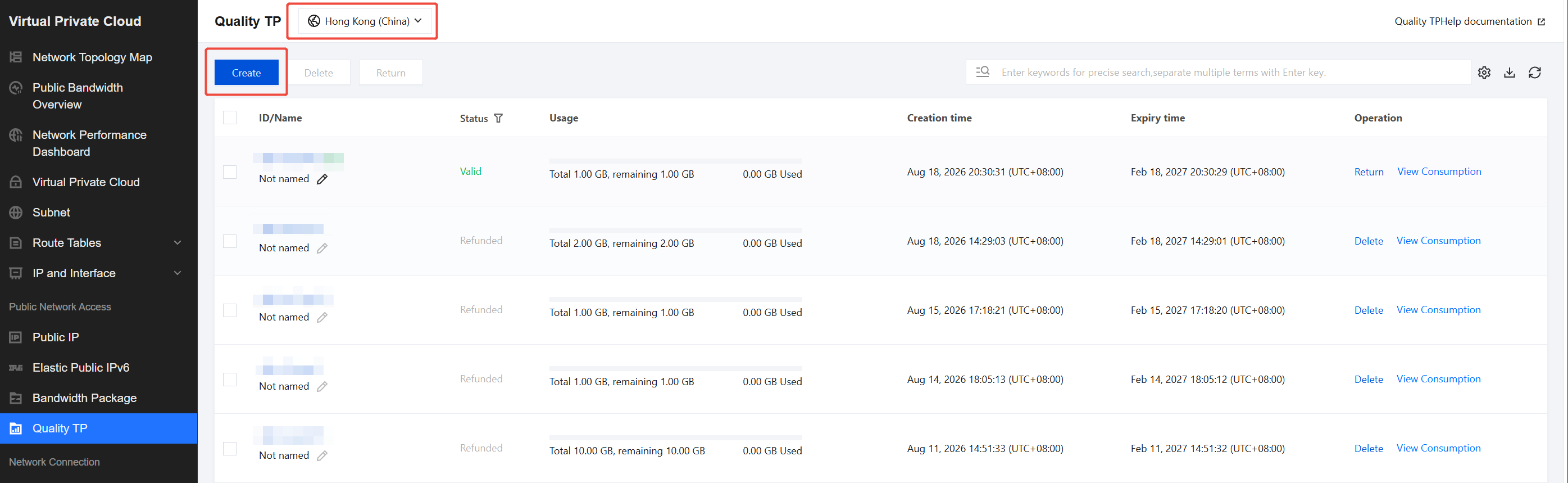
2. On the quality traffic package page, select a region from the upper-left corner, and click Create.
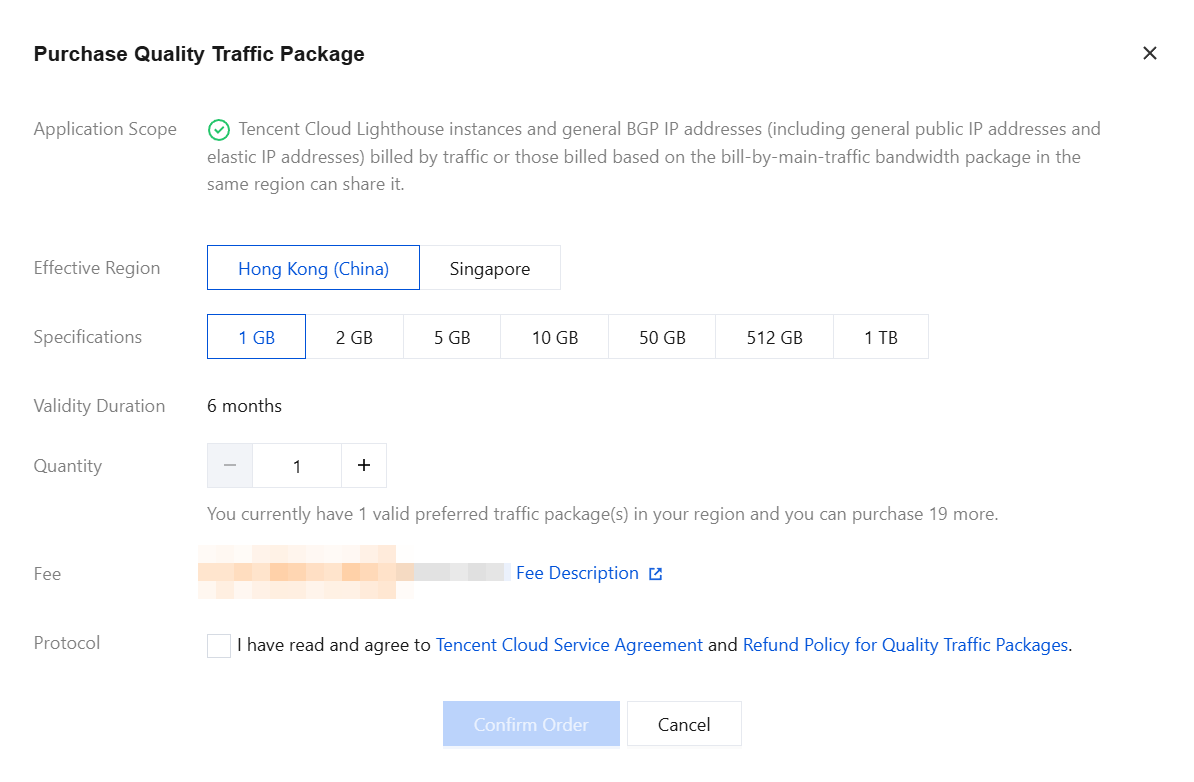
3. On the quality traffic package purchase page, configure the quality traffic package according to the following information.
Configuration
Description
Applicable Scope
This configuration does not need to be selected.
Lighthouse: supports the Hong Kong (China) and Singapore regions. To enable quality traffic packages for Razor Speed Lighthouse instances, please submit a beta application. We will complete the review within 3 business days.
General BGP IP addresses, including common public IP addresses and EIPs in pay-by-traffic and main traffic billing modes: only Hong Kong (China) is supported.
Effective Region
Select the region where you want to create the quality traffic packages. Currently, Hong Kong (China) and Singapore are supported. In this example, select Hong Kong (China).
Specification
Currently, supported specifications are as follows: 1 GB, 2 GB, 5 GB, 10 GB, 50 GB, 512 GB, and 1 TB.
Validity Period
The validity period of the quality traffic package is 6 months.
A quality traffic package is non-refundable upon expiration. Any unused traffic will be cleared upon expiration.
Purchase Quantity
Select the number of quality traffic packages you want to purchase. A maximum of 20 valid quality traffic packages can be purchased per region.
Protocol
Select I have read and agree to Tencent Cloud Service Agreement and Refund (for quality traffic packages).
4. After the configuration is completed, click Confirm Order.
5. On the order review page, review order information. If you have a product promo voucher, you can select Use Promo Voucher for Deduction. After you confirm the information is correct, click Pay Now.
6. On the payment page, select a payment method and complete the payment. After the payment is successful, view the purchased quality traffic packages in the quality traffic package list.
Subsequent Operation Steps
Enable Quality Traffic Package for the corresponding instance. For details, see Getting Started.