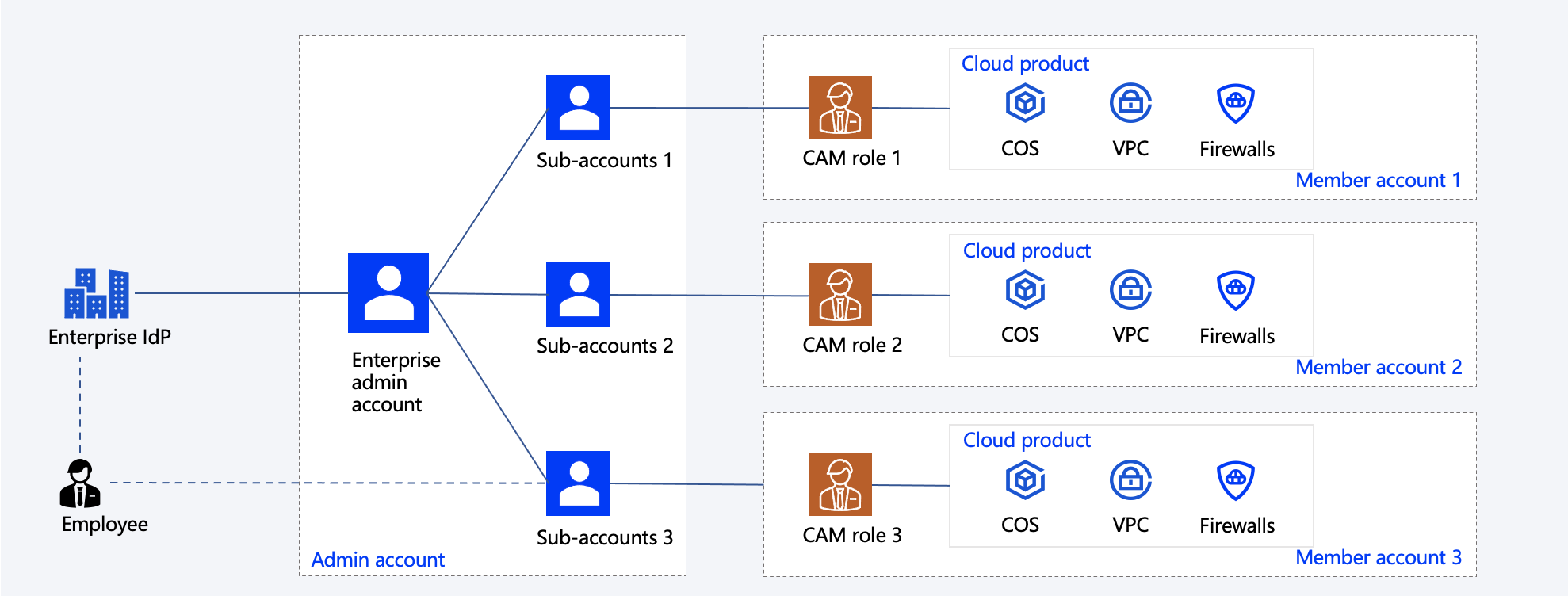
An enterprise has dedicated IT departments or administrators responsible for O&M in different areas such as security, network, and monitoring. If the enterprise has multiple cloud accounts, these IT administrators need to configure permissions under each account to handle network information and security settings for the account.
Customer Challenges
Configuring permissions across numerous accounts is complex and prone to inconsistency.
Creating sub-accounts under different accounts increases management complexity and poses risks of account information leakage.
It is difficult to identify and revoke sub-accounts and permissions of an employee after the employee's permissions change.
Solution Overview
1. The enterprise admin account is integrated with internal accounts, enabling employees to log in to the Tencent Cloud console with single sign-on (SSO).
2. Sub-users are created under the enterprise admin account for employees.
3. Cloud Access Management (CAM) roles are created based on division of responsibilities within the enterprise. Each CAM role is configured to manage multiple accounts with granted access permissions.
4. CAM roles are associated with the member accounts of the enterprise. Employees can then use the associated CAM roles to manage the accounts.
5. Sub-users under the enterprise admin account are granted the permissions to use specific member accounts and CAM roles.
6. Employees can log in to the Tencent Cloud console with SSO to view the member accounts and CAM roles they can use and switch between the accounts.