2. In the left sidebar, choose System Settings > Allowlist Settings.
Note
By default, the access allowlist feature is disabled (allowing all source IPs). You can enable the feature by clicking the
icon. Once it is enabled, you can perform the following operations.
3. By default, the automatic addition to the allowlist feature is enabled. When Ops users log in successfully, their source IPs are automatically added to the access allowlist. This feature can be manually disabled by the user.
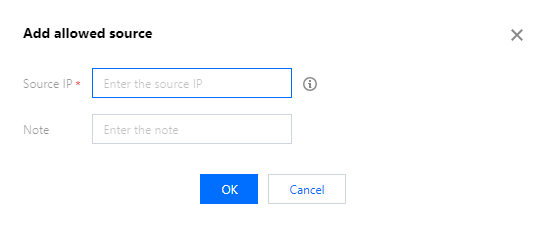
4. On the Allowlist Settings page, click Add to open the Add Access Allowlist dialog box. Configure the following information:
Parameter description:
Source IP: Enter the source IP address of the Ops personnel.
Remarks: Enter remarks information.
5. Click OK to complete the addition of the access allowlist.