tencent cloud
최신 혜택
상품
솔루션
가격
파트너
마켓플레이스
더 알아보기
Prev
Next
Bastion Host
BH 정책
개인 정보 보호 정책
데이터 처리 및 보안 계약
문서
Bastion Host
Modifying Ports
다운로드
포커스 모드
폰트 크기
마지막 업데이트 시간: 2025-04-18 10:43:28
Overview
After host synchronization, the default port is used (for instance, Linux uses port 22 by default). If the host uses a port other than the default, modify the port if necessary.
Directions
1.
Log in to the
BH console
.
2.
In the left sidebar, choose
Asset Mgmt
>
Servers
.
3.
On the Host Assets page, select the host for which you want to modify the port, then click
More
>
Modify port
.
4.
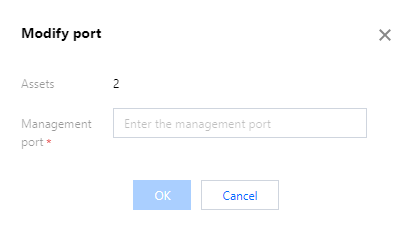
In the port modification popup, set the new management port and click
OK
to modify the management port of multiple hosts.
다음 주제: 개인 정보 보호 정책
도움말 및 지원
문제 해결에 도움이 되었나요?
예
아니오
더 자세한 내용은
문의하기
또는
티겟 제출
을 통해 문의할 수 있습니다.
피드백
키워드로 검색
Search titles only
Enter keywords to search documentation