Rename an instance on the Cluster Details Page
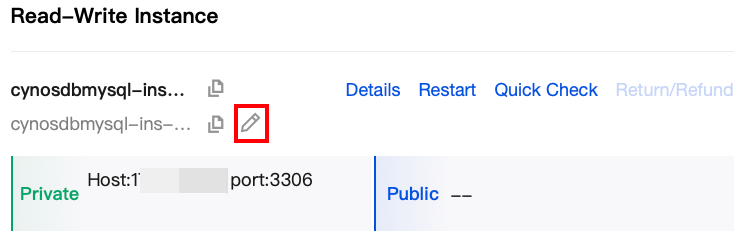
1. Log in to TDSQL-C for MySQL Console, locate the cluster list on the left, and click the target cluster to enter the cluster management page. 2. In the cluster details, find the target instance, hover over the Instance Name, and the edit icon will appear. Click the edit icon after the Instance Name.
3. In the pop-up window, enter a new name and click OK.
Note:
The instance name can contain up to 60 letters, digits, hyphens, underscores, and dots.
Rename an instance on the instance details page
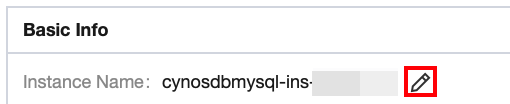
If you are currently on the details page of an instance under a cluster, you can directly rename the instance on this page. Under Basic Information, click the modification icon after the Instance Name, make the changes, and then click OK.
Renaming an instance in the instance list
1. Log in to the console and click the ID of the target cluster in the cluster list to enter the cluster management page. 2. On the instance management page, select the Instance List tab and click the modification icon after the name of the target instance.
3. In the pop-up window, enter a new name and click OK.
Note:
The instance name can contain up to 60 letters, digits, hyphens, underscores, and dots.
Renaming an instance on the instance details page
1. Log in to the console and click the ID of the target cluster in the cluster list to enter the cluster management page. 2. On the instance management page, select the Instance List tab and click the modification icon after the name of the target instance.
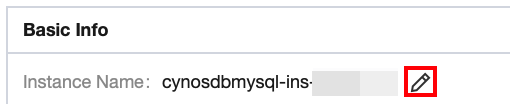
3. In the Basic Info section of the instance details page, click the modification icon after the instance name.
4. In the pop-up window, enter a new name and click OK.
Note:
The instance name can contain up to 60 letters, digits, hyphens, underscores, and dots.