tencent cloud

Chat

제품 소개
제품 개요
Basic Concepts
응용 시나리오
기능 소개
계정 시스템
사용자 정보 및 관계망
메시지 관리
그룹 시스템
Official Account
Audio/Video Call
사용 제한
구매 가이드
과금 개요
요금 안내
Purchase Instructions
Renewal Guide
연체 안내
Refund Policy
다운로드 센터
SDK & Demo 소스 코드
업데이트 로그
시나리오 솔루션
Live Streaming Setup Guide
AI Chatbot
대규모 엔터테인먼트 협업 커뮤니티
Discord 구현 가이드
IM을 게임에 통합하는 방법
WhatsApp Channel-style Official Account Integration Solution
Send Red Packet
Firewall Restrictions
클라이언트 APIs
SDK API(Web)
Android
iOS & macOS
Swift
Flutter
Electron
Unity
React Native
C APIs
C++
서버 APIs
Secure authentication with UserSig
RESTful APIs
Webhooks
콘솔 가이드
New Console Introduction
애플리케이션 생성 및 업그레이드
기본 설정
기능 설정
계정 관리
그룹 관리
Official Channel Management
콜백 설정
모니터링 대시보드
Viewing Guide for Resource Packages
Real-Time Monitor
개발 보조 툴
액세스 관리
Advanced Features
FAQ
uni-app FAQs
구매
SDK 관련 질문
계정 인증
사용자 정보 및 관계망
메시지
그룹
라이브 방송 그룹
닉네임 및 프로필 사진
협약 및 인증
Service Level Agreement
컴플라이언스 인증
IM 정책
개인 정보 보호 정책
데이터 개인 정보 보호 및 보안 계약
에러 코드
문의하기
문서Chat

Flutter

포커스 모드
폰트 크기
마지막 업데이트 시간: 2025-04-16 15:00:22

Feature Description

A community is a large group of people brought together by common topics, and multiple topics can be created under the same community based on different interests. Community groups are used to manage group members. All topics under the same community group are shared among members, who can send and receive messages within each topic independently. See use cases of community groups here.
Community and topic management APIs are in the TencentImSDKPlugin.v2TIMManager.getGroupManager() core class.
Topic message APIs are in the TencentImSDKPlugin.v2TIMManager.getMessageManager() core class.
Note:
This feature is supported by Flutter SDK v4.0.0 or later. To use it, you need to purchase the Ultimate edition, go to the console, choose Feature Configuration > Group configuration > Group feature configuration > Community, and enable the community feature.

Community Group Management

Creating a community group

Call the createCommunity (Details) API to create the community group.
Sample code:
// Create a topic-enabled community
final info = V2TimGroupInfo(
groupID: "",
groupType: GroupType.Community,
isSupportTopic: true,
groupName: "testGroup",
);

await TencentImSDKPlugin.v2TIMManager.getCommunityManager().createCommunity(
info: info,
memberList: memberList,
);

Getting the list of community groups joined

You can call getJoinedCommunityList(Details) to get the list of community groups joined.
Sample code:
// Getting the list of community groups joined
V2TimValueCallback<List<V2TimGroupInfo>> groupList = await TencentImSDKPlugin.v2TIMManager.getCommunityManager().getJoinedCommunityList();

Other management APIs

Other features can be used in the same way as an ordinary group feature and involve the following APIs:
Category
Feature
API
Community group management
joinGroup (dart)
quitGroup (dart)
dismissGroup (dart)
getGroupsInfo (dart)
setGroupInfo (dart)
Community group member management
getGroupMemberList (dart)
getGroupMembersInfo (dart)
setGroupMemberInfo (dart)
kickGroupMember (dart)


Topic Management

Multiple topics can be created under the same community group. All the topics are shared among group members, who can send and receive messages within each topic independently.
Note:
To use the feature, you need to go to the console, choose Feature Configuration > Group configuration > Group feature configuration > Community, enable the community feature and then enable the topic feature.

Creating a topic

You need to perform two steps to create a topic:
1. Create a V2TIMTopicInfo (Details) object.
2. Call the createTopicInCommunity (Details) API to create a topic.
Sample code:
// Create a topic
communityManager.createTopicInCommunity(groupID: "groupID", topicInfo: V2TimTopicInfo.fromJson({
"topicName":"topic"
}));

Deleting a topic

You can call the deleteTopicFromCommunity(Details) API to delete a topic.
Sample code:
// Delete a topic
communityManager.deleteTopicFromCommunity(groupID: "",topicIDList:["topicID"]);

Modifying topic information

You need to perform two steps to modify the information of a topic:
1. Create a V2TIMTopicInfo (Details) object and modify fields as needed.
2. Call the setTopicInfo (Details) API to modify topic information.
Sample code:
// Modify topic information
communityManager.setTopicInfo(topicInfo:V2TimTopicInfo.fromJson({
"topicName":"topicName"
}));

Getting the topic list

You can call the getTopicInfoList (Details) API to get the topic list.
If topicIDList is an empty array, the list of all topics of the community group will be got.
If topicIDList is the ID of specified topics, the list of the specified topics will be got.
Sample code:
// Get the topic list
groupManager.getTopicInfoList(groupID: "",topicIDList: ['topicID']);

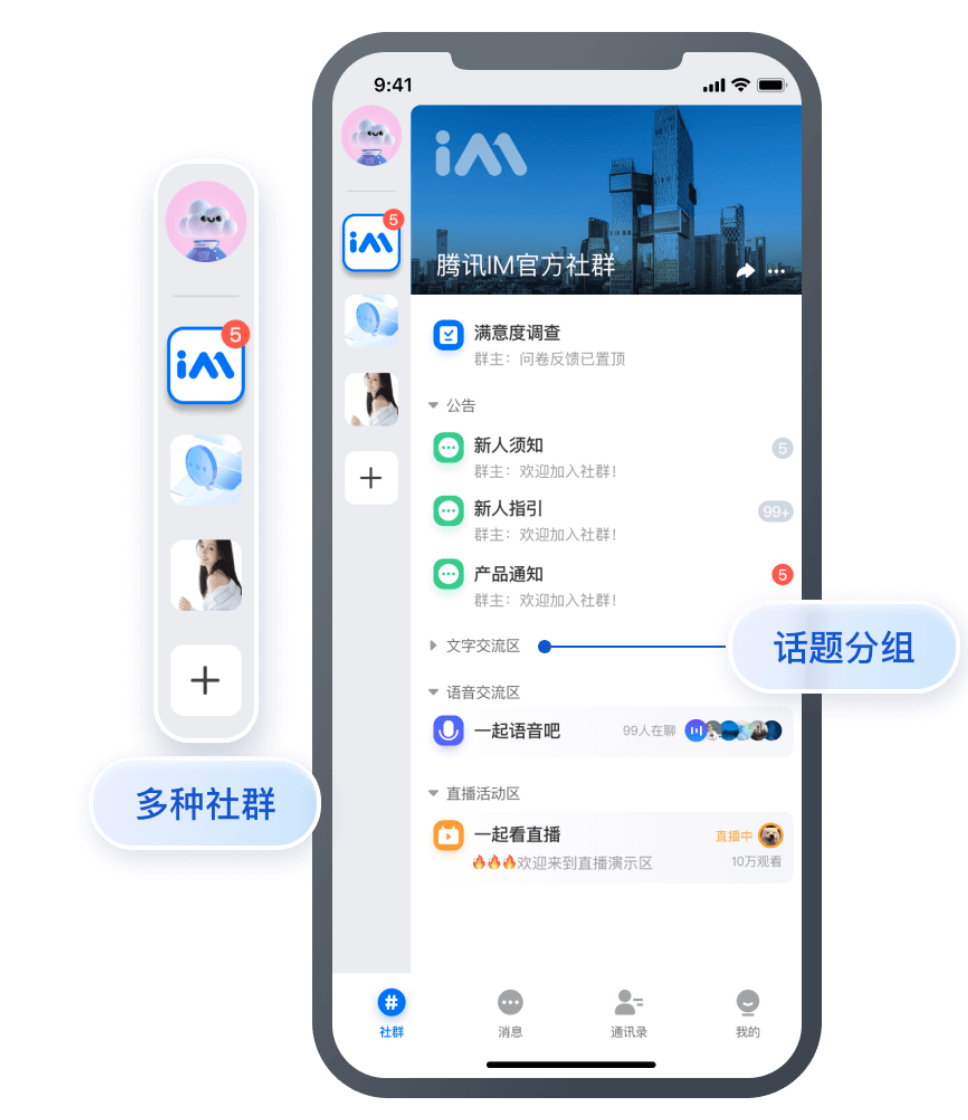
Topic groups

The community is a new powerful tool for entertainment collaboration and supports the community-group-topic hierarchy to isolate messages.


The customInfo of a community saves the topic group list of the community, while the customString field of each topic stores the topic group.
When a community is loaded, the customInfo field for the topic group list of the community (group) is used to display the group list. We recommend you store the field in the List<String> format.
To get the topics in each group, traverse the topic list and get the group of each topic through the customString of V2TimTopicInfo.
Note:
You can customize the key value of the customInfo field for the topic group list of the community (group). The following sample code names it topic_category.

Getting the list of groups in the community

Call the getCommunityCategoryList(String groupID) method. Sample code:
getCommunityCategoryList(String groupID) async {
final Map<String, String>? customInfo = await getCommunityCustomInfo(groupID);
if(customInfo != null){
final String? categoryListString = customInfo["topic_category"];
if(categoryListString != null && categoryListString.isNotEmpty){
return jsonDecode(categoryListString);
}
}
}

Future<Map<String, String>?> getCommunityCustomInfo(String groupID) async {
V2TimValueCallback<List<V2TimGroupInfoResult>> res =
await TencentImSDKPlugin.v2TIMManager
.getGroupManager().getGroupsInfo(groupIDList: [groupID]);
if(res.code != 0){
final V2TimGroupInfoResult? groupInfo = res.data?[0];
if(groupInfo != null){
Map<String, String>? customInfo = groupInfo.groupInfo?.customInfo;
return customInfo;
}
}
return null;
}

Configuring the group list for the community

You just need to modify the customInfo in groupInfo. Here is a Map, and the key value is the name of the field for the topic group list you defined.
The getCommunityCustomInfo method is implemented in the above section. Sample code:
setCommunityCategoryList(String groupID, String groupType, List<String> newCategoryList) async {
final Map<String, String>? customInfo = await getCommunityCustomInfo(groupID);
customInfo?["topic_category"] = jsonEncode(newCategoryList);
TencentImSDKPlugin.v2TIMManager
.getGroupManager()
.setGroupInfo(info: V2TimGroupInfo(
customInfo: customInfo,
groupID: groupID,
groupType: groupType,
// ...Other profiles
));
}

Adding a topic to a group

It is recommended that you pass in JSON strings into V2TimTopicInfo customString. For example, the recommended format for categoryName in the code below is {"category":"Group 1"}.
Sample code:
addCategoryForTopic(String groupID, String categoryName) {
TencentImSDKPlugin.v2TIMManager.getGroupManager().setTopicInfo(
topicInfo: V2TimTopicInfo(
customString: categoryName
),
groupID: groupID, // Group ID of the topic
);
}

Getting the topic group

Use the customString after getting the topic list.

Listening for topic callbacks

In V2TIMCommunityListener (Details), topic related callback methods onCreateTopiconDeleteTopiconChangeTopicInfo are added for topic event listening.
Sample code:
V2TIMCommunityListener v2TIMCommunityListener = new V2TIMCommunityListener() {
onCreateTopic(String groupID, String topicID) {
// Listen for topic creation notifications
}

onDeleteTopic(String groupID, List<String> topicIDList) {
// Listen for topic deletion notifications
}
onChangeTopicInfo(String groupID, V2TIMTopicInfo topicInfo) {
// Listen for topic information update notifications
}
};
TencentImSDKPlugin.v2TIMManager.getCommunityManager().addCommunityListener(listener: v2TIMCommunityListener);

Topic Messages

Topic messages can be used in the same way as ordinary messages and involve the following APIs:
Feature
API
Description
Sends a message
sendMessage (dart)
Set `groupID` to the topic ID.
Receives a message
`onRecvNewMessage` method in `V2TIMAdvancedMsgListener` (dart)
Set `groupID` in the message to the topic ID.
Marks a message as read
cleanConversationUnreadMessageCount (dart)
Set `groupID` to the topic ID.
Gets historical messages
getGroupHistoryMessageList (dart)
Set `groupID` to the topic ID.
Recalls a message
revokeMessage (dart)
Set `groupID` to the topic ID.


도움말 및 지원

문제 해결에 도움이 되었나요?

피드백