TUILiveKit provides two beauty enhancement options: Basic Beauty (built-in) and Advanced Beauty (requires additional integration and purchase). Choose the solution that best fits your application requirements.
Basic Beauty
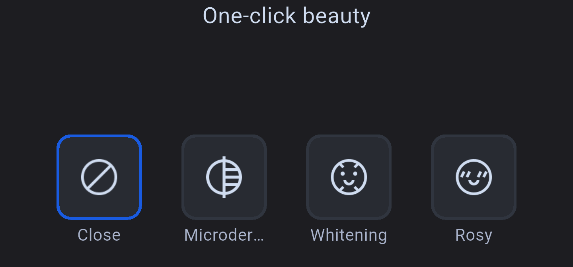
Basic Beauty is included by default in TUILiveKit with no additional setup required. It offers whitening, smoothing, and rosy skin effects, each with adjustable intensity controls.
Advanced Beauty
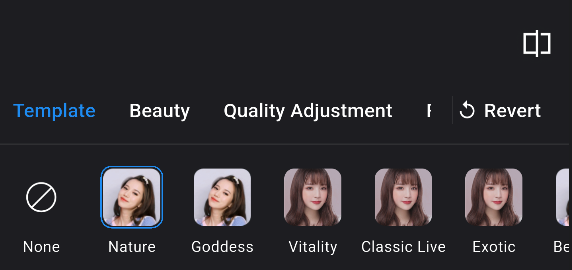
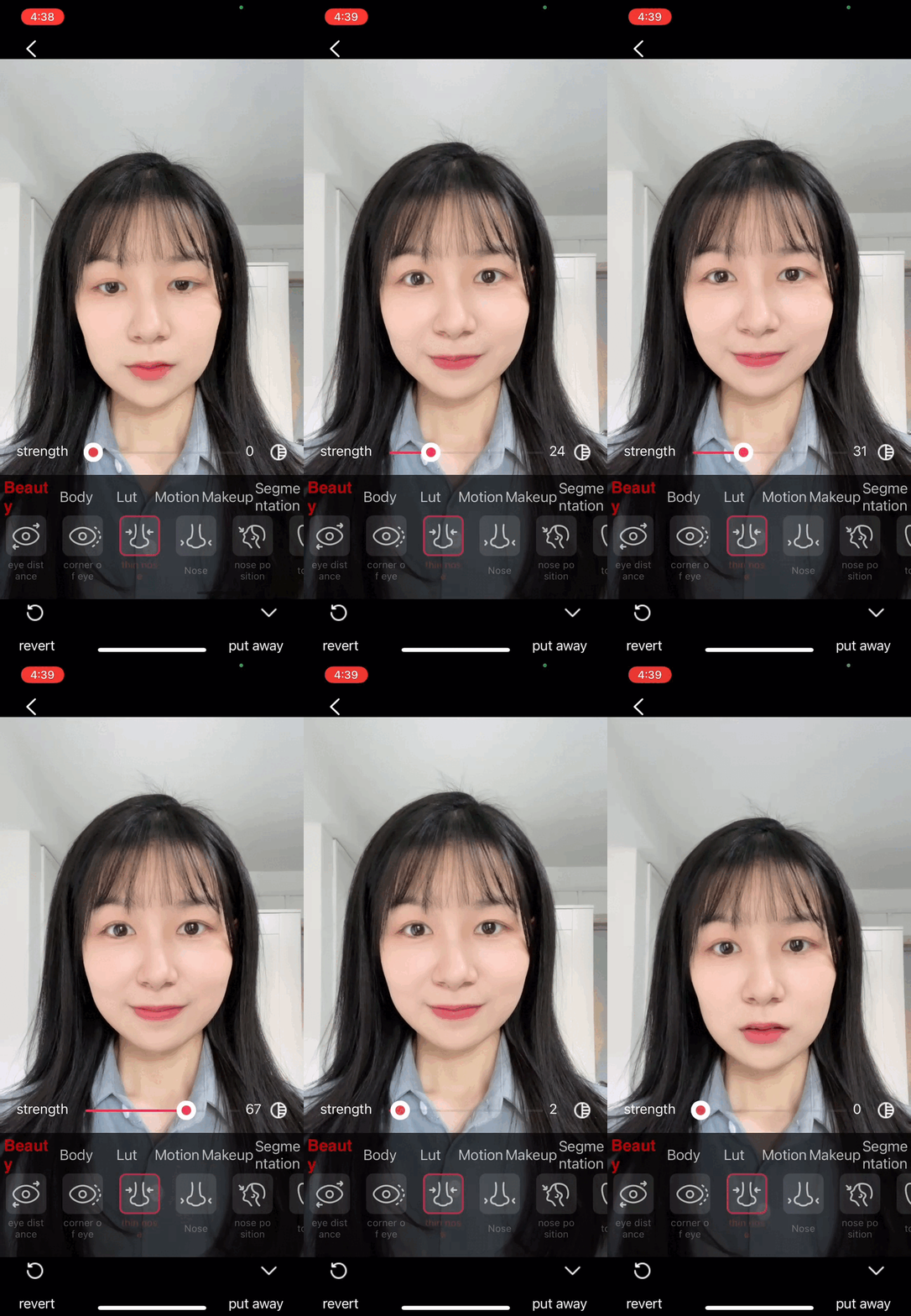
Advanced Beauty is powered by the Tencent Effects SDK, delivering a broader range of professional beauty enhancements. Features include V-shaped face, eye distance adjustment, nose slimming, 3D stickers, and more.
Example screenshots of both beauty panels:
Basic Beauty Panel
Advanced Beauty Panel
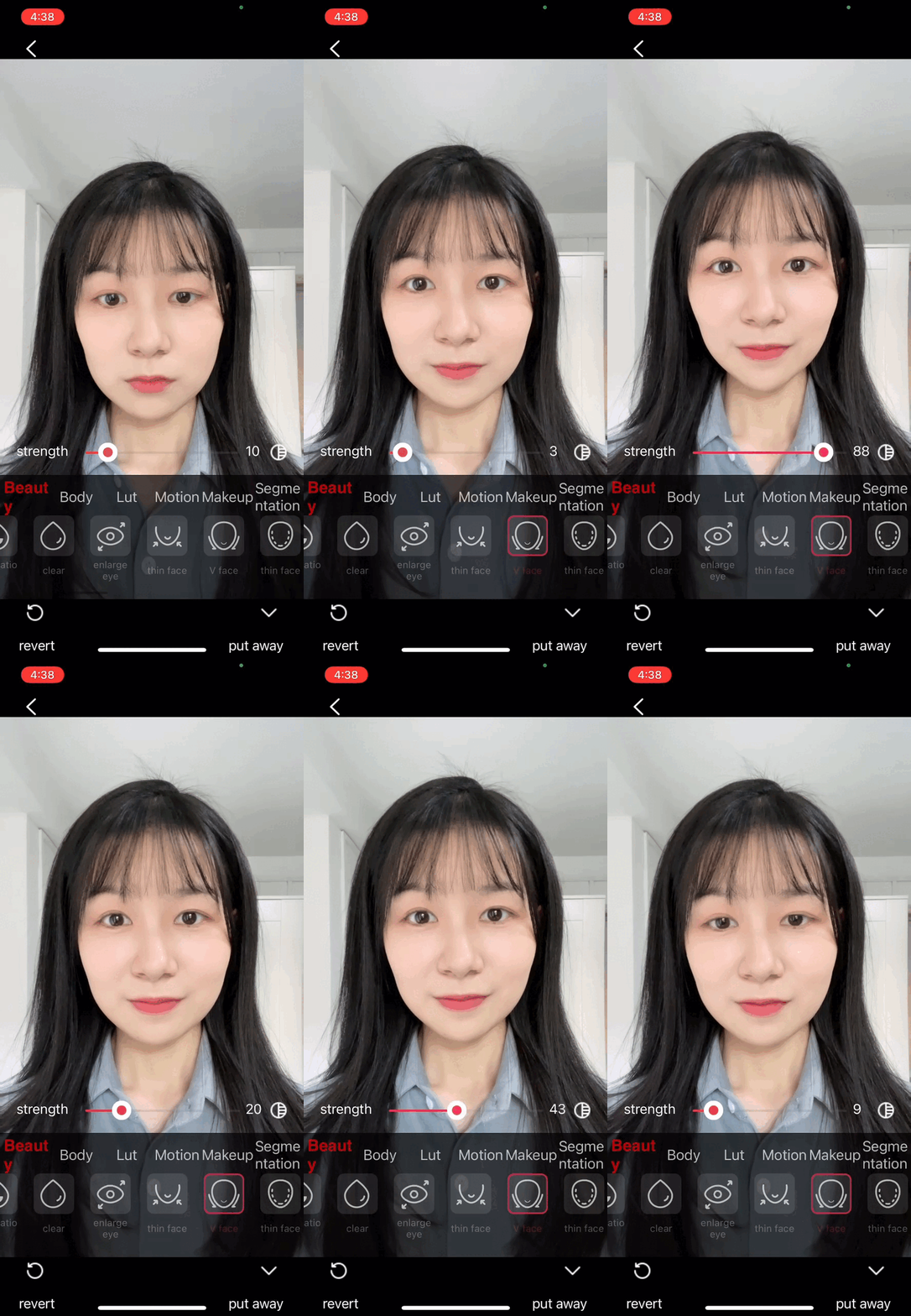
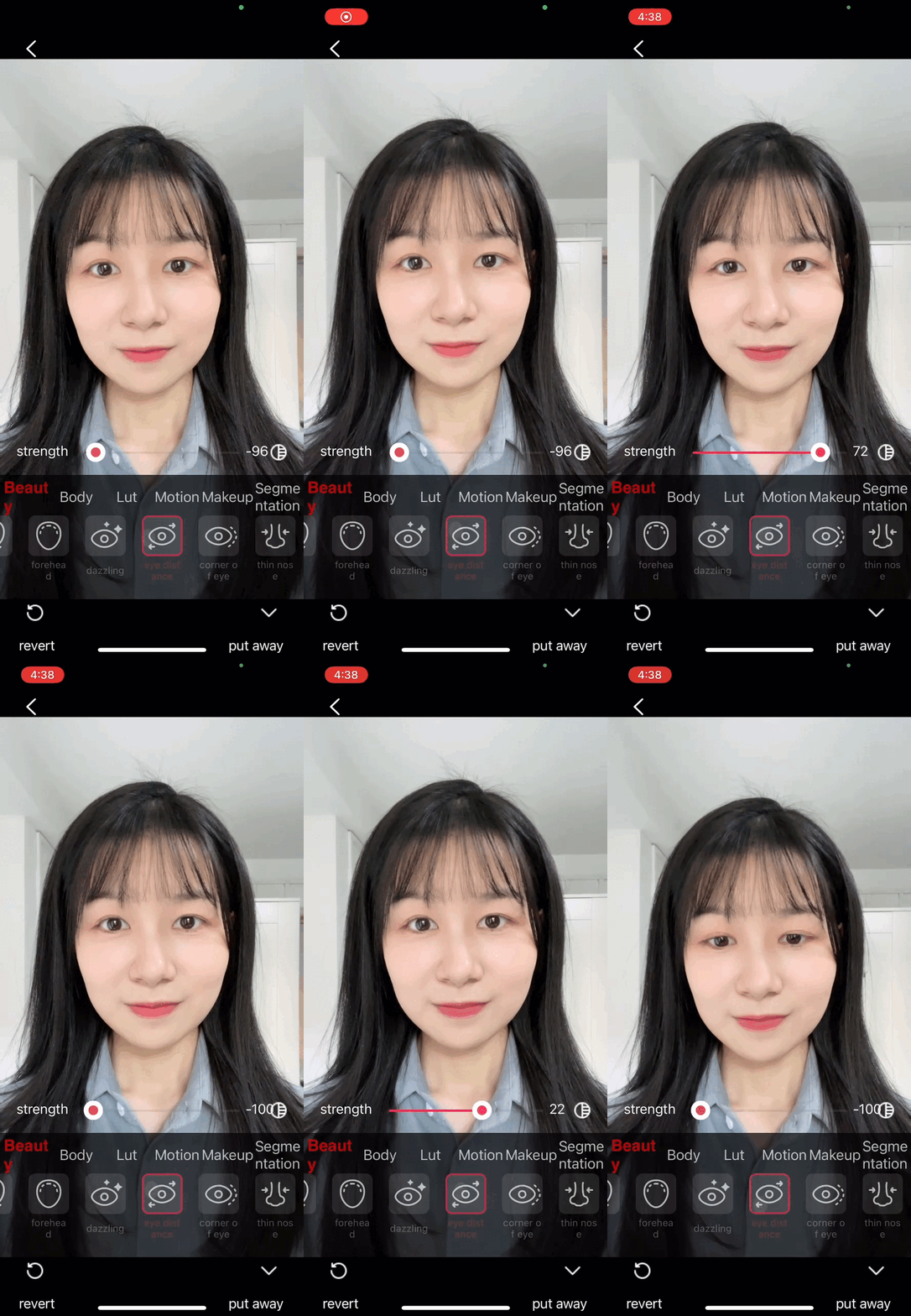
Advanced Beauty Effects Showcase
V-face
Eye Spacing
Nose Slimming
3D Sticker
Prerequisites
Complete TUILiveKit component integration by following the steps in Preparation.
Note:
Advanced beauty effect requires separate payment. For details, see Tencent Effect SDK.
Component Integration
Step 1: Integrate the TEBeautyKit Adapter Module
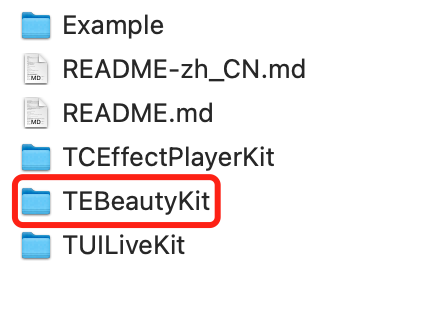
Download and extract the TUILiveKit package. Copy the iOS/TEBeautyKit directory into your project at the same level as your Podfile.
Note:
This folder acts as the adapter layer between TUILiveKit and the Tencent Effects SDK. It registers extensions and services through TUICore. When detected by TUILiveKit, the advanced beauty panel and video processing are enabled automatically. If not present, the system defaults to Basic Beauty.
Step 2: Download and Import Beauty Panel Resources (Required)
The advanced beauty panel requires two types of resources: panel configuration resources (JSON files and icons for UI elements like tabs, buttons, sliders) and material resources (filter LUTs, 2D/3D stickers, makeup, portrait segmentation .bundle). These resources are provided separately and must be combined in the same Beauty/ directory within your project.
Step 2.1: Download Part A: Panel Configuration Resources
Panel configuration resources are universal for all packages. Download them here.
After extraction, you will have a beauty_panel/ directory with the following files (different packages require different JSON files; see the "File Naming and Package Mapping" table at the end of this step):
beauty_panel/
├── beauty.json
├── beauty_template.json
├── beauty_template_ios.json
├── beauty_image.json
├── beauty_shape.json
├── beauty_base_shape.json
├── beauty_general_shape.json
├── beauty_makeup.json
├── beauty_body.json
├── light_makeup.json
├── makeup.json
├── motion_2d.json
├── motion_3d.json
├── motion_gesture.json
├── segmentation.json
├── lut.json
└── panel_icon/ # PNG icons for panel buttons
Step 2.2: Download Part B: Material Resources for Your Package
Material resources (LUTs, 2D/3D stickers, makeup, portrait segmentation .bundle) are included with each Tencent Effects SDK package, with contents varying by package. Obtain the appropriate beauty resources as follows:
1. Visit the Tencent Effects SDK Download. Under Mobile SDK, find your purchased package code (such as S1-07, A1-04, etc.). If you’re unsure, you can use S1-07 (full-featured package) for integration testing.
2. Click DOWNLOAD in the iOS column for your package to get the zip file.
3. Extract the zip and locate the following *.bundle directories (actual contents depend on your package; see the table below):
└── segmentMotionRes.bundle/ # Portrait segmentation / green screen materials
Note:
Advanced packages include more bundles. For example, A1_00 only includes lut.bundle, while S1_07 contains all bundles listed above. Always check your downloaded contents.
Step 2.3: Merge Resources and Add to Xcode Project
1. Combine the beauty_panel/ directory from Part A and all *.bundle directories from Part B into your app's Beauty/ directory. The final structure should be:
YourApp/
└── Beauty/
├── beauty_panel/ # Part A: Panel JSON config + icons
│ ├── beauty.json
│ ├── beauty_template.json
│ ├── beauty_template_ios.json
│ ├── beauty_image.json
│ ├── beauty_shape.json
│ ├── beauty_base_shape.json
│ ├── beauty_general_shape.json
│ ├── beauty_makeup.json
│ ├── beauty_body.json
│ ├── light_makeup.json
│ ├── makeup.json
│ ├── motion_2d.json
│ ├── motion_3d.json
│ ├── motion_gesture.json
│ ├── segmentation.json
│ ├── lut.json
│ └── panel_icon/ # All PNG icons for the panel
├── lut.bundle/ # Part B: Filter LUT color lookup tables
├── 2dMotionRes.bundle/ # Part B: 2D animated sticker materials
├── 3dMotionRes.bundle/ # Part B: 3D model sticker materials
├── makeupMotionRes.bundle/ # Part B: Makeup materials
├── lightMakeupRes.bundle/ # Part B: Light makeup materials
└── segmentMotionRes.bundle/ # Part B: Portrait segmentation / green screen materials
2. Drag the entire Beauty/ directory into your Xcode project (recommended placement: same level as AppDelegate.swift). When importing:
Select Create folder references (blue folder), not group.
Ensure Target Membership is enabled for your main app target.
This ensures all beauty_panel/*.json and *.bundle/ files are included in Bundle.main and accessible at runtime using Bundle.main.path(forResource:ofType:).
Step 2.4: Resource Usage Overview
Resource
Source
Purpose
Panel Feature
beauty_panel/*.json
Part A
Panel UI configuration (buttons, sliders, groups)
Overall panel
beauty_panel/panel_icon/
Part A
Panel button PNG icons
Overall panel
lut.bundle/
Part B
Filter color lookup tables
Filters Tab
2dMotionRes.bundle/
Part B
2D animated stickers / face effects
Stickers Tab
3dMotionRes.bundle/
Part B
3D model stickers
Stickers Tab
makeupMotionRes.bundle/
Part B
Full makeup sets (lipstick, eyeshadow, blush, etc.)
Include all panel JSON files required by your selected BeautyLevel. Missing files will result in blank or missing tabs. The table below lists the required panel JSON resources (from Part A) for each package. The corresponding *.bundle materials (from Part B) are provided in your SDK package and should be imported as shown above.
If any required resources are missing, TUILiveKit will still enable the advanced beauty panel, but the relevant tab may be blank or missing icons. Make sure all required panel JSONs, icons, and *.bundle materials for your selected package are included in Bundle.main.
The Part A zip is actively maintained and updated by TUILiveKit. Always download the latest version when integrating or upgrading for the newest UI configuration.
Part B *.bundle files are tied to your purchased Tencent Effects SDK package. Download the package that matches your selected BeautyLevel to avoid missing resources in the panel.
2. File Naming and Package Mapping: Include all panel JSON files required by your selected BeautyLevel. Missing files will result in blank or missing tabs. The table below lists the required JSON resources for each package:
If any required resources are missing, TUILiveKit will still enable the advanced beauty panel, but affected tabs may be blank or missing icons. Ensure all required JSONs, icons, and *.bundle materials for your package are included in Bundle.main.
Step 3: Configure the Podfile
Edit your Podfile to add the following lines, then run pod install:
platform :ios,'14.0'
target 'YourApp'do
use_frameworks!
# 1) Tencent Effects SDK (replace subspec with your purchased package, e.g., S1-07)
# 2) Adapter layer wrapper in the repo (exposes services and extensions to TUICore)
pod 'TEBeautyKitWrapper',:path=>'./TEBeautyKit'
end
Note:
Replace S1-07 with your actual package code. For best compatibility, use the version paired with your TUILiveKit integration.
Step 4: Authenticate and Initialize the License
In your app's entry point (AppDelegate.application(_:didFinishLaunchingWithOptions:)), call the following API to complete license authentication, TUICore registration, and package/panel setup:
BeautyLevel options (corresponding to your purchased Tencent Effects SDK package):
A1_00 A1_01 A1_02 A1_03 A1_04 A1_05 A1_06
S1_00 S1_01 S1_02 S1_03 S1_04 S1_05 S1_06 S1_07
Verification
After completing the steps above, launch your app and open the live broadcast or audience preview page. Click the beauty button:
1. If you see a multi-tab panel with V-shaped face, nose slimming, eye distance, filters, stickers, makeup, segmentation, etc. Advanced Beauty integration is successful.
2. If you only see three basic options (whitening / smoothing / rosy skin). Advanced Beauty extension was not registered. Please check:
2.1 TEBeautyKitWrapper is included in your Podfile and pod install completed successfully.
2.3 License validation passed (check the setTELicense callback code).
Note:
The panel opens, but certain tabs (such as Stickers, Filters, or Beauty) display no content. This issue may occur if the official beauty_panel resources have not been imported, or if the file names do not match the package configuration. Refer to Step 2 2 for troubleshooting.
FAQs
Can beauty resources be placed in a custom Bundle?
No. Panel JSON files reference sub-resources via relative paths, which are resolved by the Tencent Effects SDK using Bundle.main.
What should I do if license authentication fails?
Ensure that your licenseUrl and licenseKey are associated with your package, that the selected BeautyLevel matches the license, and that your app's BundleIdentifier matches the BundleId bound to the license.
How do I switch packages dynamically?
Call TUIBeautyKit.initialize(licenseUrl:, licenseKey:, beautyLevel:) again with the new package settings.