リソース関数
ダウンロード
フォーカスモード
フォントサイズ
res_local関数
関数定義
res_local関数を使用して、現在のデータ加工タスクで詳細設定の環境変数を取得してください。
構文記述
res_local(param, default=None, type="auto")
パラメータ説明
パラメータ名 | パラメータ説明 | パラメータタイプ | 必須かどうか | パラメータのデフォルト値 | パラメータの値の範囲 |
param | 高级設定における環境変数に対応するフィールド名です。 | string | はい | - | - |
default | フィールド値が存在しない場合、このパラメータの値を返します。デフォルト値は None です。 | string | はい | None | - |
type | データ出力時のデータ形式です。 auto(デフォルト値):元の値をJSON形式に変換します。変換に失敗した場合は元の値を返します。 JSON:元の値をJSON形式に変換します。変換に失敗した場合はdefaultパラメータの値を返します。 raw:元の値を返します。 | string | はい | auto | - |
例
データ加工の詳細設定に、フィールドが time_session、値が30の環境変数を1つ追加しました。
元のログ:
{}
加工ルール:
fields_set("time_session", res_local("time_session"))
加工結果:
{"time_session":"30"}
res_rds_mysql関数
関数定義
res_rds_mysql関数を使用して、クラウドMySQLデータベースからデータベーステーブルの内容またはSQL実行結果を取得します。初回はデフォルトでMySQLの全量データを取得します。この関数はt_table_map()関数と併用することで、ディメンションテーブル結合の効果を実現できます。
前提条件
MySQL側:アクセスアカウントがホストIPを制限している場合は、169.254.%を開放してください。詳細についてはMySQL-アカウント作成をご参照ください。
CLSデータ加工側:加工タスクの新規作成時に、外部データソーススイッチをオンにして、MySQLアクセス情報を設定してください。
構文記述
res_rds_mysql(alias, database="データベース名", sql="select name from person_info", refresh_interval=0, base_retry_back_off=1, max_retry_back_off=60, update_time_key=None, use_ssl=False)
パラメータ説明
パラメータ名 | パラメータ説明 | パラメータタイプ | 必須かどうか | パラメータのデフォルト値 | パラメータの値の範囲 |
alias | 設定されたデータベース情報のエイリアス | string | はい | - | - |
database | データベース名 | string | はい | - | - |
sql | データを取得するSQL文 | string | はい | - | - |
refresh_interval | データを取得する時間間隔、単位:秒。デフォルト値は0で、全量取得を1回だけ行うことを示します。 | number | いいえ | 0 | - |
base_retry_back_off | データ取得失敗後に再取得する時間間隔。デフォルト値は1、単位:秒。 | number | いいえ | 0 | - |
max_retry_back_off | データ取得失敗後に再試行するリクエストの最大時間間隔。デフォルト値は60、単位:秒。デフォルト値の使用を推奨します。 | number | いいえ | 60 | - |
update_time_key | 増分データの取得に使用します。このパラメータを設定しない場合、全量更新が実行されます。 | string | いいえ | - | - |
use_ssl | SSLプロトコルを使用して安全な接続を行うかどうか。 | bool | いいえ | False | - |
例
例1:テーブル内のデータを取得する
MySQLでテーブルtestを新規作成し、以下のデータを追加します:

元のログ:
[{"user_id": 1},{"user_id": 3}]
加工ルール:
//コンソールで外部データMySQLのエイリアスをhmに設定し、MySQLのdbをtest222、テーブル名をtestにします。//MySQLから全データを取得し、t_table_map関数を使用してディメンションテーブル関連付けを実行します。t_table_map(res_rds_mysql(alias="hm",database="test222",sql="select * from test"),"user_id",["gameid", "game"])
加工結果:
[{"user_id":"1"},{"game":"wangzhe","gameid":"123","user_id":"3"}]
例2:一部のデータを取得する
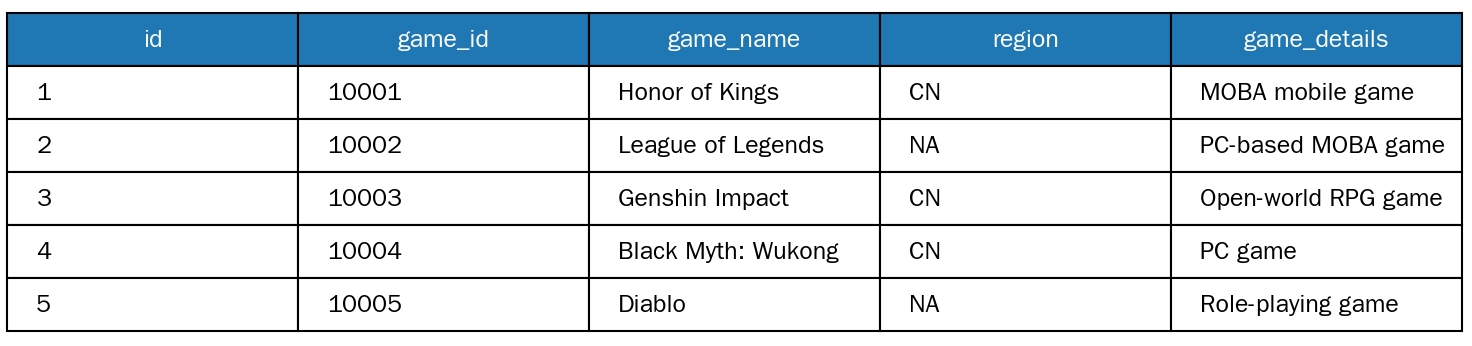
MySQLでテーブルtestを新規作成し、以下のデータを追加します:
元のログ:
[{"id": 1},{"id": 2},{"id": 3}]
加工ルール:
//コンソールで外部データMySQLのエイリアスをhmに設定し、MySQLのdbをtest222、テーブル名をtestにします。//select * from test where region='CN'、MySQLからregion='CN'の一部のデータを取得し、t_table_map関数を使用してディメンションテーブル関連付けを実行します。t_table_map(res_rds_mysql(alias="hm",database="test222",sql="select * from test where region='CN'"),"id",["game", "game_details"])
加工結果:
[{"game_details":"MOBA手游""game_name":"王者荣耀""id":"1"},{"id":"2"},{"game_details":"オープンワールドRPGゲーム""game_name":"原神""id":"3"}]
Join MySQLの説明
2種類のデータ取得方法
一度に取得する方法と増分データを取得する方法の2種類のデータ取得方法をサポートしています:
一度に取得する方法:MySQLデータソース内の全データを一度に取得します。データ量が固定されており、後続の増分更新が不要なシナリオに適しています。例えば、静的構成テーブルや履歴アーカイブデータなどです。
増分データ取得:ユーザーがMySQLテーブル内のupdate_time_keyフィールドを指定する必要があります(このフィールドにはデータのタイムスタンプを記録し、データ生成/更新時刻をマークするために使用します)。データ加工タスクは、前回取得した「MySQLデータの最大タイムスタンプ」を基準として、そのタイムスタンプ以上の新規または更新データのみを自動的に取得します。MySQLの増分データを継続的に同期する必要があるシナリオに適しています。例えば、リアルタイム業務テーブルや動的ログ関連テーブルなどです。
データ連携のコアロジック
どの取得方法を選択しても、CLSはまず取得したMySQLデータをCLS側でキャッシュし、その後キャッシュデータとログデータに基づいてJoin計算を実行し、関連付けプロセスの安定性と効率を確保します。
性能説明と拡張の推奨事項
データ加工効率を確保するため、以下の内容に注意する必要があります:
データ量制限:Join計算に参加する総データ量は100万件以内に制御することを推奨します。データ量がこの範囲を超えると、Join計算の遅延が発生し、加工タスク全体のパフォーマンスに影響を与える可能性があります。
拡張サポート:お客様のMySQLデータソースのデータ量が多い場合(長期的に安定して100万件を超えるデータを関連付ける必要がある場合)、Tencent Cloudの営業担当者を通じてお問い合わせいただき、リソース拡張を申請することで、ビジネスデータ関連付けの要件に対応できます。
MySQL内のデータ量が多い場合、本番環境のプライマリデータベースを直接CLSに関連付けないことを推奨します。CLSを通じてデータベースに対して過度に複雑なSQLクエリを発行し、本番環境の安定性に影響を与えることを避けるため、読み取り専用インスタンスの使用を推奨します。
費用
データセキュリティ
CLSがMySQLにアクセスするための専用データベースアカウントを作成することを推奨します。アカウントに対応するリソースおよび操作権限を可能な限り縮小してください。CLSに必要なのはクエリ権限のみで、編集および削除権限は不要です。設定方法についてはTencentDB for MySQLのアカウント権限変更を参照してください。アカウント情報を適切に保管し、漏洩しないでください。
フィードバック