Solution 1: Single-Write Dual-Consumption Migration
ダウンロード
フォーカスモード
フォントサイズ
Scenarios
This article mainly introduces the method of using the single-write dual-consumption scheme to migrate data from self-built Kafka clusters to CKafka.
Prerequisites
You have purchased a CKafka instance.
You have migrated topics to the cloud.
Operation Steps
When data ordering requirements are not high, the switch can be performed by adopting multiple consumers for parallel consumption.
The single-write dual-consumption approach is simple, clear, and easy to operate, with no data backlog, enabling a smooth transition; however, it requires the business operations side to add an additional set of consumers.
The migration steps are as follows:
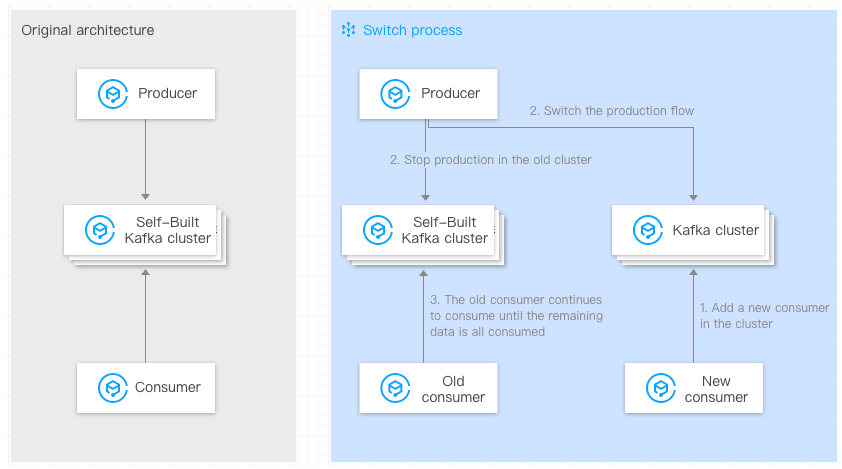
1. The old consumers remain unchanged. On the consumer side, start new consumers, configure the bootstrap-server of the new cluster, and consume the new CKafka clusters.
You need to configure the IP address in
--bootstrap-server to the access network of the CKafka instance. On the instance details page in the console, in the Access Mode module, copy the network information in the Network column../kafka-console-consumer.sh --bootstrap-server xxx.xxx.xxx.xxx:9092 --from-beginning --new-consumer --topic topicName --consumer.config ../config/consumer.properties
2. Switch the production flow so that the producer starts sending data to the CKafka instance.
Change the IP address in broker-list to the access network address of the CKafka instance. Set topicName to the Topic name in the CKafka instance:
./kafka-console-producer.sh --broker-list xxx.xxx.xxx.xxx:9092 --topic topicName
3. Existing consumers require no special configuration and continue to consume data from the self-built Kafka clusters. After the consumption completion of the data in the original self-built clusters, the migration is complete.
Note:
The commands provided above are testing commands. In actual business operations, you only need to modify the broker address configured for the corresponding application and then restart the application.
フィードバック