Authorizing Accounts
To perform more granular permission control for businesses, Cloud Service for etcd was integrated with Cloud Access Management (CAM) on May 5, 2022. After the integration, both users and backend services need to be authorized to access the console and call APIs. You can follow the steps below to authorize sub-users and the service to operate other cloud resources. Directions
Authorizing Sub-users
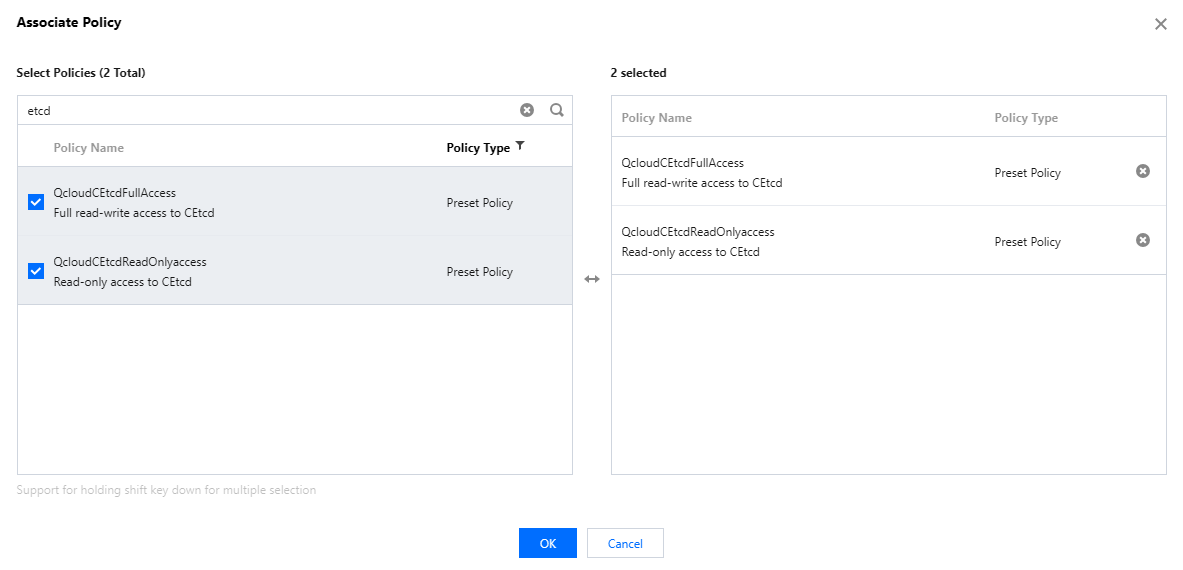
Cloud Service for etcd has predefined the QcloudCEtcdFullAccess and QcloudCEtcdReadOnlyAccess policies on CAM for full access and read-only access scenarios respectively. If a sub-user needs to access the etcd console and call APIs, use an account with administrator permissions to authorize the sub-user, so that the sub-user can use the etcd service. The steps are as follows:
1. Log in to the CAM console and choose Users > User List from the left sidebar. 2. Click Authorize on the right of a sub-account's username in the user list.
3. Select the following policies in the Associate Policy pop-up window:
QcloudCEtcdFullAccess
QcloudCEtcdReadOnlyaccess
4. Click OK. After the authorization is completed, the sub-account can access the etcd service normally. The administrator can create custom policies to set more specific permissions for users.
Authorizing the Service
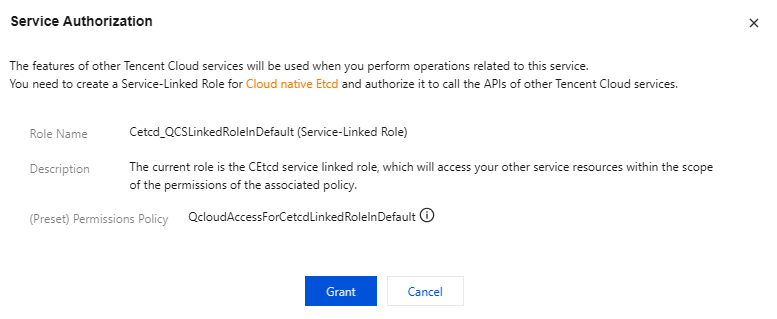
Service authorization refers to granting permissions for the current service to operate other cloud resources. For example, when a user creates an etcd cluster, Cloud Service for etcd should have the corresponding operation permissions if the user chooses to create TMP resources and tags. In this case, the administrator needs to authorize Cloud Service for etcd.
1. Log in to the console of Cloud Service for etcd. The Service Authorization window will pop up if no authorization is performed previously, as shown in the figure below: 2. Click Grant and complete authentication for authorization.