Global SMS Renewal Policy
ダウンロード
フォーカスモード
フォントサイズ
When auto-renewal is enabled, the system will automatically renew your package and deduct the corresponding fee from your Tencent Cloud account once renewal conditions are met. To avoid renewal failure due to insufficient balance, please ensure your account has adequate funds.
How to Set Up Auto-Renewal
1. Log in to the SMS Console.
2. Navigate to Package Management > Global SMS, where you can view auto-renewal settings and manage your purchased packages.

3. If auto-renewal is not enabled, you may activate it by setting renewal conditions and renewal quantity.
Note:
Only previously purchased package types are eligible for auto-renewal.
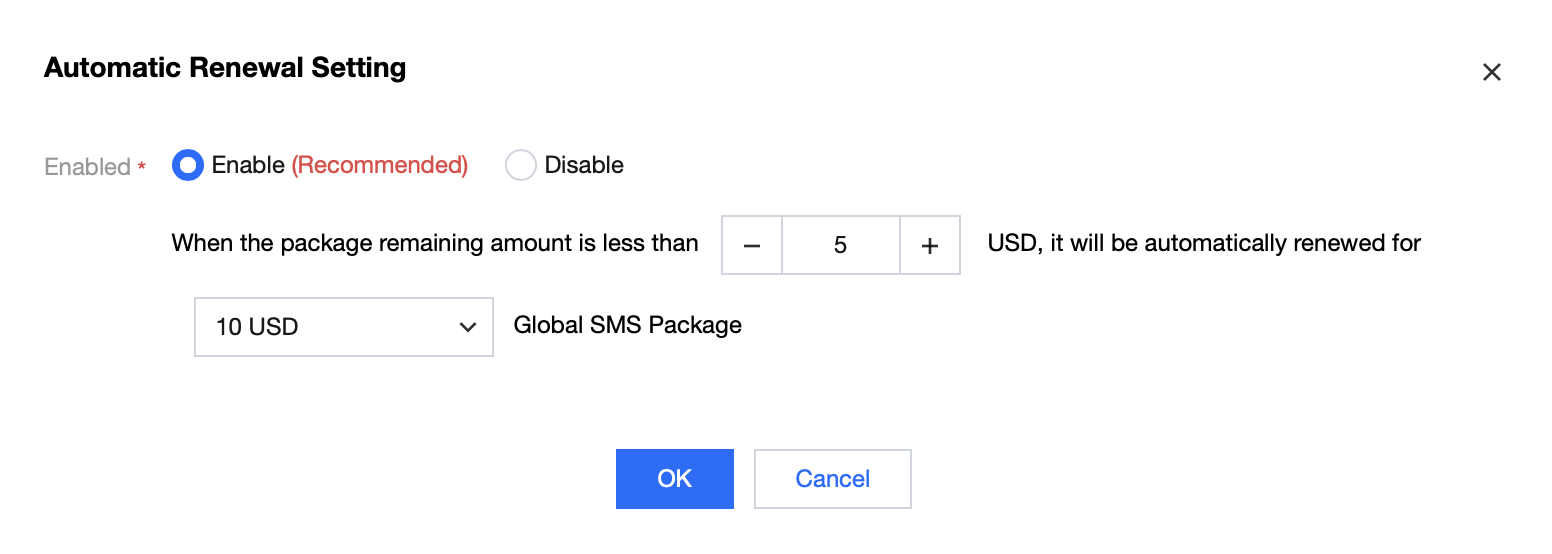
4. Click OK to save your settings.
5. Renewed packages will take effect as new purchases and remain valid permanently from the renewal date.
フィードバック