High Number of Total Requests
ダウンロード
フォーカスモード
フォントサイズ
Symptom
Symptom 1: the QPS value was high.
Symptom 2: the response latency increased.
Symptom 3: connection timeout occurred.
Possible Causes
The business needs to be optimized.
The instance configuration needs to be upgraded.
Solutions
Check the node load: for the cluster architecture, check the node load. If the QPS of only one or a few nodes exceeds the alarm threshold, there may be a hot key; if the QPS of most nodes is high, the overall load of the Distributed Cache instance is high, in which case the instance configuration needs to be upgraded.
Check the node load: for the cluster architecture, check the node load. If the QPS of only one or a few nodes exceeds the alarm threshold, there may be a hot key; if the QPS of most nodes is high, the overall load of the Distributed Cache instance is high, in which case the instance configuration needs to be upgraded.
Check the CPU utilization: you can check whether the CPU utilization is too high, and if so, the machine resources may be insufficient, in which case the instance configuration needs to be upgraded.
If your business requires optimization, you can optimize it in terms of hot keys and big keys. If the instance configuration requires upgrade, you can enable read/write separation and add more shards to meet your current business needs.
Troubleshooting the Issue
1. Log in to the Tencent Cloud Distributed Cache console.
2. In the instance list, locate the target instance and click the instance ID to go to the instance management page.
3. On the System Monitoring tab, check whether QPS is high or whether there are unexpected hot keys.
4. After troubleshooting abnormal access, optimize your business logic:
Hot keys: You can split hot keys of complex data structures into several new keys and distribute them across Redis nodes to reduce the pressure. For example, if a two-level hash hot key has a lot of hash elements, you can split it.
Big keys: If the value is too large, you can split the object into multiple key-values so that multiple Redis nodes will share the pressure. If there are too many keys, you can store multiple keys in a hash structure.
Instance upgrade
Instance upgrade
Heavy read load
Note:
Confirm that your business allows inconsistent data before enabling read/write separation, because after it is enabled, inconsistent data may be read from the replica node and the master node (the replica node lags behind the master node). For more information, see Changing Instance Specification.
Heavy write load
Cluster Architecture
Log in to the Tencent Cloud Distributed Cache console, find the target instance in the instance list, and select Configure > Add Shard in the Operation column.
Note:
After the configuration is adjusted, the instance will be charged at the price of the new configuration.
When shards are added, the system will automatically balance the slot configuration and migrate data, which may fail in rare cases. We recommend that you perform such operations during off-peak hours to avoid the impact of migration on business access.
Add shards as needed: Each shard supports a QPS of 80,000 to 100,000.

Standard Architecture
Upgrade the instance from standard architecture to cluster architecture to improve the processing power of CPU. Before the upgrade, you need to check the compatibility. For more information, see Check on Migration from Standard Architecture to Cluster Architecture.
1. Log in to the Tencent Cloud Distributed Cache console and click an instance ID in the instance list to enter the instance details page.
2. In the Specs Info section, click Upgrade Architecture.
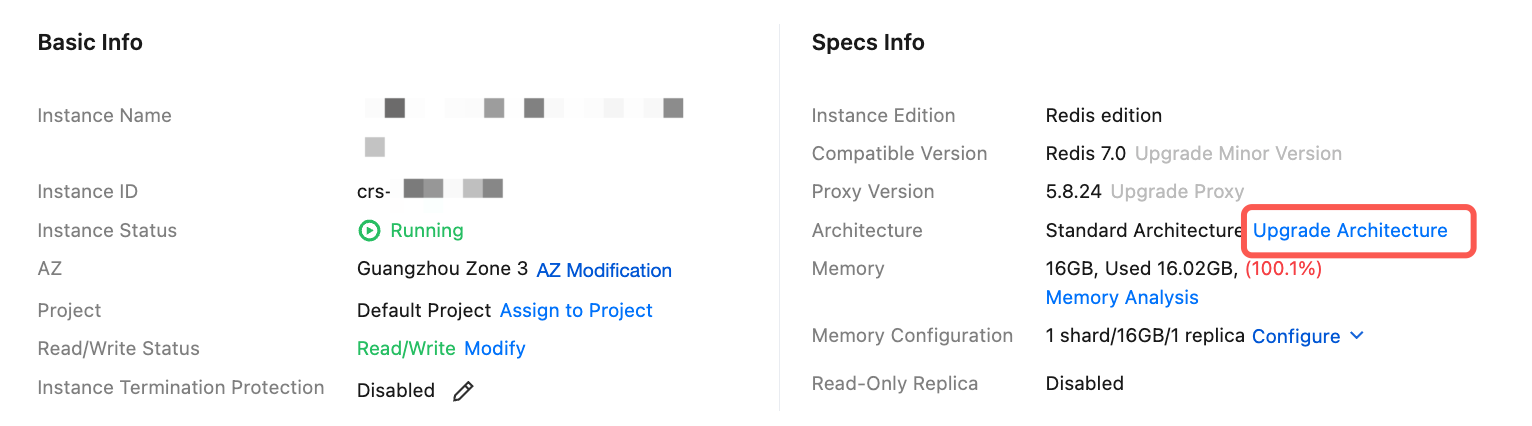
3. After the upgrade is completed, go to the instance list and select Configure > Add Shard in the Operation column.
Note:
フィードバック