Configure Regular Backups
ダウンロード
フォーカスモード
フォントサイズ
TencentDB for SQL Server supports two methods for database backup: automatic backup and manual backup. For automatic backups, data backups are classified into two scenarios based on different backup retention policies: setting regular backup retention and setting periodic backup retention. The retention period for log backups in automatic backups remains consistent with that of regular data backups.
This article introduces you to how to set regular backup retention via the console.
Note:
TencentDB for SQL Server instance backup only backs up user databases and does not back up system databases.
The backup time defaults to Beijing time. If the default time zone is modified, the storage time of backup data will be displayed in the time zone of the instance server, but the console display will be in Beijing (UTC+8) time.
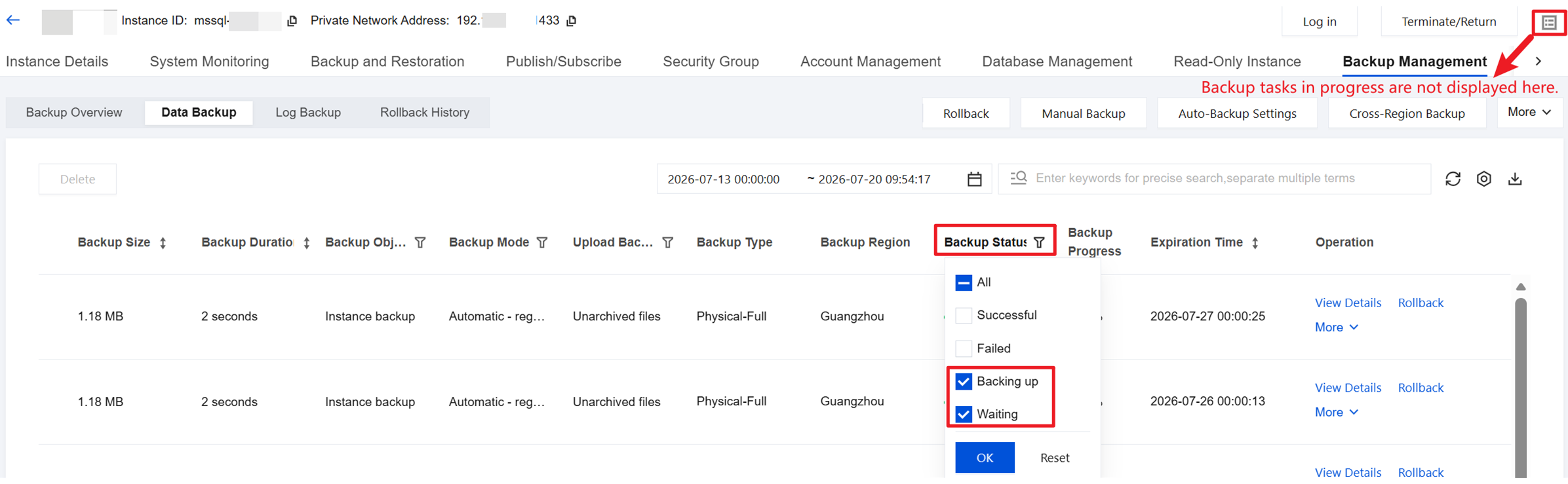
On the instance management page, backup tasks that are being created are not displayed in the task window in the upper-right corner. Instead, they are displayed in the backup list. You can query the backup tasks that are being created and their status by navigating to Backup Management > Data Backup/Log Backup and viewing backups whose Backup Status is "Backing up" or "Pending".
Automatic Backup Notes
Backup files are stored in an independent backup space and will not occupy the local disk space of the instance.
Do not perform DDL operations during backup to avoid table locking resulting in backup failure.
It is recommended to perform backups during off-peak hours.
If the amount of data is large, the process may take longer. Please be patient.
Automatic Backup Notes
Increasing the retention period for data backups and log backups may result in additional backup storage billing costs.
Reducing the retention period for log backups may affect the data rollback cycle of the instance.
The free backup allowance is limited. If the free allowance is exceeded, the excess portion will be charged on a pay-as-you-go basis.
Local backups occupy the free storage allowance, while cross-region backups do not occupy the free storage allowance; that is, creating cross-region backups will incur billing costs.
Operation Steps
1. Log in to the SQL Server console.
2. Select a region above, locate the target instance, click Instance ID or Manage in the Operation column to go to the instance management page.

3. On the instance management page, select the Backup Management tab and click Auto Backup Settings.

4. In the pop-up dialog box, configure the following data backup and log backup settings, read and select the Backup Storage Billing Description, and click OK.
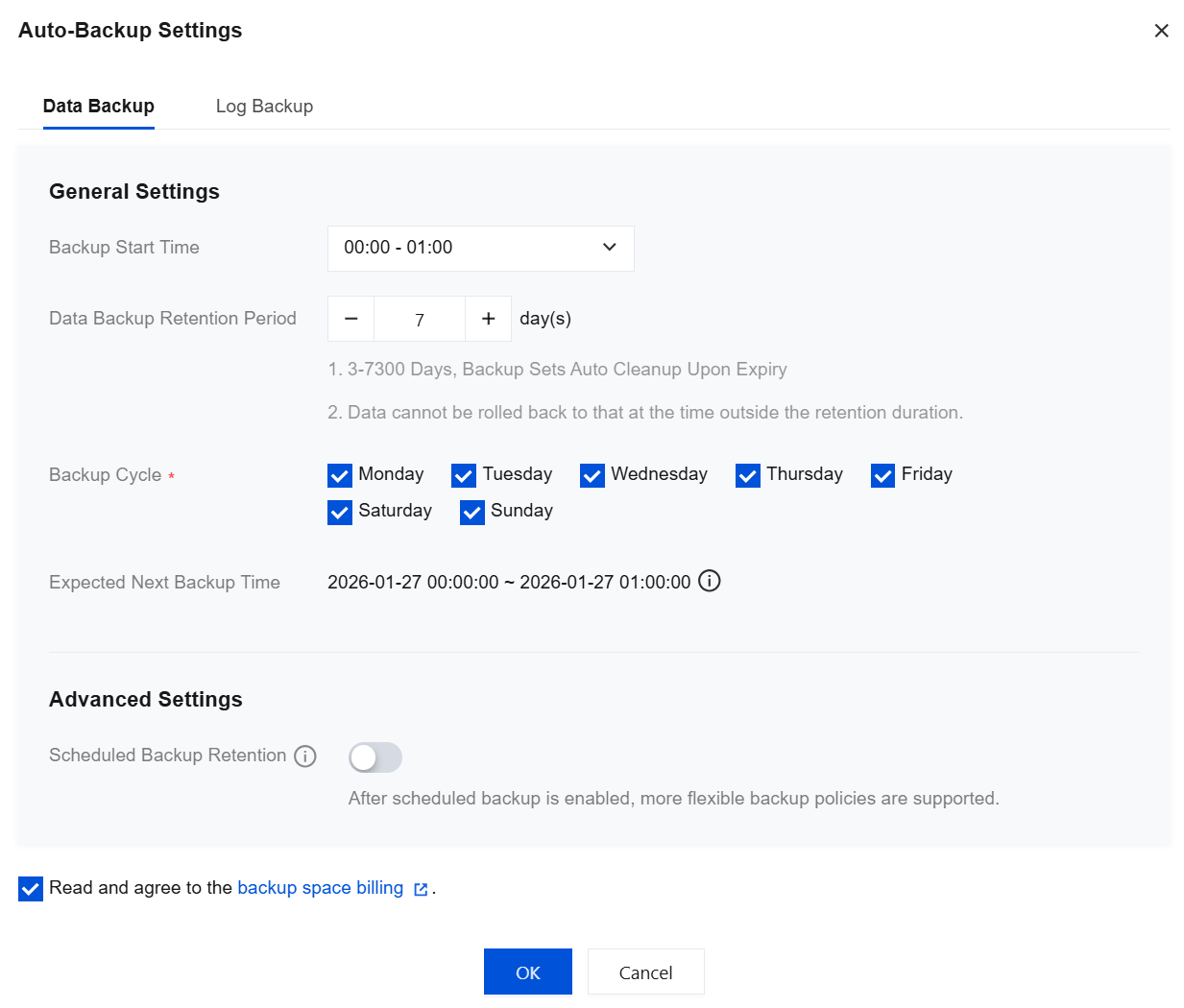
Data Backup: The configuration items for data backup are set as follows.
Parameter | Description |
Backup Start Time | Select a time period for backup initiation, preferably during off-peak hours. The backup start time indicates when the backup process begins, not when it ends. For example, if you select 00:00 - 01:00, the system will initiate a backup at a specific time point within this window. The exact initiation time depends on the backend backup policy and the backup system's status. Available time slots are as displayed on the console, such as 00:00 - 01:00, 01:00 - 02:00, and so on. |
Data Backup Retention Period | The default retention period is 7 days. You can customize the retention period (3-7300 days). Backups will be automatically deleted upon expiration. Note: You cannot roll back to a time point outside the retention period. Therefore, set the data backup retention period based on your actual business needs. |
Backup Cycle | Supports selecting any time from Monday to Sunday for performing backups. Note: To ensure that users' data backup retention time and backup cycle remain continuously available: If the backup retention period is set to less than 7 days, the backup cycle defaults to daily, and Monday through Sunday are selected by default. If the backup retention period is set to greater than or equal to 7 days, at least two backups per week must be configured. If only one backup is selected, the configuration cannot be completed. |
Estimated Next Backup Time | Displays the next backup time for the current instance. The console shows the time in Beijing (UTC+8). |
Scheduled Backup Retention | Keep this switch disabled when setting up regular backup retention. |
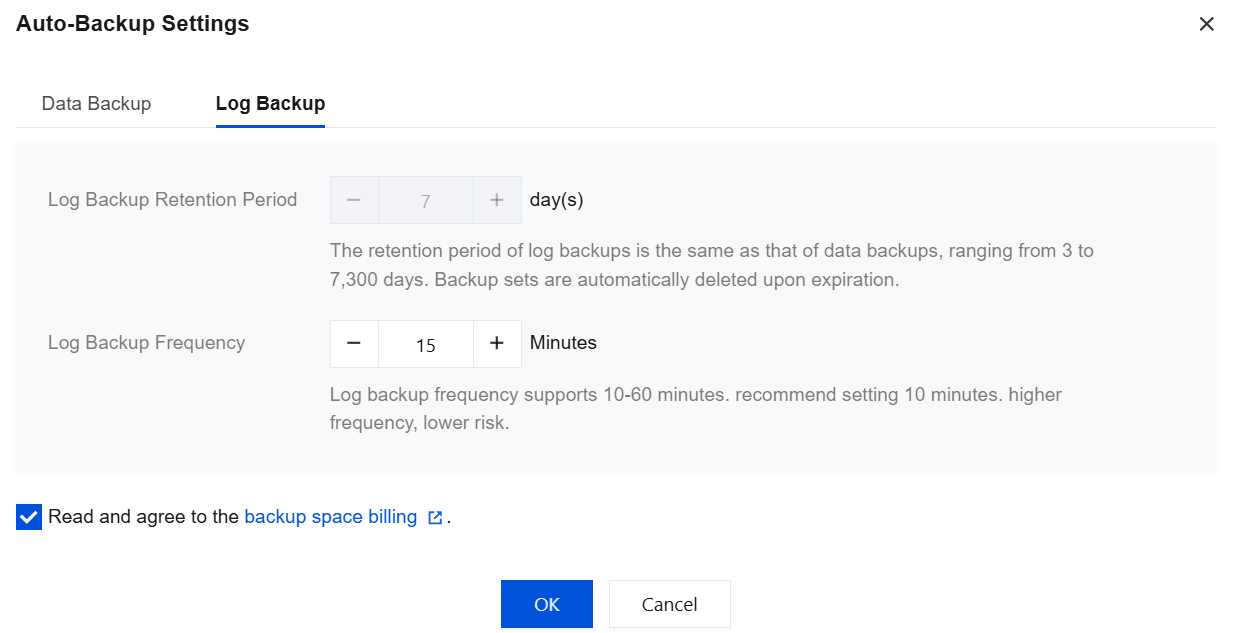
Log backup: The configuration items for log backup are set as follows.
Note:
When the recovery model of TencentDB for SQL Server is Full, it can fully record all transactions, support transaction log backup, and support point-in-time recovery to avoid data loss. We strongly recommend that you use the Full model. Using the Simple recovery model does not perform log backup and does not support point-in-time recovery. For information about updating the recovery model, see Modify Recovery Model.
Parameter | Description |
Log Backup Retention Period | By default, it is consistent with the data backup retention period. Range: 3 - 7300 days. Backup sets are automatically deleted upon expiration. |
Log Backup Frequency | The default is 10 minutes. Range: 10 minutes - 60 minutes. It is recommended to set it to 10 minutes. The higher the frequency, the lower the risk. |
Related APIs
API | Description |
This API (ModifyBackupStrategy) is used to modify backup policies. | |
This API (DescribeBackupByFlowId) is used to query the details of created backups by the ID of the backup creation process, which can be obtained from the CreateBackup API. |
フィードバック